
 The latest roundup of LearnTech news is now available
LLS on-campus, off-campus UK and off-campus overseas service provision
 Library and Learning Services (LLS) have produced a document detailing LLS on-campus, off-campus UK and off-campus overseas service provision. This document provides information on the alternative but equivalent services to students who are not on site.
It is expected that the contents will be of use in any planning, development or curriculum review meeting to enhance student experience.
NILE Design Targets 2014
As part of building on previous NILE quality discussions, the schematic below represents the current proposal for quality standards. Rather than gold, silver and bronze, there are two main levels – foundation at the most basic level and then collaboration / participation above this.
All campus-based programmes should be at the foundation level, based on the standard NILE templates.
Each programme designed for blended learning must reach the ‘participation’ threshold. Each programme designed for pure online learning must reach the ‘collaboration’ standards.
Please note that further guidance is currently being developed to support each of the standard levels. This information is being presented to provide extra context to the current LearnTech training sessions.
Training Sessions – May to August 2014

All sessions have now been mapped to the UK Professional Skills Framework as attendees may include these as evidence for Fellowship applications or ongoing professional development. The NILE Suite has been used to group related sessions together. Where relevant the events have also been mapped to the developing quality standards for NILE sites.
The list below represents the scheduled sessions however they can be run as a bespoke session for three or more staff at any mutually convenient time.
Menu of sessions available:
- [NEW] Enhancing NILE content using Xerte
- [NEW] Virtual Classrooms using WizIQ
- [NEW] Enhancing NILE with media for asynchronous learners
- [NEW] NILE – Grade Everything (Managing multiple elements in assessment. Marking presentations / live performances)
- [NEW] The App Cafe
- SaGE Essentials
- Adding value to your SaGE experiences
- SaGE – Providing quality feedback using rubrics
- Managing Groups (and group assignments)
- NILE Essentials – Making the most of your NILE site
- NILE – Encouraging collaboration and NILE interaction using Blogs, Discussion Boards, Journals and Wikis
- NILE – Developing formative assessments in NILE
- Making best use of smartboards
- Increasing in class session interaction using the voting handsets
Sessions with dates in July and August
SaGE Essentials
(Link to the UK PSF – A3, K4)
NILE Suite Alignment: Assessment
This essential session is for both staff who are new to the Submission and Grading Electronically (SaGE) Project and those who need a refresher on the current process. The event will cover the SaGE workflow including marking in Turnitin; passing grades to the NILE grade centre; downloading grades to send to the SATs; and working with the External Examiner. (12 places).
Attendance at this session will assist engagement with the Foundation Quality Standard for NILE sites.
Learning Outcomes:
- Understand the SaGE workflow
- Able to grade work
| Date (s) | Time |
| 01/05/2014 | 2-4 |
| 08/05/2014 | 10-12 |
| 15/05/2014 | 10-12 |
| 28/05/2014 | 2-4 |
| 16/06/2014 | 2-4 |
| 03/07/2014 | 2-4 |
| 11/08/2014 | 2-4 |
| 28/08/2014 | 10-12 |
Register on: https://www.eventbrite.co.uk/e/sage-essentials-tickets-11137162553
The App Cafe
(Link to the UK PSF – A2, K2, V2)
NILE Suite Alignment: Content / Collaboration
With more and more people accessing the internet via mobile devices, The App Cafe provides an opportunity to look at the implications of mobile devices and apps in HE and how we can better use them in learning and teaching.
We want to hear from you. This is a participative ‘by you, for you’ event with an opportunity each month to share the apps you already use in the classroom with fellow staff across all disciplines.
With take-aways like ‘Your 5-a-month’ (top apps for learning and teaching), coffee and even cake, this is one lunchtime event in LLS you shouldn’t miss.
First Monday of every month (excluding bank holidays)
| Date (s) | Time |
| 2/6/14 | 1-2 |
| 7/7/14 | 1-2 |
| 4/8/14 | 1-2 |
Register on: https://www.eventbrite.co.uk/e/the-app-cafe-tickets-11137371177
Events run prior to July
Enhancing NILE content using Xerte
(Link to the UK PSF – A2, K2, V2)
Xerte is a great alternative to PowerPoint or Word to enhance basic content in your NILE sites
Xerte can provide rich information and interaction for learners at all levels. You can have a look at an example of material produced in Xerte at: https://xerte.northampton.ac.uk/xertetoolkits/play.php?template_id=118
(12 places).
Learning Outcomes:
- Ability to confidently use Xerte
| Date (s) | Time |
| 28/5/14 | 10-12 |
Virtual Classrooms using WizIQ
(Link to the UK PSF – A2, K2, V2)
NILE Suite Alignment: Collaboration
WizIQ is an online learning platform / classroom fully integrated into NILE. The rooms are designed to provide an online virtual classroom learning environment to supplement synchronous online activity. (12 places).
Attendance at this session will assist engagement with the Collaboration Quality Standard for NILE sites.
Learning Outcomes:
- Ability to confidently use WizIQ
| Date (s) | Time |
| 17/6/14 | 2-4 |
Adding value to your SaGE experiences
(Link to the UK PSF – A3, K4, K5)
NILE Suite Alignment: Assessment
Available for staff who already have SaGE experience but would like to attend a small group session to review their current processes and make sure that the most up to date processes and recommendations are being used. The session may look at aspects of the full SaGE workflow (including grades to SATs, Smart Views for the External and external moderation).
(Limited to 4 places)
Learning outcomes:
- Greater understanding of the SaGE process
| Date (s) | Time |
| 8/5/14 | 2:30-4:30 |
Increasing in class session interaction using the voting handsets
(Link to the UK PSF – A2, K2, V2)
NILE Suite Alignment: Content / Collaboration
Many opportunities now exist to increase the amount of student interaction within traditional lectures. Voting handsets may be used to increase the amount of feedback students provide within sessions. This event will provide practical experience on using these tools. (12 places).
Learning Outcomes:
- Ability to confidently use the voting handsets
| Date (s) | Time |
| 6/6/14 | 2-4 |
SaGE – Providing quality feedback using rubrics
(Link to the UK PSF – A3, K4, V2)
NILE Suite Alignment: Assessment
A dedicated session for those who have already attended the SaGE Essentials session and are confident with the basic SaGE workflow. The event will focus on both Turnitin and NILE rubrics. Rubrics are useful for various styles of marking and can be used for qualitative and quantitative feedback. (12 places).
Learning outcomes:
- Able to setup and use rubrics
| Date (s) | Time |
| 5/6/14 | 2-4 |
Managing Groups (and group assignments)
(Link to the UK PSF – A3, K4, V1)
NILE Suite Alignment: Assessment / Collaboration
Regardless of the size of the cohort, the ability to manage groups is an important part of using NILE. Groups allow focused activity, assessment and communication which will enhance student engagement. In addition to learning about the setup and management of groups you will also focus on the NILE assignment submission area which may be used as an alternative to Turnitin submissions. (12 places).
Attendance at this session will assist engagement with the Collaboration Quality Standard for NILE sites.
Learning outcomes:
- Understand how to setup and organise groups
- Appreciate the range of functionality with groups
- Understand how the NILE assignment submission area may be used with groups
| Date (s) | Time |
| 13/5/14 | 2-4 |
NILE Essentials – Making the most of your NILE site
(Link to the UK PSF – A4, K4, V2)
NILE Suite Alignment: Content / Management
This session will introduce the NILE sites which are being used for all module and course areas. Find out the Top Ten most common mistakes with existing NILE sites and how to avoid them to improve the student experience. Attendees will develop confidence with working in their NILE area to add new and exciting content. (12 places).
Attendance at this session will assist engagement with the Foundation Quality Standard for NILE sites.
Learning Outcomes:
- Appreciate the range of NILE sites and comon student problems with finding content
- Reflect on your own NILE site based on areas for improvement
- Understand the range of tools to enhance NILE sites
| Date (s) | Time |
| 10/6/14 | 2-4 |
NILE – Encouraging collaboration and NILE interaction using Blogs, Discussion Boards, Journals and Wikis
(Link to the UK PSF – A2, K2, V1)
NILE Suite Alignment: Collaboration
This session will allow participants to explore the Blogs, Journals, Discussion Boards and Wikis tools inside NILE which encourage greater collaboration. (12 places).
Attendance at this session will assist engagement with the Collaboration Quality Standard for NILE sites.
Learning Outcomes:
- Understand the range of tools available to enhance collaboration within NILE sites
| Date (s) | Time |
| 1/5/14 | 10-12 |
NILE – Developing formative assessments in NILE
(Link to the UK PSF – A3, K4)
NILE Suite Alignment: Assessment
Formative assessment may be used by students to better track their progress and understanding. It may also be used by tutors to ensure that students are engaging and understanding the course material. This session will explore the test, survey and question pool tools within NILE. There is a range of functionality which provides the option of auto marked formative (and summative assessment) with question choices like multiple choice and fill in the blanks. These tools may be used with features such as adaptive release and the performance dashboard to allow greater student interaction with content and a higher level of tutor understanding of student engagement. (12 places).
Attendance at this session will assist engagement with the Participation Quality Standard for NILE sites.
Learning Outcomes:
- Understanding of the range and value of formative assessment
- Appreciate the tools which may be used within formative assessment
- Ability to implement range of appropriate tools within their own course
| Date (s) | Time |
| 23/6/14 | 2-4 |
NILE – Grade Everything (Managing multiple elements in assessment. Marking presentations / live performances)
(Link to the UK PSF – K4, K5)
NILE Suite Alignment: Assessment
This session will explore the NILE Grade Centre where all grades created by students within NILE are held and managed. In addition to being the link between NILE and the Student Record System, this tool allows you to manage the student view of grades, collate grades between assignments (SmartViews) and manage grades and feedback on physical artifacts and performances/presentations. (12 places).
Learning Outcomes:
- Appreciate the functionality available within the Grade Centre
- Understand how the Grade Centre may be used with performances/presentations.
| Date (s) | Time |
| 15/5/14 | 2-4 |
[NEW] Enhancing NILE with media for asynchronous learners (3 hours)
(Link to the UK PSF – A2, K2, K4)
During this session you will be able to bring along your own ideas for small videos and produce these during the session. Following a short introduction to a range of tools this practical session will encourage you to use these to create material which may be used within existing and planned courses. (12 places).
You will be able to use material which you create within this session within Welcome Sites for new students.
Attendance at this session will assist engagement with the Foundation and Participation Quality Standard for NILE sites.
Learning Outcomes:
- Appreciate the range of tools for asynchronous learners
- Ability to implement tools within their own NILE site.
| Date (s) | Time |
| 12/5/14 | 1:30-4:30 |
Making best use of smartboards
(Link to the UK PSF – A2,K2,K4)
Many opportunities now exist to increase the amount of student interaction within traditional lectures. Smartboards are located in many of the teaching spaces but are often only used to display PowerPoints. This event will introduce the range of tools which allow the Smartboard to ‘come alive’. This event will provide practical experience on using these tools. (12 places).
Learning Outcomes:
- Ability to confidently use the Smartboard
| Date (s) | Time |
| 19/6/14 | 10-12 |
All of the sessions above and a number of other sessions listed below are also available on request for bespoke events (such as for Subject group training). Please contact your Learning Technologist or mail LearnTech@northampton.ac.uk for details on arranging these.
The NILE Suite 2014

Have you ever wanted to do something in NILE, but been unsure which tool to use or how to do it? If so, then this breakdown of the core technologies that comprise NILE may be of help!
The core NILE functionality has been broken down into five main categories:
- content
- collaboration
- assessment
- information
- management
Depending on the task in hand, have a look at the appropriate column and see which tools and applications may be relevant. Each category is mapped to the UKPSF to assist tutors in the process of submitting an HEA Fellowship application.
Sources of Help: There are three main ways in which tutors can get help with using these tools:
- Attend the ‘official’ LearnTech training sessions
- Access our detailed help guides and resources via the NEW Help tab in NILE
- Contact your dedicated school Learning Technologist for 1:1 support.
We hope you find this useful. If you think anything is missing, please let us know: learntech@northampton.ac.uk
NILE: Send an Announcement to more than one site at the same time… and more!
The Learning Technology team have had numerous requests for a way to send an announcement out to more than one site at the same time. We have acted on this feedback and have made a tool available to you which enables the management of announcements. There are a couple of added bonuses too! You can also send an email to multiple sites, and make your sites available to students – without having to go into each site individually!
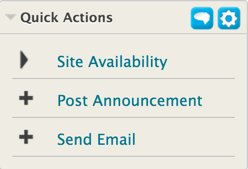
The use of this tool comes along with the rearrangement of the Sites and Organisations management tools that all staff have access to. The Sites & Organisations tab on NILE tends to be quite under used, and feedback about the Home tab indicates that it is too crowded. So, we have made the logical step to move the Manage my NILE sites box away from the Home tab, and group it with other site management tools on the Sites & Organisations tab. More information about the new ‘Quick Actions’ tool and the ‘Manage my NILE sites’ box, can be found on the Help tab on NILE.
NILE in Numbers
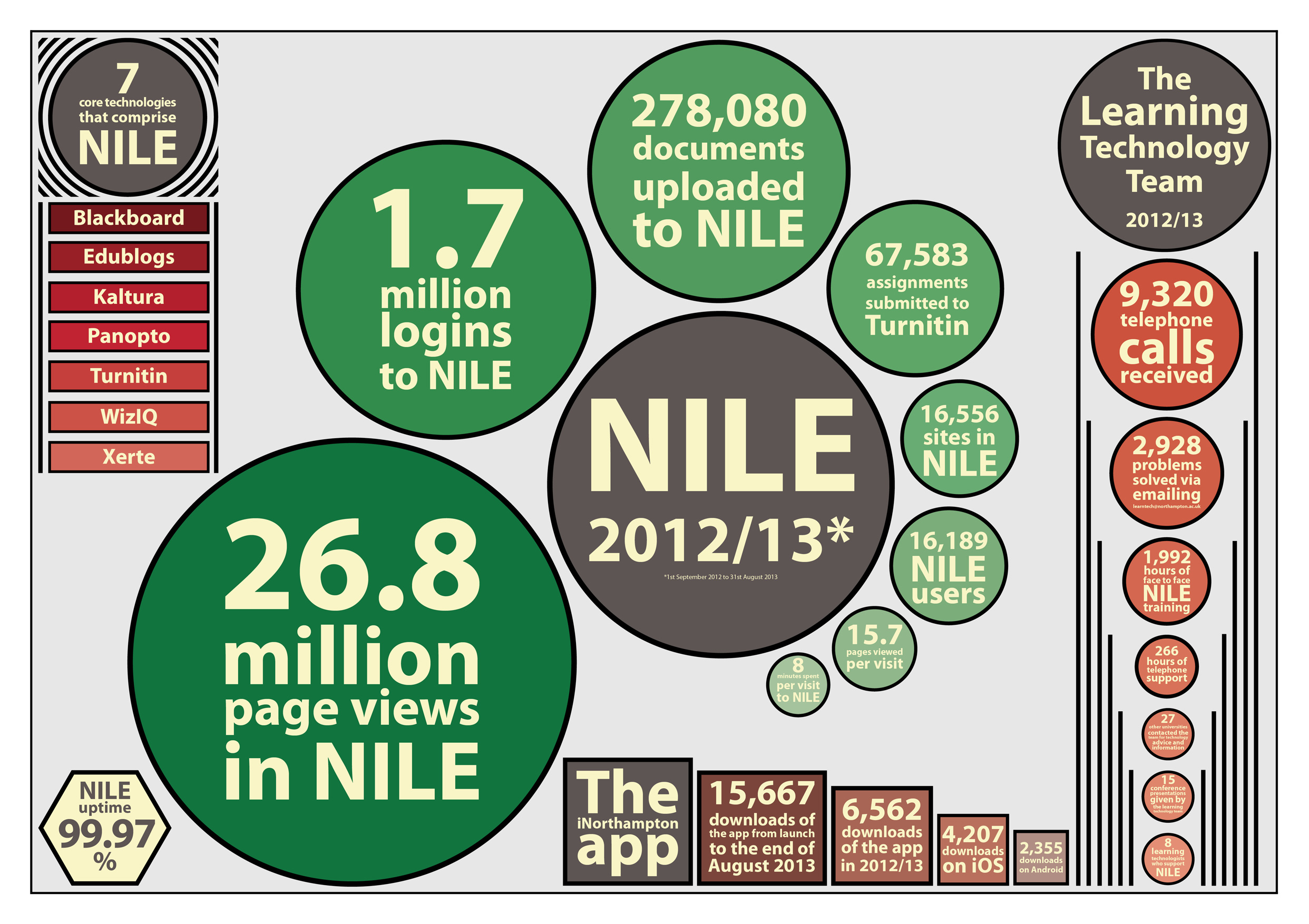 Did you know that last year 16,189 users logged into NILE 1.7 million times and viewed pages in NILE 26.8 million times?
Did you know that the iNorthampton app has been downloaded 15,667 times?
Did you know that NILE is available and working 99.97% of the time?
This, and other information about NILE and the Learning Technology Team is available on our infographic poster.
Click on the link below to download the PDF, or click on the image on the right to view the image full size.
Staff and students spring forward with technology

On the 10th February over 40 staff and 20 students visited the Park Library Tpod to try out the Smart Table which we had on loan and also take the opportunity to talk to staff representing LearnTech, CfAP, Academic Librarians and Resource Development.
This was the first time that we had arranged for a Smart Table at Northampton.  It appears that whilst the table has been focused so far at the primary education market (a range of case studies are available) – there may be some niche applications for HE which were being discussed.
We are currently assessing the event to assist us with planning follow-up sessions.
NILE goes social
You probably noticed a nice big welcome if you recently logged into NILE, as we’ve switched on a new social tool.
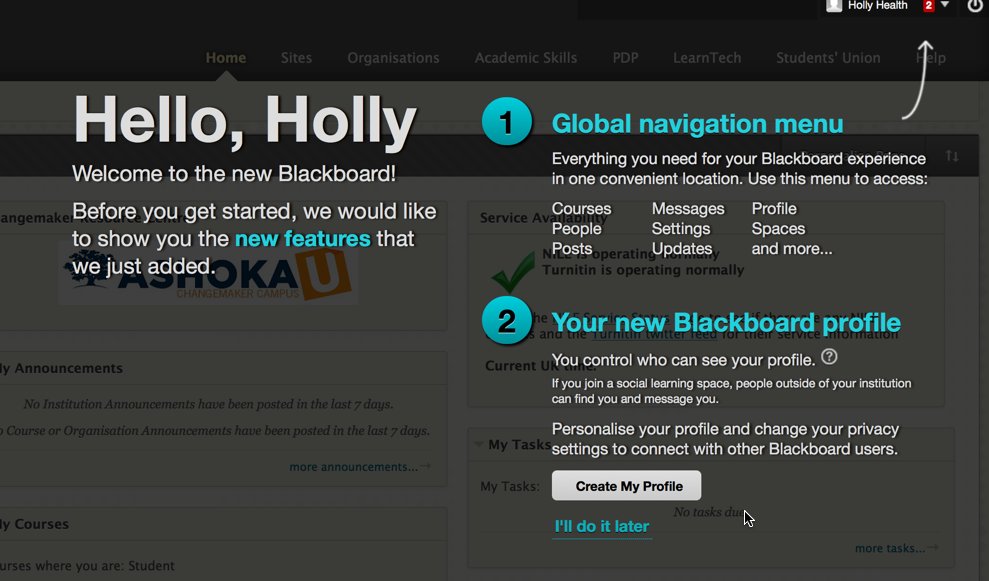 The information screen you’ll see when you log in explains what’s new and how to set up your profile (or opt to “do it later”), but we thought it would be useful to explain what it all means.
What are the new Cloud Profile Tools in NILE?
Cloud Profiles are a new set of cloud-based features available in NILE, that consist of basic Profiles called Profile Cards, the People tool, and enhancements to the Posts tool.
Using your Profile Card you can personalise your online presence in Blackboard by sharing a photo of yourself, information about your area of study/work, and an “about me” description.
The tool is optional, so if you don’t want to create a profile just yet, that’s fine, you’ll still be able to use the system. If you do complete your profile, your information will be saved to the cloud (on Blackboard’s servers – the product behind NILE) and your picture will appear in various places throughout NILE, such as Discussion Boards, Blogs, Journals, and Wikis. When someone hovers over this picture, your profile card will automatically pop-up so they can learn more about you.
In some areas a small thumbnail is used whilst in other areas a large version is displayed – so it’s worth choosing a good quality likeness of yourself:

Your profile can appear in the new People Tool – a tool to help students, teaching staff and support staff put a face to your name, and when Social Profiles are enabled, connect with you. There are privacy options, so you can choose whether you want to keep your profile hidden, make it available to just the people who are enrolled into the same courses as you, or make it available to everyone at Northampton.
Your profile can also appear in the Posts page which displays the latest discussion, blog and wiki activity taking place in the courses you are enrolled in.
If you want to create a Profile Card:
You can edit your Blackboard profile from the Welcome screen – click Facebook, Twitter or ‘I’ll update it myself’. If you select ‘I’ll do it later’, you won’t see the welcome screen next time you log in – so you’ll need to click the profile icon in the global navigation bar (top right).
When you first create your profile, you have the option to start by pulling in information from Facebook or Twitter – such as your profile picture or the “about me” description. If you do choose to do this, you must make sure the information you pull in to share is suitable for this professional academic environment. Also be mindful of your own safety and don’t share anything too personal. We recommend you require others’ request permission to follow you.

You can also choose to add a link to your Facebook or Twitter profiles on your Blackboard Profile Card to help people who view your profile to connect with you outside of the Blackboard environment. Again this is entirely optional. If you don’t use these services, or want to keep them separate from your work at the University that is ok – you don’t need to link to these social networks for profiles to work.
You should note that if you use Twitter or Facebook to import details then a link will be made to your Twitter or Facebook homepage – you may wish to break this link after importing or change your security to prevent people viewing details which should be hidden!
Finally, you will be asked to add a personal email address to verify your account. This is because by creating a Cloud Profile, your information will be saved to Blackboard servers and you’ll have the option to use the same profile on other Blackboard platforms, perhaps if you take a MOOC on Coursesites, or work at another Institution. We recommend that you do not display your email address on your profile card. Staff and students at the University will be able to contact you via your Northampton email address should they need to.
Spaces
In addition to all of the functionality added above, we have also enable the Cloud Spaces feature in NILE. You may access this from the NILE Global Navigation at the top right of your NILE screen.

Spaces are simple social areas that anyone can set up. They are not connected to a course or module area, and can even include people from other institutions that use Blackboard Spaces. Students working on a group project might want to set up a Space to share links to resources and thoughts with each other. Perhaps a group with a niche interest might want to connect with other like-minded people from other institutions.
Learn More
If you want to learn more before you decide whether to use these features you can check out the videos and information pages provided by Blackboard:
- Blackboard Quick Hit Video – Profiles
- Blackboard Help Website – Profiles
- Blackboard Help Website – Spaces
- Blackboard Help Website – Social Learning Tools FAQs
- Blackboard – Privacy Policy
We are really interested in how you find this new tools. Please contact the LearnTech team if you have any questions.
Resuscitating the Wrong Opinions of Dead Men: A Student Perspective

Last December, Economics Lecturer at NBS, Dr Kevin Deane, took the unusual step of abandoning 4 weeks of his timetabled lecture programme and replacing it with a group exercise culminating in an academic poster exhibition (see this blog posting for more details!)
The exhibition was a real success, particularly for a first-time event, as evidenced by the comments from the students and other NBS staff who attended the exhibition. That said, Kevin has some definite changes and improvements he would introduce next time around. But, in these days of NSS scores and working to improve the student experience, the big question to be answered is … what did the students think?
Generally, their reflections mirrored those of Kevin himself. Apart from an appreciation of the refreshments (!) the following comments are worth mentioning in response to the question of what was good about the task:
- One student responded by saying that the good thing was the “big range of information exchanged and displayed, very insightful. Food was good, getting tutors and guests involved.”
- Another enjoyed the fact that they didn’t have the pressure of an assessed assignment.
- “People did them relatively well. Rewards were good incentive”.
- Another student commented that it “was a great insight into a variety of economists. It provided me with a better understanding of these economists and their philosophies.”
There were some technical hitches on the day of the exhibition itself. In particular, Kevin had been expecting the room to be ready when he and his students arrived, but an error in communication meant that an hour was lost having to set up the exhibition boards. This did have a significant knock-on effect for students as the first hour of the session was lost. This had been scheduled for a student-student presentation of each of the posters, which would have provided the primary opportunity for students to learn about those other economists being studied by their peers.
The following student comments on what could be done differently/better mirror Kevin’s own reflections. Specifically, the students were keen that copies of the other posters were circulated – something Kevin had already planned to do. This is of particular importance pedagogically – where students are creating and generating module content which forms one jigsaw piece of the whole picture, ensuring that each student has access to the full and final picture is essential. Another comment was that it was rightly considered unfair that some students were asked to produce posters on economists that had already been studied in class whereas others were starting from scratch. Looking ahead, Kevin would ensure this didn’t happen again and recognises that it was purely circumstantial, arising from the decision to move away from lecturing to the poster exhibition after the lectures had begun. In itself, this was engendered by student feedback indicating that the lecture approach to this topic was dry and uninteresting.
One final comment worth addressing directly was that students considered the poster to be “too much extra, [it was] not part of our course.” This feedback reflected a failure to appreciate that this poster wasn’t actually ‘extra’ work per se, rather a change in the way the module content was being taught. In future, Kevin would draw attention to the fact that the requirements of producing a poster are no more onerous in terms of the expected study time than indicated in the module spec: 4 students per group x 3 hours per week of independent study x 3 weeks = 36 student study hours per poster.
Other negative comments included the following:
- It was a lot of work, for no obvious reward in terms of assessment.
- Lack of assessment meant no incentive to produce high quality.
- Doing a poster on one subject was limiting.
- Some people didn’t even go.
Having allowed time for both his personal and the students reflections, the following changes would, Kevin believes, improve the exercise next time around:
- Ensuring that the dedicated time for student-student presentations is preserved to ensure that all students receive the benefit of the work done by other groups and learn about all the economists studied in the module
- Explicitly recognise the focus that students place on assessment and grades and therefore turn the task into the first assessment for the module and run it earlier in the academic year when students were not under pressure to complete assessment tasks for other modules
- Ensure that the key points are captured in a summary ‘timeline’ lecture that places them all in context.
Probably the biggest objection he has to overcome is the idea that this task placed an additional burden on students and this really boils down to managing their expectations more explicitly. A clearer explanation and on-going reminder that the poster itself should be the final product of 36 student study hours (9 per student) would go a long way to removing this objection and engendering in students the realisation that this level of work and time investment is, ultimately, what they are at University for!