
Update, 6th August: The August 2026 upgrade has been temporarily delayed and will not be available as planned on the 7th of August.
Update, 10th August: The August 2026 upgrade was completed over the weekend of the 8th/9th August.
The new features in this month’s Blackboard’s upgrade will be available from Friday 7th August. This month’s upgrade includes the following new/improved features to Ultra courses, etc:
- Major overhaul of the gradebook
- Improved groups management tools
- Option to duplicate learning modules, folders and content items within a course
- Xerte Conference 2026
Major overhaul of the gradebook
Blackboard’s August upgrade includes significant changes to the gradebook. There is no loss of functionality with the new gradebook, and some new features have been added, but the layout and general look and feel of the gradebook is quite different.
As there’s too much to cover in a blog post we’d recommend taking a look at the following page on Blackboard’s Community site for a video walkthrough of new gradebook (no login is required to access this page): Blackboard Community – Gradebook Navigation and Layout
Also available is the following PDF document which outlines the changes: Blackboard – Gradebook Grid View: What’s Changing, Side-by-Side Guide
Improved groups management tools
The creation and management of groups will become easier following the August upgrade. As well as an improved interface, the new groups tool allows students to be added to groups using drag-and-drop.
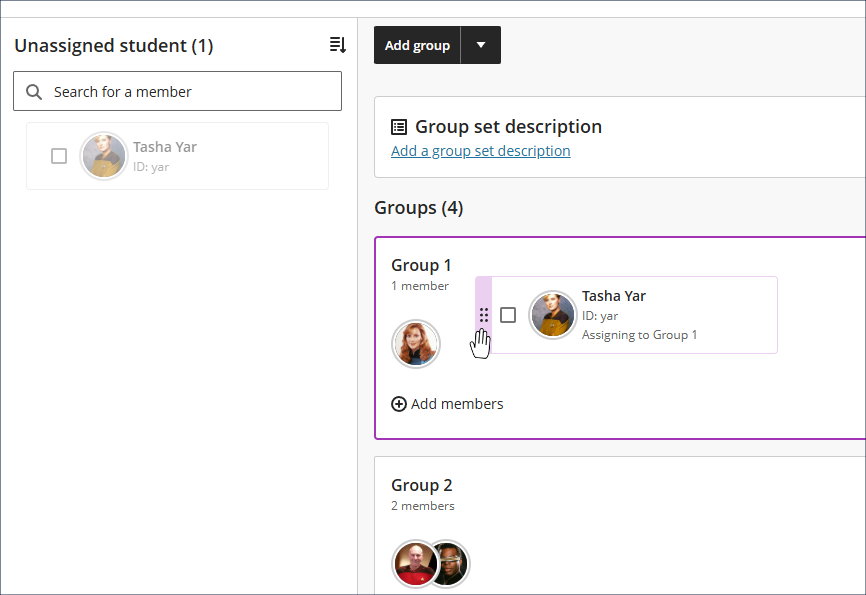
More information about the new groups tools is available from: Blackboard Help – The Reimagined Groups Experience
Option to duplicate learning modules, folders and content items within a course
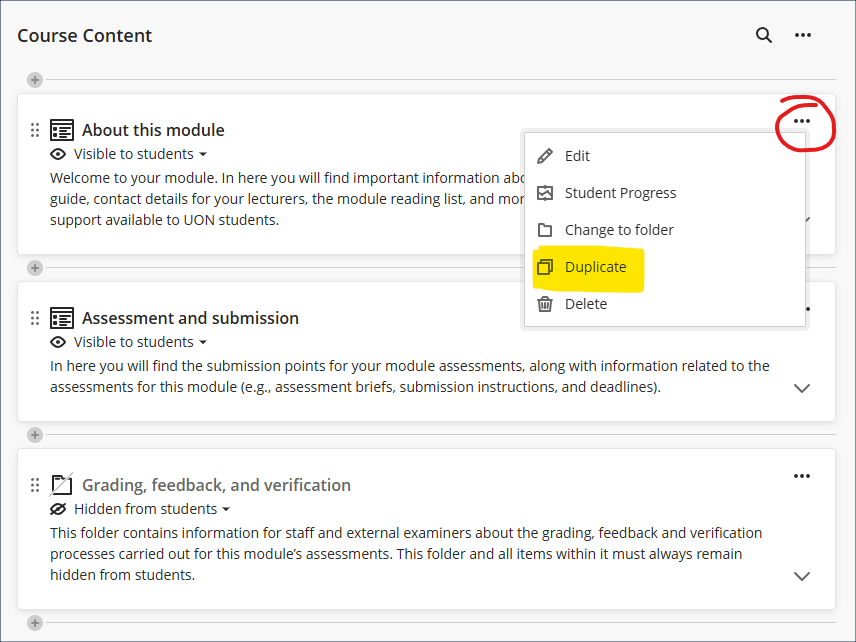
Following the August upgrade, staff will be able to duplicate learning modules, folders, and individual content items within a course via the ‘More options’ (•••) menu to the right of the item.
Copied items will, by default, be hidden from students and placed immediately below the original, with ‘Copy’ added to the name of the copied item. Most individual item types can be copied, but for those that cannot be duplicated individually (i.e., LTI items*) the duplicate option will not be available. However, where a whole learning module or folder is duplicated all items within (including LTI items) will be duplicated.
*An LTI item is anything which has been added via the Content Market
Xerte Conference 2026
Save the date: Wednesday 18th November 2026.
We’re hosting an online Xerte conference on 18th November and you can read more about it on our Xerte community site.
If you’d like to present or lead a workshop at the conference, please submit your proposal.
Learning technology / NILE community group
Staff who are interested in finding out more about learning technologies and NILE are invited to join the Learning Technology / NILE Community Group on the University’s Engage platform. The purpose of the community is to share information and good practice concerning the use of learning technologies at UON. When joining the community, if you are prompted to login please use your usual UON staff username and password. By joining the Learning Technology / NILE Community you will receive calendar invitations to our regular live community events:
Join the Learning Technology / NILE Community Group
More information
As ever, please get in touch with your learning technologist if you would like any more information about the new features available in this month’s upgrade: Who is my learning technologist?