
 The latest roundup of LearnTech news is now available
Training Sessions January to April 2014
 All sessions have now been mapped to the UK Professional Skills Framework as attendees may include these as evidence for Fellowship applications or ongoing professional development.
The list below represents the scheduled sessions however they can be run as a bespoke session for three or more staff at any mutually convenient time.
SaGE Essentials
(Link to the UK PSF – A3, K4)
This session is for both staff who are new to the Submission and Grading Electronically (SaGE) Project and those who need a refresher on the current process. The event will cover the SaGE workflow including marking in Turnitin; passing grades to the NILE grade centre; downloading grades to send to the SATs; and working with the External Examiner. (12 places). All sessions will be run in the Tpod at Park Campus
| Date | Time |
| 10th January | 9:30-12:00 |
| 14th January | 2-4:30 |
| 23rd January | 9:30-12:00 |
| 28th January | 2-4:30 |
| 12th February | 9:30-12:00 |
| 24th February | 2-4:30 |
| 13th March | 2-4:30 |
| 26th March | 9:30-12:00 |
Register on https://www.eventbrite.co.uk/e/sage-essentials-tickets-9654618223
Adding value to your SaGE experiences
(Link to the UK PSF – A3, K4, K5)
Available for staff who already have SaGE experience but would like to attend a small group session to review their current processes and make sure that the most up to date processes and recommendations are being used. The session may look at aspects of the full SaGE workflow (including grades to SATs, Smart Views for the External and external moderation). All sessions will be run in the Tpod at Park Campus
(Limited to 4 places)
| Date | Time |
| 20th February | 9:30-11:30 |
| 18th March | 2-4:00 |
Register on: https://www.eventbrite.co.uk/e/adding-value-to-your-sage-experiences-tickets-9654762655
SaGE – Providing quality feedback using rubrics
(Link to the UK PSF – A3, K4, V2)
A dedicated session for those who have already attended the SaGE Essentials session and are confident with the basic SaGE workflow. The event will focus on both Turnitin and NILE rubrics. Rubrics are useful for various styles of marking and can be used for qualitative and quantitative feedback.(12 places). All sessions will be run in the Tpod at Park Campus.
| Date | Time |
| 13th February | 2-4 |
Register on https://www.eventbrite.co.uk/e/sage-providing-quality-feedback-using-rubrics-tickets-9654814811
Using the NILE assignment submission area and managing groups
(Link to the UK PSF – A3, K4, V1)
A dedicated session for those who have already attended the SaGE Essentials session and are confident with the basic SaGE workflow. This event will focus on the NILE assignment submission area which may be used for both individuals and groups. (12 places). All sessions will be run in the Tpod at Park Campus
| Date | Time |
| 23rd January | 2-4 |
NILE Essentials – Making the most of your NILE site
(Link to the UK PSF – A4, K4, V2)
This session will introduce the NILE sites which are being used for all module and course areas. Find out the Top Ten most common mistakes with existing NILE sites and how to avoid them to improve the student experience. Attendees will develop confidence with working in their NILE area to add new and exciting content.(12 places). All sessions will be run in the Tpod at Park Campus.
| Date | Time |
| 18th February | 2-4 |
Register on https://www.eventbrite.co.uk/e/nile-essentials-making-the-most-of-your-nile-site-tickets-9654895051
NILE – Encouraging collaboration and NILE interaction using Blogs, Discussion Boards, Journals and Wikis
(Link to the UK PSF – A2, K2, V1)
This session will allow participants to explore the Blogs, Journals, Discussion Boards and Wikis tools inside NILE which encourage greater collaboration.(12 places). All sessions will be run in the Tpod at Park Campus.
| Date | Time |
| 4th March | 2-4 |
NILE – Developing assessments using Tests and Pools
(Link to the UK PSF – A3, K4)
This session will explore the test, survey and question pool tools within NILE. There is a range of functionality which provides the option of auto marked formative and summative assessment with question choices like multiple choice and fill in the blanks. These tools may be used with features such as adaptive release and the performance dashboard to allow greater student interaction with content and a higher level of tutor understanding of student engagement.(12 places). All sessions will be run in the Tpod at Park Campus.
| Date | Time |
| 13th March | 10-12 |
Register on: https://www.eventbrite.co.uk/e/nile-developing-assessments-using-tests-and-pools-tickets-9654949213
NILE – Understanding and working with the NILE Grade Centre
(Link to the UK PSF – K4, K5)
This session will explore the NILE Grade Centre where all grades created by students within NILE are held and managed. In addition to being the link between NILE and the Student Record System, this tool allows you to manage the student view of grades, collate grades between assignments and manage grades and feedback on physical artefacts and performances/presentations.(12 places). All sessions will be run in the Tpod at Park Campus.
| Date | Time |
| 30th January | 2-4 |
Register on: https://www.eventbrite.co.uk/e/nile-understanding-and-working-with-the-nile-grade-centre-tickets-9654971279
Recording lectures and creating videos for students using Panopto
(Link to the UK PSF – A2, K2, K4)
Find out about the most recent advances which will allow you to capture individual student presentations or whole lectures. The session will provide an introduction to Panopto. (12 places). All sessions will be run in the Tpod at Park Campus.
| Date | Time |
| 13th February | 10-12 |
Register on: https://www.eventbrite.co.uk/e/recording-lectures-and-creating-videos-for-students-using-panopto-tickets-9655007387
Working with sound and video using Kaltura
(Link to the UK PSF – A2, K2, K4)
Find out about the most recent advances which will allow you to upload and share videos using the tool embedded in NILE (Kaltura). This tool may be used as part of the SaGE process to allow for video submissions.(12 places). All sessions will be run in the Tpod at Park Campus.
| Date | Time |
| 17th March | 10-12 |
Register on: https://www.eventbrite.co.uk/e/working-with-sound-and-video-using-kaltura-tickets-9655029453
Making best use of smartboards
(Link to the UK PSF – A2,K2,K4)
Many opportunities now exist to increase the amount of student interaction within traditional lectures. Smartboards are located in many of the teaching spaces but are often only used to display PowerPoints. This event will introduce the range of tools which allow the Smartboard to ‘come alive’. This event will provide practical experience on using these tools.(12 places). All sessions will be run in the Tpod at Park Campus.
| Date | Time |
| 16th January | 2-3:30 |
Register on: https://www.eventbrite.co.uk/e/making-best-use-of-smartboards-tickets-9655061549
Increasing in class session interaction using the voting handsets
(Link to the UK PSF – A2, K2, V2)
Many opportunities now exist to increase the amount of student interaction within traditional lectures. Voting handsets may be used to increase the amount of feedback students provide within sessions. This event will provide practical experience on using these tools.(12 places). All sessions will be run in the Tpod at Park Campus.
| Date | Time |
| 27th February | 2-3:30 |
Register on: https://www.eventbrite.co.uk/e/increasing-in-class-session-interaction-using-the-voting-handsets-tickets-9655091639
All of the sessions above are also available on request for bespoke events (such as for Subject group training). Please contact your Learning Technologist or mail LearnTech@northampton.ac.uk for details on arranging these.
‘Appy staff at the App Cafe try out the new Turnitin iPad app
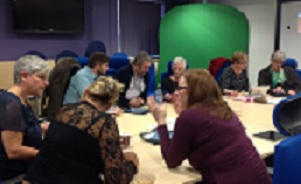 Monday saw the second iteration of the App Cafe – a new drop-in lunchtime session in the Tpod, run by the Learning Technology team and looking at how we can use apps in the learning and teaching context. This week’s starters included a second look using Dropbox for Cloud storage and some syncing issues, but the main course was a meaty demonstration of the new Turnitin app for iPad.
The most difficult thing that anyone will find with this app is the initial syncing of NILE modules to the iPad, but that is only because it involves an additional step in the SaGE workflow.
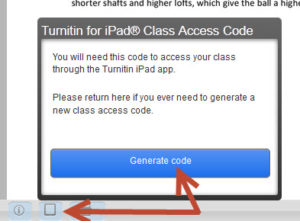
Syncing involves generating a class code which is possible using your desktop pc / laptop from within one of the Turnitin papers on the module you are marking. Simply click on the ‘new’ iPad icon at the bottom left of the screen and then Generate code. Once you have the 16-letter code you need to enter it into the app. You don’t need to login with your Turnitin username as most staff don’t have one of this (it isn’t your NILE login!) The code will link that module to your iPad and then you are ready to go.
If you are used to using an iPad then this app is very intuitive – so intuitive that we don’t think you need a help guide on it! Just have a go and see how you get on. The functionality is better than that on a pc as you can take full advantage of iPad features like touch screen technology to add or create a quick mark, Siri to enter the text both 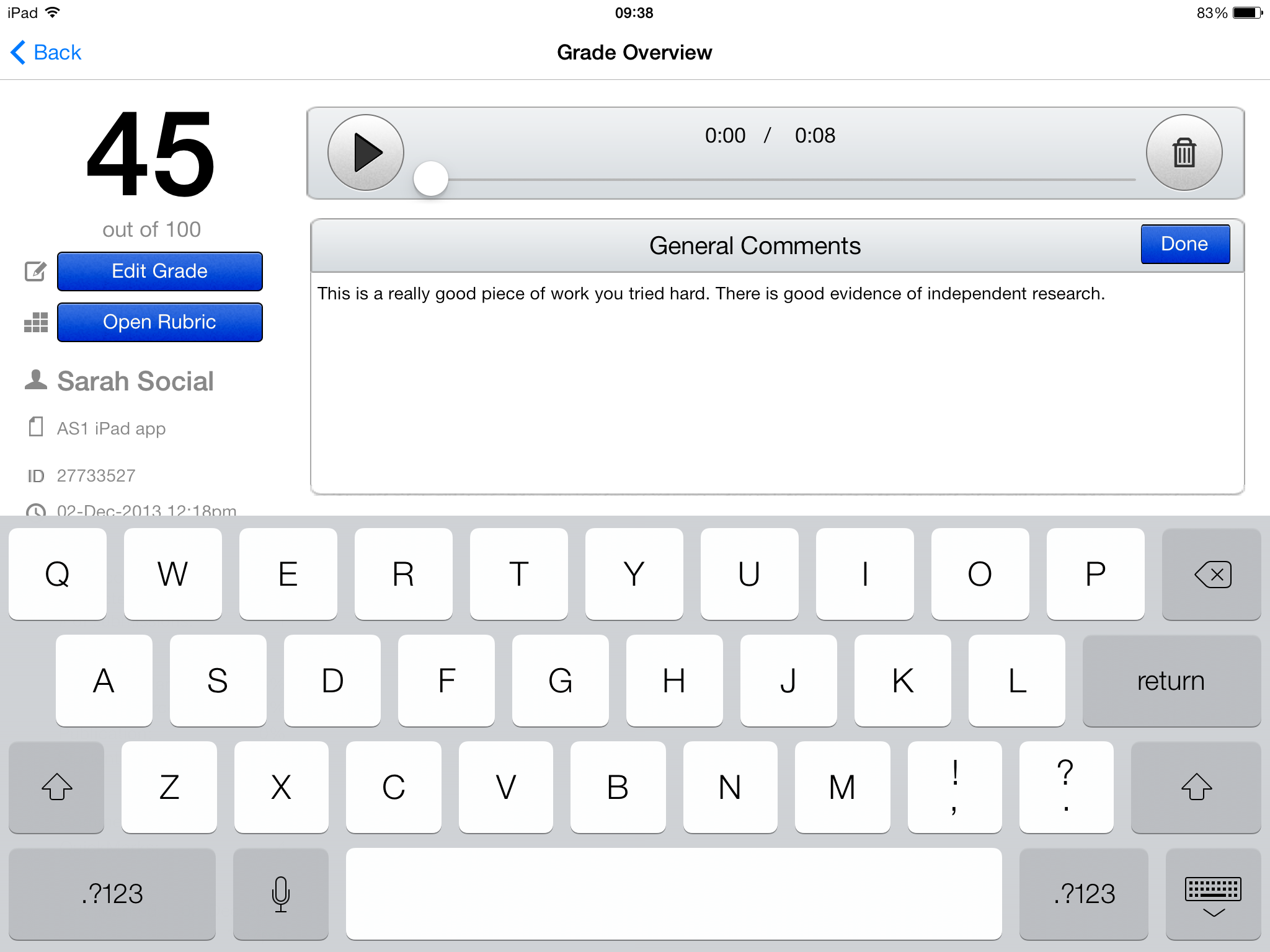 for existing and new Quick Marks, longer in-text comments or the full text comment at the end. Voice comments as found in the desktop version of Turnitin are still possible but obviously Siri makes using voice much quicker and easier in the standard QM/text comments as well. So even typing may be a thing of the past!
One other major advantage of the app is that once you have downloaded the papers you can mark offline. So no more paying for wi-fi so that you can do your marking when on holiday, or when abroad working as International Flying Faculty! Simply sync, download, mark and then re-sync when you next have a (free) signal.
Roshni Khatri, Senior Lecturer in Occupation Therapy, has been using the app for a while now and has this to say about it:
“The Turnitin App gives me the flexibility to mark where and when I want to without the need for a WIFI connection. The user friendly interface allows me to give feedback, use comments, rubrics and sync grades without any fuss. Makes marking easier but enables tutors to continue giving high quality feedback!”
The Turnitin iPad app is honestly the best thing since sliced bread – and you won’t find that on the menu at the App Cafe!
The App Cafe is on the 1st Monday of every month, from 1-2 in the TPod, Park Library. Next meeting: 6th January 2014. Bring your lunch and your mobile device (this isn’t just about iPads you know!) We will provide coffee and tea.
Nominations from the University of Northampton for EduBlog Awards
Nominations for the Edublogs Awards from the University of Northampton:
Best new blog
http://mypad.northampton.ac.uk/iodim/ Images of Disability (Kyffin Jones).
New Blog created in November 2013 for Undergraduate module examining perceptions of disability. Students were asked to source images of disability portrayed in the Media and add as a post, then use the Class Blog to support discussion. This became even more meaningful when Dominic Hyams, whose YouTube video ‘Crip on a Trip’ was posted on the Blog, was invited in to meet the class, to discuss and challenge their own perceptions.
Best ed tech / resource sharing blog
http://mypad.northampton.ac.uk/resourcebank
Teaching ideas for early years and primary (fantastic resources created and shared by trainee teachers).
Best educational use of audio/video/visual/podcast
https://vimeo.com/64793013
“Blogging for Students”– A short video by the School of Education. Teaching Students are given their chance to describe how well and how effectively they feel blogging has become a way to record and assess their work.
Best individual blog
http://samuelsbay.wordpress.com
One of the Education students (Julian Keith – Researcher in Training) who has carried on blogging since he left the course
LUNAR@LLS

The inaugural meeting of LUNAR@LLS (LUNchtime Academic Reading) took place on Friday 25th October. As someone who has only been to social reading groups before, I was pleasantly surprised at how easy the conversations and discussions flowed in this more academic context and how emotional I found myself getting about some of the points that were discussed! (Yes, weird I know!)
For staff who weren’t there (but who are nevertheless interested in what we discussed), here is a short summary of the key points …
The three papers were Chapters 3, 9 and 13 of Oblinger, D. G. (2006) Learning Spaces (available as a free e-book):
- Chapter 3. Seriously Cool Places: The Future of Learning-Centered Built Environments by William Dittoe (View: HTML | PDF)
- Chapter 9. Trends in Learning Space Design by Malcolm Brown and Phillip D. Long (View: HTML | PDF)
- Chapter 13. Assessing Learning Spaces by Sawyer Hunley and Molly Schaller (View: HTML | PDF)
Dittoe’s paper followed a hypothetical scenario where student living and learning environments were seamlessly entwined. While initially the idea of turning up to a day of learning ‘experiences’ in your slippers (and presumably your onesie!) initially sounded quite attractive, there were feelings of being cocooned and isolated away from the real world. However, the flexible and creative use of spaces, offering quiet reflection, social involvement and social learning, active engagement with learning materials and the presence of tutors in the learning (as opposed to teaching) environment suggest an environment vastly different to that currently experienced in most HE settings. The author cited Kuh’s key features for this type of learning space as being a space that encourages student-tutor interaction and one which permits a high degree of effort on academic tasks.
Brown and Long considered trends in learning space design, adopting a constructivist approach that focusses on the whole campus as a potential learning space and where the focus on the learner provides an environment for people that fundamentally changes current approaches to teaching and learning. Their three main trends were: (1) Design based on learning principles resulting in intentional support for social and active learning strategies; (2) Emphasis on human-centred design; and (3) an increasing ownership of diverse devices that enrich learning. With my learning technology hat on, the discussion in both these chapters on device agnosticism and the fact that although the technology will change between now and our move to Waterside, the way in which we learn won’t, mirrors the discussions that we have been having as a team in recent months.
The focus on the learner requires a fundamental shift however from a teacher-centric, pedagogical approach to teaching and the delivery of information that may well be better obtained elsewhere, to a learner-centred approach that encourages individuals to take increased ownership of their own learning journey and where the tutor is but one tool among many that the learner can draw upon in order to further and deepen their own learning. It presupposes a collaboration between architecture and technology and the provision of a seamless, robust IT infrastructure and also requires that classroom spaces are built with a defined client base in mind in order to prevent the development of spaces that meet no-one’s needs optimally.
Hunley and Schaller adopted an assessment-based approach to the topic of learning spaces, comparing both formal and informal learning in terms of environment, time, structure and content, as well as looking at the interaction between people and their environments. They assessed the need for learning spaces by the level of student engagement. Academic engagement was shown to be enhanced where the environment is comfortable, open flexible and appealing and decreased in more formal settings. They concluded that a balanced approach between the two was still required and that the key was good assessment design of learning spaces with the enhancement of student learning being the ultimate goal.
So … having briefly summarised the papers, what did we actually talk about?
Not surprisingly, our discussions did focus considerably on the implications of the move to Waterside where there will be around 40% less space. There was a strong recognition of what has been achieved in the library as it currently is, with lots of different learning spaces and this idea of a learning commons (hopefully still called a Library) remaining at the heart of the new campus, with learning taking on a more social aspect and becoming more informal.
Probably the single most important strand was around the extent to which there would need to be a culture change for academic staff around space, its use and ownership, the corollary being a considerable change in pedagogy. In this regard, a recent article that I read by Thomas Cochrane and Vickel Narayan from AUT University in Auckland, New Zealand, had some interesting insights particularly in considering how staff transform their role, moving from a heavily pedagogical approach, through andragogy, to heutagogy (student-directed learning). This requires lecturers to undergo a reconceptualization of their role and to take advantage of the mobility offered by the various Web 2.0 tools (including Twitter, blogs, wikis and Skype etc). For more on this article, please read my (first ever) blog posting!
The implications of this change do need to be considered as soon as possible, and steps taken sooner rather than later to enable staff to grow into this new approach, providing them with the confidence to learn new approaches and to try things out because, ultimately, space really does matter to people.
If you would like to come along to LUNAR, it is held on the last Friday of every month* from 1-2pm in the Tpod in the Library at Park. You can bring your lunch and tea and coffee is provided.
Suggestions for papers to read prior to the next meeting on Friday 29th November are still needed. We would like to explore topics of interest for each of the teams within LLS so if you have some ideas of hot topics (even if you don’t have any actual papers to read) please let me know.
*December’s meeting will be on Friday 20th as we will all be on holiday on the 27th!
Hope to see you there!
Use of Flipcams – GEO3030 Geographers at Work
Introduction
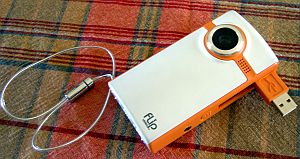
Faith Tucker used Flip Cameras to record interviews as part of a mock interview exercise. Here’s how she incorporated their use into her module and her observations after the event.
The exercise
Final year Geography students undertake a mock interview exercise during the autumn term as part of GEO3030 Geographers at Work. This module, which focuses on career planning and employability skills, incorporates an application exercise. Students are asked to complete a covering letter and application form for a graduate-level job. Following this, they are interviewed for the post. The interview is chaired by an experienced interviewer (someone from a local business or a senior member of University staff), with the panel made up of other members of the class. All students have the opportunity to be interviewed and take on the role of interviewer, enabling them to learn about both sides of the interview process.
Flipcams are used to record each interview. The small size of the camera helps to make the videoing process unobtrusive. Each interviewee gets a copy of their video to help them review their performance. It also acts as an aide-mémoire: at the end of the academic year students complete a reflective report in which they review their learning from the entire module, and the video provides useful reminders about the interview experience. Feedback from recent graduates reveals that some have also used the video in preparation for interviews for real jobs.
Post-exercise observations
- the cameras were very easy to use;
- it was quick and easy to download the videos;
- the quality of the sound was a bit variable (you need to be quite close to the camera for quiet voices to be picked up effectively, which wasn’t always possible in this exercise).
LearnTech go to Moscow (Education 3.0)
 On the 31st October, 2013, Rob Howe was invited to Education 3.0 in Moscow to present on the strategic development of Learning Technology at The University of Northampton.
Rob was the only speaker from the UK and joined speakers from leading Russian institutions: FEFU, KAI, LGU, MISiS, and Ural Mining to an audience of Rectors, Provosts, Heads of IT.
The forum was part of a major education exhibition, hosted by the Ministry of Education of the Russian Federation, Government of Moscow and the Moscow Department of Education. The goal was to enhance the access to, and quality of, education through public-private partnership, promoting international best practices that will boost the personal and professional development of individuals.
The Russian government has earmarked £178 million to enable its leading national universities to break into the top 100 in the global league tables. Vladimir Putin, Russia’s president, announced plans that would see at least five of the country’s universities enter the top 100 by 2020. Education 3.0 was part of a number of events which are encouraging institutions to be more innovative in their outlook.
Rob’s presentations were developed in both English versions and Russian versions to cater for the audience at this event and an interpreter was used throughout.
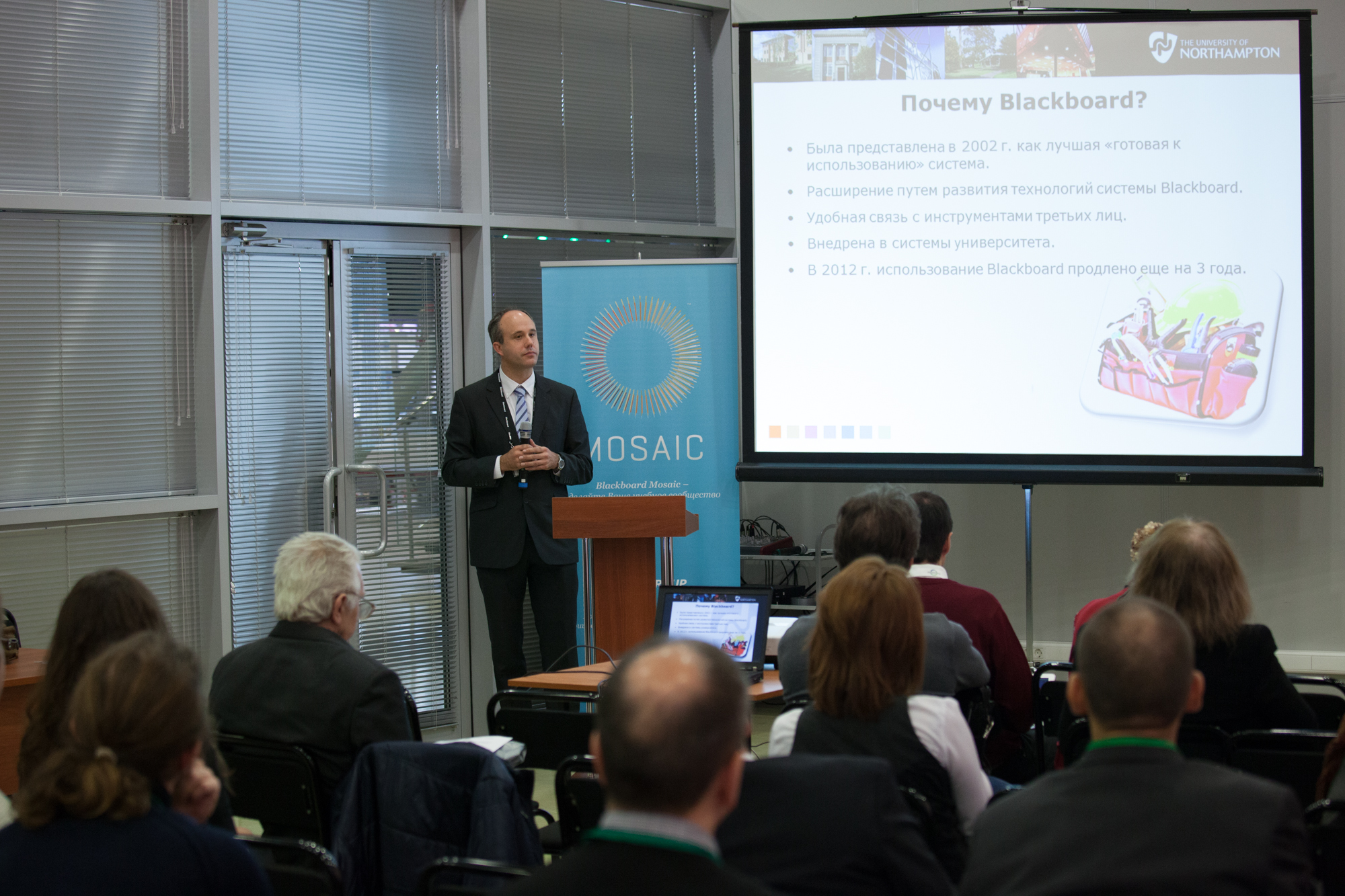
There was a real interest in the Learning Technology work and developments at Northampton including our Changemaker status…..and surprisingly a question on the Northampton clown during the drinks reception ! As a result of the presentations, Northampton has already had requests for greater collaboration and potential sharing of resources between ourselves and Russian institutions.
Twitter for collaboration and communication – LearnTech Podcast Episode 6
Al Holloway, Learning Technologist at University of Northampton talks to School of Health staff member Angie Bartoli on her use of Twitter for collaboration and communication in the field of social work.
Finding images to use in eLearning
 We are often asked in CAIeROs where to obtain images that are licensed for use in material that could be part of an Open Resource. There is nothing worse than having to pick out images from a potential OER because of copyright problems. This article on Zembl is a really useful guide to where you can find suitable images.
http://zembl.com/news/blogs/2013/11/15-places-get-free-images-your-elearning
Using MyPad (Edublogs) for student portfolios – LearnTech Podcast Episode 5
Al Holloway, Learning Technologist at University of Northampton talks to School of Education lecturer Helen Caldwell on her use of Edublogs for student portfolios.