
UPDATE 02/09/2026: Blackboard have postponed this September update until October 1st at the earliest. The below features will become available from October onward.
This month’s upgrade includes the following new/improved features to Ultra courses, etc:
Ability for staff to restrict accepted file types for Blackboard assignment submissions
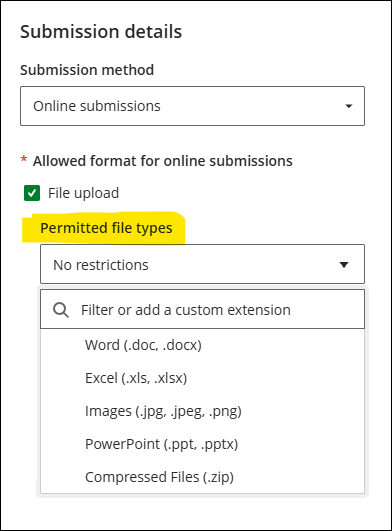
Just one change to NILE this month, an update to Blackboard assignments allowing staff to restrict the types of file that students can submit. By default all file types can be submitted, so Blackboard assignments will continue to work as normal where these new settings are unchanged. However, where staff wish to do so a list of accepted file types can be added to a Blackboard assignment.
To specify which types of file students can submit, staff can add these in the assignment settings panel, under ‘Submission details’. Common file extensions can be selected from a drop down list, but staff can add their own too. Where this feature is used, we strongly recommend that students are informed of this well in advance.
More information about setting up Blackboard assignments can be found in: Learning Technology Team – Ultra Workflow 2: Blackboard Assignment
Learning technology / NILE community group
Staff who are interested in finding out more about learning technologies and NILE are invited to join the Learning Technology / NILE Community Group on the University’s Engage platform. The purpose of the community is to share information and good practice concerning the use of learning technologies at UON. When joining the community, if you are prompted to login please use your usual UON staff username and password. By joining the Learning Technology / NILE Community you will receive calendar invitations to our regular live community events:
Join the Learning Technology / NILE Community Group
More information
As ever, please get in touch with your learning technologist if you would like any more information about the new features available in this month’s upgrade: Who is my learning technologist?