PebblePad Glow Up 🌟 – November 2026

In the past, updates to PebblePad have been easily communicated via a quick announcement, however, there have been many changes over the past six months and some of these might be relevant to the workbooks that you assess or manage. Therefore, we have dedicated an entire blog post to some of the more significant changes.

Progress tracking

In the past, progress tracking within PebblePad has been reliant on a student marking a page as complete. However, you can now track both students and assessors progress through a workbook and be in control of exactly what is tracked by enabling ‘block-level progress’ in the properties sidebar.  
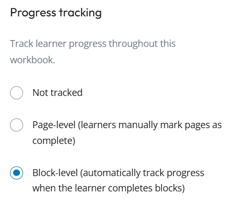
The progress tracking element from the properties sidebar which shows the options for progress tracking. In this image, block-level progress is selected.
Block-level progress tracking

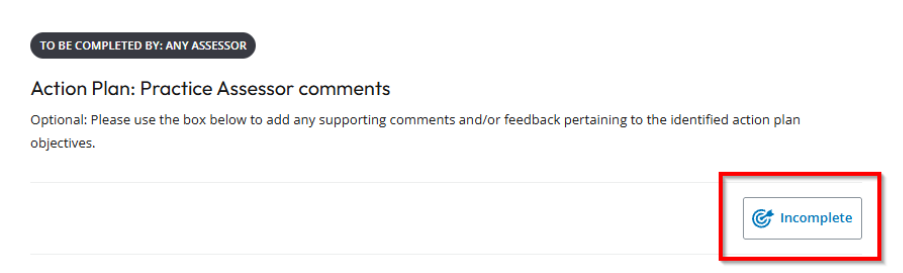
You can decide which blocks on a page/template you would like to track regardless of whether the blocks are for students or assessors. When in editing mode, the block will show a ‘tracked’ icon. When viewed by a student or assessor, a tracked block will show an ‘incomplete’ icon until the criteria for completion has been met.
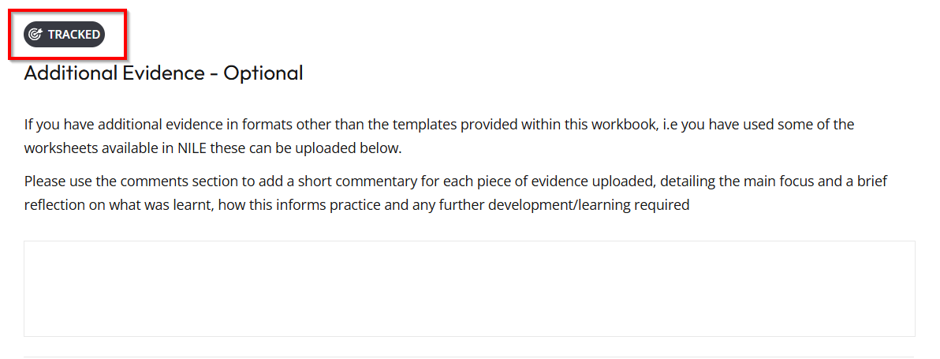
There is a multiline text box that is for student completion and a bold 'tracked' icon is at the top of the block to indicated that tracking has been activated. This has been highlighted with a red rectangle to show the reader its visibility on the block.
A block showing ‘tracked’ when in editing mode.
An role restricted text box with an 'incomplete' icon in the bottom right-hand corner. The icon has a red rectangle around it to highlight it to the reader.
When in use, the block will display an incomplete or complete icon to both the student and assessor.

All block types can have tracking applied, which means that you can more easily keep track of the parts of a workbook where completion is mandatory. There are some further settings for each block depending on what it is, and these are highlighted below:  

  • Capability blocks – these are blocks that enable further evidence to be added. When tracking is added to these blocks, further terms can be set for the block to be marked as complete (see section ‘evidence blocks’ below). 
  • Multi-line text boxes – where students have been given a text box to complete, tracking can be set to be marked as complete as soon as any text is entered or once the minimum word count has been reached. *Please note: if the minimum wordcount is set to 0, this will immediately show as complete.  

There are also some blocks where tracking (at present) is potentially limited: 

  • Tables – if using repeating rows, the table will be marked as complete once the first row has been completed. If there are a set number of rows the table will show as complete once ALL cells have been completed.  
  • Check list – this block will be marked complete if 1 item is ticked. At present there is no option to indicate how many checkboxes should be ticked to verify completion.  

The PebblePad video below demonstrates progress tracking in action and also gives some insight into how this data can be viewed on your ATLAS dashboard. 

If you would like a sneaky peek at progress tracking in action, please take a look at the workbook example found here: Progress tracking example

Evidence blocks

When the option to ‘attach evidence’ is added to a block, progress tracking can be enabled along with a selection of criteria that needs to be met before the evidence is marked as complete. Criteria include: 

  • The number of pieces of evidence needed 
  • The evidence type used 
  • Required tags 
  • Creation date 
  • Only completed evidence (i.e. a fully complete template) 
  • A set signature requirement 
  • A verification requirement

Additionally, if tags are used as a criterion for evidence collection, these can now be automatically added as evidence if the ‘Automatic Criteria’ option is selected. This means that students would not need to upload evidence that is correctly tagged, it would automatically be added as evidence. 
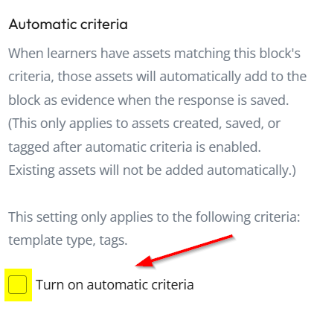
A description of the automatic criteria option in the workbook side bar along with a yellow highlight to demonstrate where the checkbox is to activate it.

To see how evidence blocks might be used, take a look at our workbook example found here: Evidence Blocks example

Assessor only tables

A long-awaited change for tables is that they can now be assigned as assessor only. In the past, rubrics were the only tabular format that could be role restricted. To add the role restriction, select the table, open the properties panel and select the appropriate role restriction.  

Collection pages, activity logs and verifications 

Collection pages and activity logs have always caused a few headaches but there have been a number of improvements to these. You may have noticed that ‘search results’ are now turned on by default; we no longer need to rely on students locating the toggle button to see their collection of worked hours or patient feedback forms. 
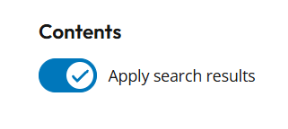
The collection page search results toggle, switched to ON.
The search results toggle should always be ON

If progress tracking is enabled on the templates for a collection, then the progress of completion will now be shown on the collection page itself. Once fully compete, this will show as such with a blue 100% icon under the progress heading. 

An example of a table that is shown on a collection page. The type of document , the document title, when it was last updated, the progress of completion are shown in the table.
Table to show collected templates on a collection page

For activity logs that contain information that needs to be verified (such as worked hours), this is now more easily done by using assessor defined tables on the templates associated with the activity log. Students can insert their hours, and assessors can verify these by entering the verified hours into their table. If there is a discrepancy, only the verified hours will display on the collection page. Assessors can see if hours still need verification from the ‘unverified’ section on the target card. 
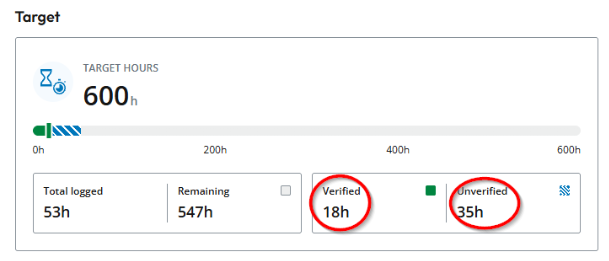
An example of a target card which shows the target hours as 600 and then a progress bar to show completion. The total logged hours, the remaining hours, verified hours and unverified hours are also shown.
Target hours card from an activity log.

Other changes to activity logs and collections are listed below: 

  • More information on the collection pages and activity logs with a full-width table layout with sortable information including item, last updated date, progress, hours or points, verification status and verifier. New target cards provide an at-a-glance view of logged, verified, unverified and remaining hours, or logged and remaining points. 
  • Students and staff can search entries by title and use verification status to find items still awaiting review. 
  • A blue dot highlights work updated since the viewer’s last visit, helping assessors focus on what has changed. 
  • Tutor-defined Activity Logs and Collections now use one streamlined description field when creating new resources. Existing hint content remains available for resources that already use it. 

To see collection pages and activity logs in action, please take a look at our workbook example found here: Collection pages and activity log example

Interested in these changes?

For more information on these updates or for a discussion/demonstration on how they might be used within the workbooks you manage, please get in touch with your Learning Technologist.
Exploring AI in Blackboard Ultra: A Case Study in Test Creation

Blackboard’s AI design assistant, launched last December, has quickly proven to be a helpful tool for developing content within NILE courses. Our early data shows that while most users create tests independently, the AI design assistant is especially popular for test and quiz creation. Senior Lecturer in Nursing, Julie Holloway, shares her positive experience using AI to support her pharmacology students in a prescribing program.

“We are using AI to help generate new exam questions, particularly in relation to pharmacology content,” Julie explains. Due to the parameters of professional regulation within independent prescribing, she’s unable to provide students with past exam papers for their revision. Instead, AI has allowed her to create supplemental revision questions directly linked to each pharmacology lecture, providing students with valuable practice material aligned with their coursework.

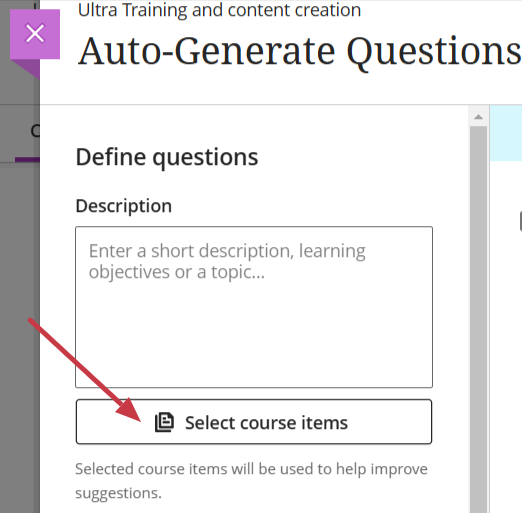
One notable feature in the AI design assistant enables users to select existing course materials for the AI to draw from when generating content. Julie has leveraged this by selecting specific pharmacology materials, allowing her to create questions that closely reflect the lectures and give students an efficient tool for self-assessment. “The process was easier than I originally thought,” she adds.

An image to show the option to select course items when generating test questions

As well as helping with efficiency, Julie also noted the AI’s capacity to inspire new ways of phrasing questions. “Exam questions can become repetitive,” she says, and the AI’s suggestions help with this and enhance the student experience by supplementing their revision.

In thinking about the limitations of using AI to create test questions, Julie points out that the AI occasionally generates questions that aren’t entirely relevant. However, she highlights, “I think this will improve as we get more experienced with working with AI and search terms, etc.”

Would she recommend this approach to other educators? “Absolutely,” she says, encouraging colleagues to explore the tool themselves. “Just give it a try—it’s not as scary as you think!”

If you would like any support using any of the AI Design Assistant tools in NILE, then please contact your Learning Technologist. If you are unsure who this is, then please select this link: https://libguides.northampton.ac.uk/learntech/staff/nile-help/who-is-my-learning-technologist

For more information on the AI Design Assistant, then please select this link: https://libguides.northampton.ac.uk/learntech/staff/nile-guides/ai-design-assistant

Evolving student perspectives on Generative Artificial Intelligence at UON: 2024 Report

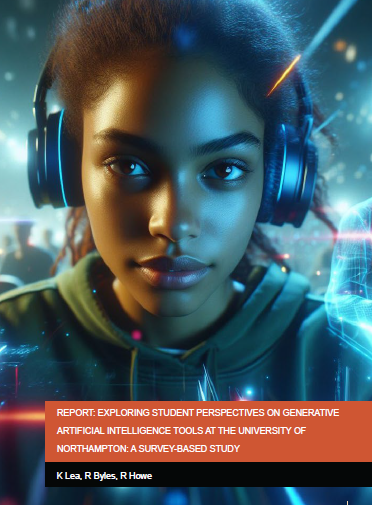
As part of a longitudinal study into student perspectives of Generative Artificial Intelligence (GenAI), Learning Technologists Richard Byles and Kelly Lea, along with Head of Learning Technology Rob Howe, have published the results of their second student survey, launched in February 2024.

This 2024 report reveals a significant shift in the role of GenAI in students’ academic lives and their changing motivations to engage with these technologies. Notably, the survey highlights a marked increase in student use of GenAI since the 2023 survey with distinct differences in usage and views between UK and international students.

Key findings indicate a growing awareness among students about both the benefits and limitations of GenAI. Many students appreciate its ability to assist with summarising content, generating ideas, and editing text. However, they are increasingly questioning where data is gathered from and its reliability. Students remain ethically aware and want to ensure academic integrity when using these tools.

The full report can be viewed below.

Click to view

Report Link (PDF): Exploring Student Perspectives of Generative Artificial Intelligence Tools at the university of Northampton: A survey-Based Study
R Byles, K Lea, R Howe

Getting started with AI: A guide to using the Jisc Discovery Tool’s new AI question set.

With an overload of information and such dichotomous opinions about Artificial Intelligence (AI), it is difficult to know where to begin; especially if you are yet to experience using AI at all. One starting point is to find out where you are with your own knowledge and the Jisc discovery tool can assist with this.

The discovery tool, which was introduced to UON in 2020, is a developmental tool that students and staff can use to self-assess their digital capabilities, identify their strengths, and highlight opportunities to develop skills. The tool has been recently updated to include a question set for both staff and students on their capability and proficiency with AI and generative AI tools.

The question sets for students and staff have been developed with assistance from Jisc and aligns with the latest AI advice and AI guiding principles developed by Jisc and the Russell Group on the responsible and equitable use of AI to enhance learning and teaching.

How the discovery tool helps students and teachers

The new question sets provide users with a basis to self-assess their skills and knowledge of what AI is and how it could, or should, be used in the context of their studies or role.

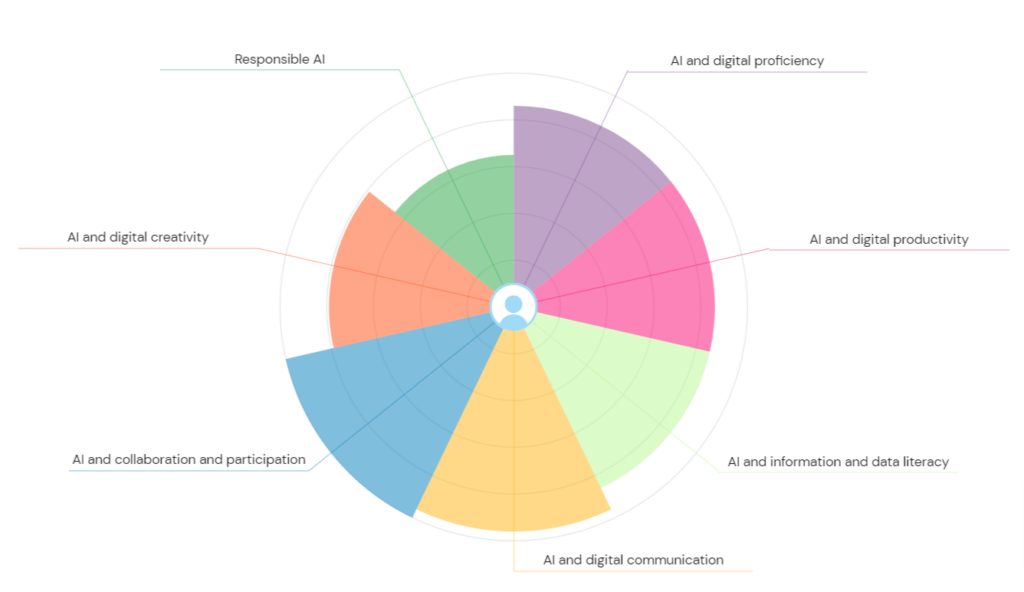
An image of a wheel that is divided into sections to show a users confidence level with different areas of the question set.
Example of the AI Question set report wheel

Once users complete the question set, they can then access a personalised report with a confidence rating which will vary from ‘developing’ through ‘capable’ to ‘proficient’ depending on their experience. The report also provides recommendations and courses on how to advance knowledge around AI.

Images to show a sample of the resources that are available once the report has been generated
A sample of the resources that are available once the report has been generated

Users can repeat any of the discovery tool’s question sets at any point and therefore keep a dynamic view of their confidence levels.

Where can I access the tool?

Click here to log straight into the discovery tool and the AI question set, or copy and paste the link below into your address bar.

https://northampton.potential.ly/pub/jisc/digital-capability/pages/staff/playlists/question-bank/cards/ai-question-set/page/1

How can I Support Students?

To assist students in enhancing their digital skills and their knowledge and understanding of AI, we have put together a student guide which can be found here. It may also be helpful to add a link to this guide, or to the discovery tool itself, within NILE courses.

What if I would like to know more?

For more information about how to use the discovery tool, see: https://digitalcapability.jisc.ac.uk/resources-and-community/discovery-tool-guidance/staff/

For further information about the AI design assistant in NILE or Padlet’s new AI features, please get in touch with your Learning Technologist. 
Helpful links

Who is my Learning Technologist?

Learning Technology Lib Guides

Generative AI – Exploring the Potential Impact on Education and Creativity

The year 2023 is proving to be a fascinating one for generative AI tools, with ChatGPT, the latest chatbot from OpenAI, crossing the 100 million user line in January 2023, making it the fastest-growing consumer application in a short period of time (source: DemandSage). ChatGPT is a large language model that provides detailed answers to a wide range of questions. Ask it to summarise a report, structure a presentation or activities for your session and you may well be pleased with the results. ChatGPT’s ease of use, speed of response, and detailed answers have seen it quickly dominate the AI generator market and gain both widespread acclaim and criticism.

While early media attention focused on the negative, playing on sci-fi tropes and the out-of-control desires of AI tools, scientists such as Stephen Wolfram have been exploring and explaining the capabilities and intricacies of ChatGPT, expertly raising awareness of its underlying Large Language Model architecture and its limitations as a tool.

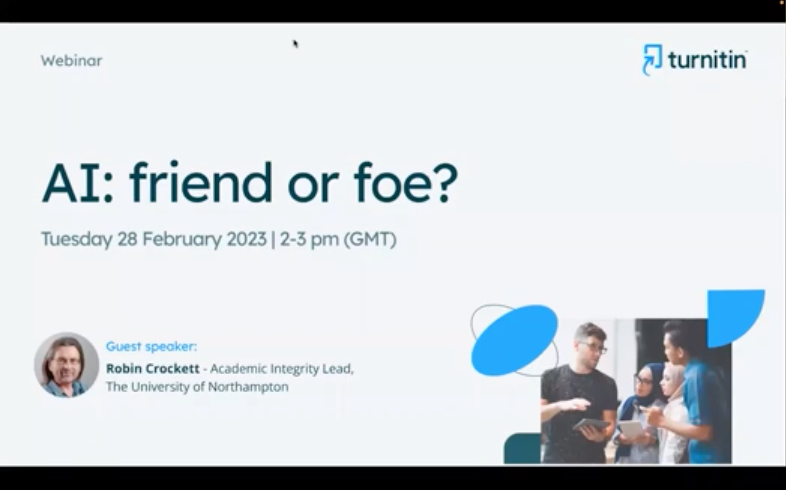
In his recent talk on the Turnitin Webinar ‘AI: friend or foe?’, Robin Crockett – Academic Integrity Lead here at UON, discussed how a better understanding of the ability of ChatGPT to create content can be used to deter cheating with AI tools. However, concerns have also been raised about students using the tool to cheat, claiming that minimal effort required to enter an essay question in ChatGPT may produce an essay that may be of an adequate standard to, at least, pass an assessment (source: The Guardian).

AI: friend or foe? (session)

Link to YouTube, Turnitin Session: AI friend or foe? 28/02/23 (CC Turnitin)

The next webinar in the Turnitin series entitled ‘Combating Contract Cheating on Campus’ with expert speakers Robin Crockett, Irene Glendinning and Sandie Dann, can be found here.  

One thing the media stories seem to agree upon is that generative AI tools have the potential to change the way we do things and challenge the status quo, with some traditional skill sets at risk of becoming replaced by AI, and new opportunities for those who embrace these technologies.

In terms of how AI might be utilised by academic staff, Lee Machado, Professor of Molecular Medicine, describes his use of AI tools in cancer classification and how AI tools might be used to help answer questions in his field. Lee also discusses how he feels AI tools such as ChatGPT could improve student experiences by providing personalised feedback on essays and by simplifying complex information.

Interview with Lee Machado
Click to view video: Interview with Lee Machado – Experiences of Generative AI (link opens in new tab)

In the following interview, Jane Mills, Senior Lecturer in Fashion and Textiles, discusses how the fashion industry is embracing AI, emphasising that rather than AI replacing creativity, it can be used to enhance creative work. Students Amalia Samoila and Donald Mubangizi reflect on the collaborative nature of working with AI, using examples of their current work.

Interview with Jane Mills
Click to view video: Creative use of AI in BA Fashion (link opens in new tab)

In his interview, Rob Howe, Head of Learning Technology, discusses the evolution of AI technology and its impact on the academic world. He explains that AI has come a long way since the original definitions by Minsky and Turing in the 1950s and that improvements in processing speed and access to data have made it a revolution in technology. Rob describes how AI technology has already been integrated into tools and academic systems in universities and how the rise of AI technology has led to a change in the way assignments are being considered, as students may now be using AI systems to assist in their studies. Although there is discussion around institutions wishing to ban the use of AI in academic work, Rob emphasizes the importance of learning to live with such tools and using them in a way that supports educators and students. AI systems have the potential to be a valuable resource for tutors to generate learning outcomes and offer new ideas which can then be critically evaluated and modified. 

Interview with Rob Howe
Click to view video: Interview with Rob Howe – Artificial Intelligence (link opens in new tab)

Exploring AI through multiple platforms and apps is a great way for users to get started. However, it’s important to note that not all AI tools are free. While many offer free tokens or limited availability for new users, some require payment. Our team member, inspired by the use of AI-generated images by an art student at UON, tried the IOS app, Dawn AI, which offered a 3-day trial. They enjoyed generating 48 new versions of themselves and even created versions of themselves as a warrior and video game character. 

However, it’s important to consider whether using AI in this way is simply a gimmick or if it has a more purposeful use. It’s easy to dismiss AI-generated images as mere novelties, but the potential applications of this technology are vast and varied. AI-generated images can be used in advertising, social media marketing, and even in the film industry. As AI continues to develop and evolve, we’re likely to see even more innovative and exciting uses for this technology. The possibilities are endless. 

The full extent of how AI tools will fit into daily academic life is yet to be determined. While some believe that AI has the potential to revolutionize the way in which we teach and learn, others remain skeptical about its ethical implications and its potential to negatively impact student engagement.

One of the main concerns is whether AI tools will prove to be a positive tool to enhance creativity and support students or whether they will provide a shortcut to assessments that undermine the learning process. It is clear that there are significant implications for how educators use AI tools in the classroom.

To explore these issues and more, Rob Howe, Head of Learning Technology at the University of Northampton (supported by University staff, external colleagues and the National Centre for A.I.), will be running a series of debates and talks on campus and online. These discussions will aim to assess the potential of AI tools and examine their ethical implications. Participants will discuss the challenges and opportunities presented by AI, and debate the best ways to incorporate these tools into the classroom.

The first of these debates, titled, ‘The computers are taking over…?’, is on March 15th. The full details can be found here; https://blogs.northampton.ac.uk/learntech/2023/01/30/the-computers-are-taking-over-debate/

Link to future Webinar from the series: https://www.turnitin.com/resources/webinars/turnitin-session-series-contract-cheating-2023 

Authors: Richard Byles and Kelly Lea.

Clinical Simulation at UON

Simulation has become an integral part of teaching and learning pedagogy within the Health Faculty at UON.  In order to operationalise the faculty’s simulation strategy, a lead for simulation was recruited in September 2022. Roshini Khatri, Head of Health Professions, explains why:

“Simulation is used regularly in Healthcare as a learning and teaching technique to create situations or environments to allow persons/students to experience a demonstration of real-life scenarios for the purpose of practice and learning in a safe and nurturing environment. We have chosen to embed simulation as part of our curriculum to ensure that we are using contemporary and innovative activities to support the healthcare professionals of the future.”

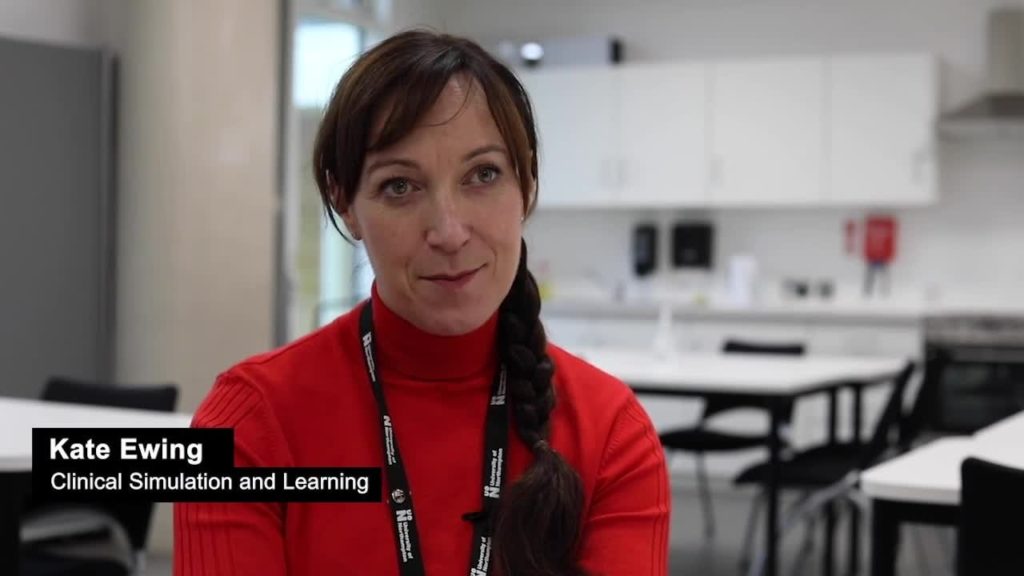
The new Academic Lead for Simulation, Kate Ewing, is passionate about how the use of simulation and virtual reality scenarios can create more immersive, engaging, and more productive learning outcomes. Kate explains that simulation ranges from a technical skill, for example, where students might be learning to catheterise, to a more immersive scenario which is designed to give students the opportunity, in a safe and controlled environment, to experience a clinical situation.

(Click the image or text link below to launch the video in a new tab)

Image: Academic Lead for Simulation, Kate Ewing.
Video: Interview with Kate Ewing and Hannah Cannon

The challenge Kate has, is scenarios need to be written and carefully constructed with learning outcomes at the forefront. Kate admits this can create a ‘heavy workload’ for academic staff, so her aim is to see how these scenarios can be utilised across programmes so they fulfil a range of learning outcomes; allowing students to work inter-professionally with each other, rather than having a single use.

Kate is aware of the limitations of this technology when utilised by small groups or individuals at a time. However, Kate’s strategy provides a “shift in thinking” which encompasses all of the students in the learning process. In her learning situations, the students become observers of the process taking place. Kate comments: “Evidence says, if you debrief the situation and the learning in the right way, observers gain as much as the participants. The simulation is seen as an excuse for a debrief – the debrief is where the rich learning takes place”.

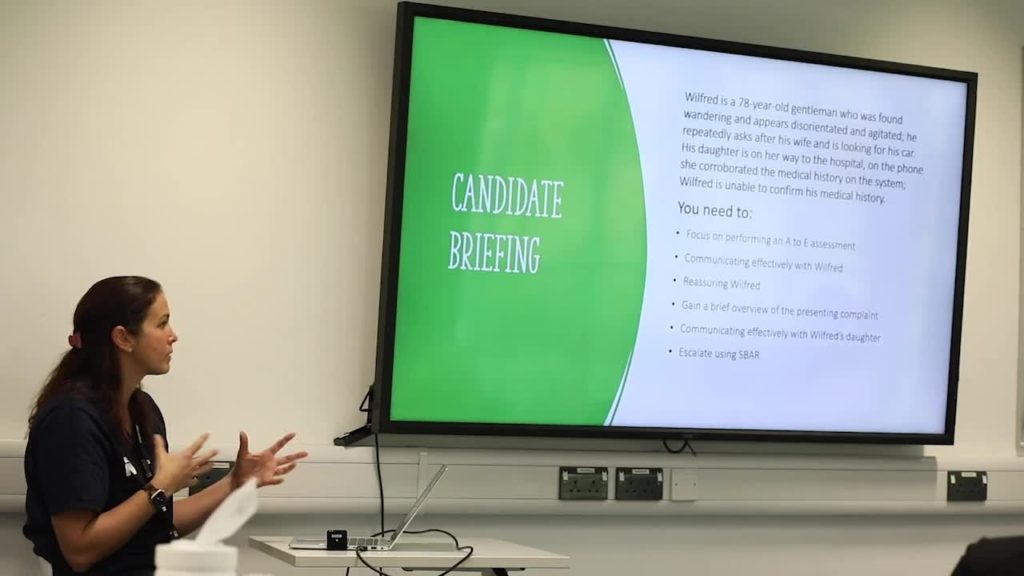
Image: Hannah Cannon carries out a debrief session with her nursing students.

Kate highlights how simulations in a learning environment are very different to clinical settings. “Students aren’t just testing out their skills, as they might do in a clinical environment, rather, they are developing skills of communication and those human factors which require a more intricate debrief strategy”. Although Virtual Reality (VR) scenarios contain published debriefs, Kate feels strongly these need customising so they can be mapped closely to the learning outcomes of individual programmes at UON.

Hannah Cannon, Practice Lead for Nursing Associates, has been working with students on their clinical skills using a VR platform in a whole class situation. Hannah said that in her experience, students seem to feel “really safe” when engaging with scenarios in this way. Her students can play through a scenario safely without the need to worry about the consequences of their decision–making. Hannah believes by having a group of students present, it allows for a more productive and wider discussion about patient care. As a team, the students can work together to make decisions about the patient’s treatment.

Image: Hannah Cannon Senior Lecturer in Practice Development -Nursing

Hannah emphasises how the use of a debrief, which is usually twice as long as the scenario, permits her students to have more effective discussions about the scenario and to reflect on their decision-making. Hannah feels this style of immersive learning allows her students to better grasp their learning outcomes by having the opportunities to see their decision-making play out and then by reflecting on the end result.  She goes on to say that it, “heightens student’s self-awareness both professionally and personally,” which she feels is fundamental in nursing care.

Although immersive and engaging, Kate understands simulations are not an “easy answer” to fulfilling learning outcomes at UON, due to their time-consuming nature. But Kate is passionate that, through her role, she will be able to help create a strategy that supports staff to not only fulfill learning outcomes in a more productive way within their own programme, but to enable collaborative scenario-based learning to be adopted across programmes in a more cohesive and versatile way.