
Currently viewing the category:
"LearnTech News"
We are currently experiencing issues with emails from the Announcements and Email tool. We are investigating and apologise for the inconvenience. We are aware that some users are receiving multiple, back dated notifications. Please ignore these messages for now. We will post an update once it has been resolved. Thanks for your patience.
Tablets seem to be the new ‘must have’ device, and a few staff have been asking us for our thoughts on these. While we wouldn’t necessarily recommend a particular device, we do have a couple you can try out, and the thoughts below might be of some help.
What are they good at?
Tablets are great for carrying around. They’re small, and lightweight, and as a general rule, start-up time and battery life are both much better than a laptop. They are great for on-the-go tasks, like checking email and browsing the web. The point to remember though, is that they usually use a mobile (cut-down) version of the operating system, similar to that used in smartphones, which means that they can’t run the same type of software as a laptop or desktop computer. The software usually comes in the form of ‘apps’, which have different functionality to their desktop counterparts.
What are they bad at?
This varies between models. They usually have a mobile (cut-down) web browser installed by default, which can struggle with web pages that are not designed for mobile use. Famously, the iPad won’t play any Flash content in the default web browser (Safari), so watching video content on the web can be tricky unless there is “an app for that” (for example, there are native apps for Youtube and BBC iPlayer). It can also be tricky to transfer files between your desktop computer and your tablet, unless (for the iPad) you are an expert iTunes user, or (for Android) you use other ‘cloud’ applications to store your work online (such as Google docs).
A quick note about browsers: if you have a tablet, you don’t have to use the default browser that is already installed. Other browsers are available to download, although they may not be free.
Common tasks for University staff
We put some of our tablets through their paces to see if they could support some of the common tasks staff carry out using technology. The findings are below. If there are some more key tasks that you would like us to try out for you, please add your suggestions as comments on this post.
| Task | iPad (Apple) | Motorola Xoom (Android) |
| Syncing work email (Exchange) | Works fine, including calendars and contacts. New appointments can be added but can’t be set to private. | Email, calendars and contacts all work fine. |
| Editing documents | Has a basic Notes app already installed, that allows you to type text and email it to yourself. The iWork suite of apps allows you to work with Word, Powerpoint/Keynote and Excel, and document transfer is done via iTunes or cloud storage services. Google docs can be accessed via the app or the browser, although editing is fiddly. |
Doesn’t come with a basic note-taking app, although Freenote is a good one you can download, that also saves handwritten notes. Documents, spreadsheets etc. can be imported/exported via Google docs, although disappointingly the editing functionality in the browser/app is not much better than in the Apple app. |
| Using NILE* (Blackboard 9.1) | NILE can be accessed through the browser, but editing and adding new items is fiddly as it can only be done with the Visual Editor switched off. | Box pages display slightly strangely in the browser. You can add and edit items, and type using the Visual Editor, but it struggles applying settings from pop-up menus (e.g. text colours). |
| Using Turnitin and GradeMark | Originality reports can be viewed, but navigation doesn’t always work properly. Commenting in GradeMark does not work. | As with the iPad. |
| Presenting | The iPad 2 supports video output, so as long as you have the right connector, you can plug it in to the VGA lead on a lectern (as you would with a laptop), or the HDMI lead for your HD TV, and demo whatever you like. The iPad 1 only supports video output from certain apps, like Keynote. |
Motorola haven’t as yet produced a VGA connector for the Xoom, although it does have HDMI output via the mini-HDMI socket. Apparently it is possible to adapt this to VGA output – see this forum on the Motorola site for more. |
| Adding blog posts (WordPress) | Works in the browser, but better in the (free) app, even though it does display the HTML version rather than WYSIWYG. | Slow and clumsy in the browser – again better in the app. |
| Reading e-books & journals** | Online journals: the Metalib search pages work fine, although the fact that it opens everything in a new window can mean you run out of browser windows quickly (you can only have 9 open at a time). Other useful apps include EBSCOhost, iBase (searches open access repositories, arXiv (e-prints for science subjects) and iScholarReader (Google Scholar app). Library eBooks: Dawsonera – read online works fine, but it doesn’t seem to want to download for reading later. Safari Tech books online works fine, although watch it for it locking you out as the browser has trouble with session IDs. Netlibrary books also work for online reading, although these will soon be moving to EBSCOhost. Other eBooks/files: The iBooks app (already installed) allows you to download from the iTunes bookstore, and EPUB/PDF files can be transferred via iTunes. There is also a free Kindle app available. |
Online journals: Metalib works fine, and opens new tabs, which is more manageable than the iPad browser. There are also Android apps for arXiv and gScholarReader (Google Scholar). Library eBooks: Dawsonera books do not display in the browser (blank pages), and the download option doesn’t seem to work either. Safari Tech books load ok, but scrolling is tricky. The Netlibrary reader also displays as a blank page. Other eBooks/files: The Xoom can read EPUB & PDF files, using an eBook reader app such as Aldiko (files can be transferred via USB). There is also a Kindle app available. |
| Watching video | Major video streaming sites Youtube and Vimeo will play in the browser, however Flash-based video (on sites like the BBC and the University’s Video Library Server) will not. A number of apps are available for streaming, including BBC iPlayer. Video files can be transferred and played using the VLC app. |
Plays Flash-based video, so BBC video and the University VLS work fine, as do Youtube and Vimeo. Video files can be transferred directly via USB. As yet there isn’t an official VLC app, but QQPlayer seems to handle most file types ok. |
| Taking Photos/Video*** | The iPad 2 comes with a camera that takes VGA quality stills (0.69MP). There are two options for video, with VGA quality on the front camera, or HD (720p) on the back. There is an iMovie app but it’s only for the iPad 2, and costs £2.99. |
The Xoom has a 5MP still camera, which will take better photos than the iPad, although they don’t always look as clear on the screen. Also shoots 720p video, and comes with an editing app (Film Studio). |
*more information on accessing NILE on mobile devices will be coming soon, watch this space for more details…
**we also have a Kindle available for loan – if all you want to do is read, then this might be more suitable for you (and cheaper). You may also be interested in the Web Tools for Researchers guide.
***If the camera is your thing, have a look at this comparison by PC World, or this one from TechCrunch.
 During 2011 we are changing the way we run inductions for Learning Technology. Student feedback indicates that they feel overloaded with information during welcome week, and many either do not attend their designated induction slot, or find they have quickly forgotten the information that we provide. Feedback also tells us that NILE inductions are more helpful when they are hands-on and task-focused, and so a decision has been made to discontinue the demonstration-style ‘overview of NILE’ sessions previously offered during this period.
Changes being made over the summer will simplify the process of getting access to and using NILE:
- From August 3rd, 2011 NILE will use the same username and password which is used to log on to University computers.
- Changes made to passwords used to log on to University computers via the central system (http://www.northampton.ac.uk/user) will also update those on NILE.
- NILE will use the same email address as held centrally by the University
Students are able to check the email address that the University has recorded on the Student Record System.
If the email the University has recorded is incorrect they will need to contact their Student Admin Team. (Follow the link if you’re not sure how to get in contact with your Schools’ team)
Information on NILE will also be available from library staff, who will be meeting all students during the Deans’ talks on the Monday of Welcome Week to outline what the department has to offer them. They will also be out on the floors in the library for two weeks offering support at point of need.
Additional guidance and information for students will be available from the Help tab on NILE and via the LTSupport email address, and drop-in sessions will be available for any students who feel that they would value more detailed assistance with IT systems – these will be advertised during September. The team will also continue to offer a variety of more in-depth sessions throughout the year working alongside and in response to academic staff.
As always, we recommend that tutors introduce NILE in an integrated way, along with other teaching methods and resources, both in face-to-face sessions and in information packs sent out to new students.
If you feel that this approach does not suit your students needs, then please contact a member of the Learntech team, who will be happy to discuss alternatives.
Rob, Julie and Adel were lucky enough to go to Amsterdam to have a tour of the Blackboard (the product underpinning NILE) offices and data centre where our servers are housed.
The trip involved a morning of meetings with Blackboard staff and representatives from Bath Spa, and Birmingham University at the the Blackboard offices which are based near Dam Square the in the heart of Amsterdam. Jan-Willem Van der Zalm (Director EMEA, Managed Hosting at Blackboard) lead the discussion where we talked about the service they provide and where their roadmap will be taking the service in the future.
The meeting confirmed many of the reasons why we pay Blackboard to provide this service. It includes everything from systems monitoring, security and backups to front line support, project planning, and handling of upgrades. With all of this handled by Blackboards team of experts, and service level agreements in place guaranteeing 99.9% uptime, we can concentrate on supporting staff and students in using technology to enhance their teaching and learning practice.
The Blackboard servers are housed in an Equinix Data Centre where the security just to get in was like something out of ’24’, requiring passports, pre-booking and a registered user whose finger prints are recorded. We had a tour of the facility including a room containing 5 generators which can keep power going into the centre for 51 hours without needing a fuel top up. The Data Centre is a sophisticated building with millions being invested in the continued maintenance, security provision and safety of the equipment and data held within its walls.
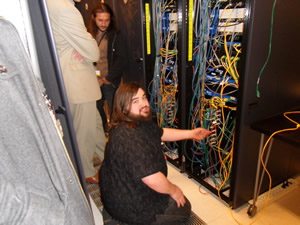 We finished the tour by going into the Blackboard ‘cage’. Some of the Blackboard servers are run from this relatively new area where there is a lot of space available for expansion. There are other Data Centres containing Blackboard servers in Virginia, USA and Sydney, Australia. The Blackboard Data Centre/Infrastructure engineer gave us an enthusiastic overview of the set up within the cage demonstrating the physical structure of an otherwise virtual system.
The whole visit gave us a clearer understanding and appreciation of the work that goes on behind the scenes to support and maintain NILE. Pretty good value as far as we’re concerned.
Since NILE was formally established in 2002, the system has developed organically based on staff and student feedback. To date NILE has not been linked with other institutional systems, and this has sometimes caused confusion both at module and user level – modules listed on this system often did not have the same name or code as that held elsewhere within the University, and passwords and email addresses used for NILE have not been consistent with those used for other systems. The Learning Technology team have been monitoring these issues, and QNIG (QLS / NILE Integration Group) was set up to address them, and starting this summer, a programme of improvements will begin.
Feedback received
A number of comments have been received based around the following points:
- Some users have reported issues with logging into NILE because their password is different to that used on other systems.
- Some users have reported that they have not received communications being sent out by NILE via email, because of a mismatch in email address. Some users also report that they have received information from courses and modules which they are no longer taking, because they are not automatically removed from NILE sites.
- Students often have problems finding their correct modules on NILE, as the site may not have the name they were expecting or is listed inside another course site. Students appreciate being added in advance to the sites they need on NILE, so that they don’t need to search for them, but for staff, adding students to sites can be a long task.
- Staff sometimes need sites at the field or course level rather than just at the module level, and sometimes sites which do not fit with any of the course, field or module descriptions (for example: a site for particular project activity).
- Students are currently removed from NILE sites each year which means that they will lose access to previously used materials unless they are separately saved. Again, the process of removing students from sites is time consuming for staff.
- Staff would like to make better use of the information held in the Grade Centre in NILE, as some of this contains information which also needs to be located on the student record system.
Future Planning
As a result of the feedback above, a number of actions are now being taken forward in a phased process:
Phase 1 (2 / 3 August 2011)
The usernames, passwords and email addresses held in NILE will be linked to the central identity management system. When a user changes their centrally held password or email address then this will be automatically updated on NILE.
Phase 2 (piloting Jun – Dec 2011)
New sites on NILE will be named with a specific ID which matches exactly with that held on the student record system. The ID will define the module, field or course; the cohort (e.g. Autumn, Spring or Summer); and the year of activity.
Any requested site which is not specifically related to a module, field or course will be set up on an ad hoc basis by the Learning Technology team, and normally listed under the Organisation section of NILE rather than within the Module tab.
Once the pilot is complete and any issues have been addressed, this will be rolled out for all NILE sites. Existing course and module sites will be recreated with new codes, and sites not related to taught courses or modules will be moved to organisations. Once this is done we should be able to proceed to automatically enrol students onto the course and module sites they need.
The specific setup of the sites will also mean that a new site will be created for each different cohort and each new year. The implications for this on storage are currently being assessed but this should mean that students could have access to previously taken modules and courses. The setup of new sites will mean that there is no need for staff to manage site enrolments, and communication to specific cohorts will be easier.
Phase 3 (2012 onwards)
Pilots will be undertaken to look at how Grade Centre data from NILE may be passed directly into the student record system. This will potentially speed up student access to grades and reduce administration.
Further Information
If you have any comments or questions on the above then please email Rob.Howe@northampton.ac.uk
Sign up for the following session at www.northampton.ac.uk/it-training
- Creating Large documents
- Remote Working
- Refworks
- PowerPoint
Take a look at the new IT training schedules at www.northampton.ac.uk/it-training
The May 2011 Learning Technology Newsletter is now available from the Learntech Newsletter page. This provide full details on current team activity and new activity based on feedback received.

Image via Wikipedia
The Learning Technology team are now available on Skype!
We can’t always be where you need us, but Skype allows us to support you remotely using the screen-sharing tool – we can show you what we’re doing on our screens, or talk you through what to do on yours, without either of us needing to travel. Best of all, it works on PCs, Macs, and even some mobile devices, from anywhere in the world. All you need is the Skype software, a Skype account (free), and a headset (or speakers and a microphone/webcam).
If you already use Skype, or if you think this might be helpful for you, why not get in touch with us to find out more. Each of team has a Skype ID, which you can find listed on the Contact Us page in the LearnTech site on NILE.

Executive Summary
The University of Northampton (UN) is committed to enhancing the quality of its e-learning and this is a central component of its Learning and Teaching strategies and key to the delivery of its new Strategic Plan 2010-15. The QAQE E-Learning Toolkit allows the University to develop, refine and enhance the institutional approach to quality with a particular focus on the whole lifespan of the (re)development of programmes, making use of Open Educational Resources where applicable. The toolkit will particularly assist as the institution moves forward to increase and enhance its distance learning provision and review and develop its curricula.
1) Institutional Context
Since 2007, UN has been working on improving processes for course design and delivery using a method based on the Carpe Diem model (Originally developed by The University of Leicester (Armellini et al, 2008 and 2009)). Over time this process has been changed and refined and is now termed CAIeRO (Creating Aligned and Interactive educational Resource Opportunities).
The CAIeRO process is an opportunity for the course team, Learning Technologists, Librarians, Students and other stakeholders (e.g. academic developer/facilitator(s) who are not part of the course team) to come together over a focused period of time to reflect on current or future courses and rebuild these in a way which is pedagogically focused and makes use of technology where relevant – and where it would enhance the delivery.
‘…….the use of the technology itself is increasingly not a distinguishing factor for organisations, but rather the quality of that use and the way it advances the goals of a change resilient organisation become essential to success.’
(Marshall, 2010)
The style of the events held under the CAIeRO banner have subtly changed over time to incorporate new practices and developments. For example, recent JISC/HEA funding during 2010 has allowed the University to explore the development of Open Educational Resources under the TIGER project (www.northampton.ac.uk/tiger). This has introduced the elements of Designing for Openness to the CAIeRO events so that culture of both using and sharing material is ingrained at the earliest opportunity.
We are also discussing the nature of course development and design with the Director of Learning and Teaching and Head of Quality and Curriculum Services to look at the nature of the validation process and the way in which programmes are delivered within the University.
2) Focus, Scope and Timeline
A team with the following staff will review the toolkit during March and its applicability to the CAIeRO process:
- Director of Learning and Teaching
- Head of Quality and Curriculum Services
- Deputy Director of Academic Services (Information Services)
- Principal Lecturer Learning and Teaching (Health)
- Head of Learning Technology
Whilst the institution has interest in all the stages and the detailed questions which are provided within the toolkit, it is clear that we currently place more focus on some areas than others. We will provide full feedback on the use of the toolkit and would hope to be involved in future revisions.
Two CAIeRO events will be held during March/ April / May informed by the outcomes of the above review and appropriate modifications. Staff involved in the CAIeRO processes will be surveyed about their experiences with particular focus on the value added through the use of the e-learning toolkit.
The feedback will be collated by 31st May, reported on, case study developed and then presented at the e-learning quality conference on 14th June.

