
The new features in this month’s Blackboard’s upgrade will be available from Friday 6th February. This month’s upgrade includes the following new/improved features to Ultra courses:
- Automations
- Ultra document enhancement
- Convert a Word/PowerPoint/PDF file to an Ultra document
- Ultra Course Awards 2026
- H5P, Xerte, Video Showcase – Call for presenters
Automations
Automations allow staff to configure triggers that prompt NILE to email students automatically when certain criteria are met. Following the upgrade staff will be able to set up automatic congratulatory emails for students who have achieved above a specified threshold on assessments, and to send supportive emails for those who have scored below a specified threshold. Staff can also send reminder emails to students who have unread feedback, although please note that this applies only to Blackboard assignments, not Turnitin assignments.
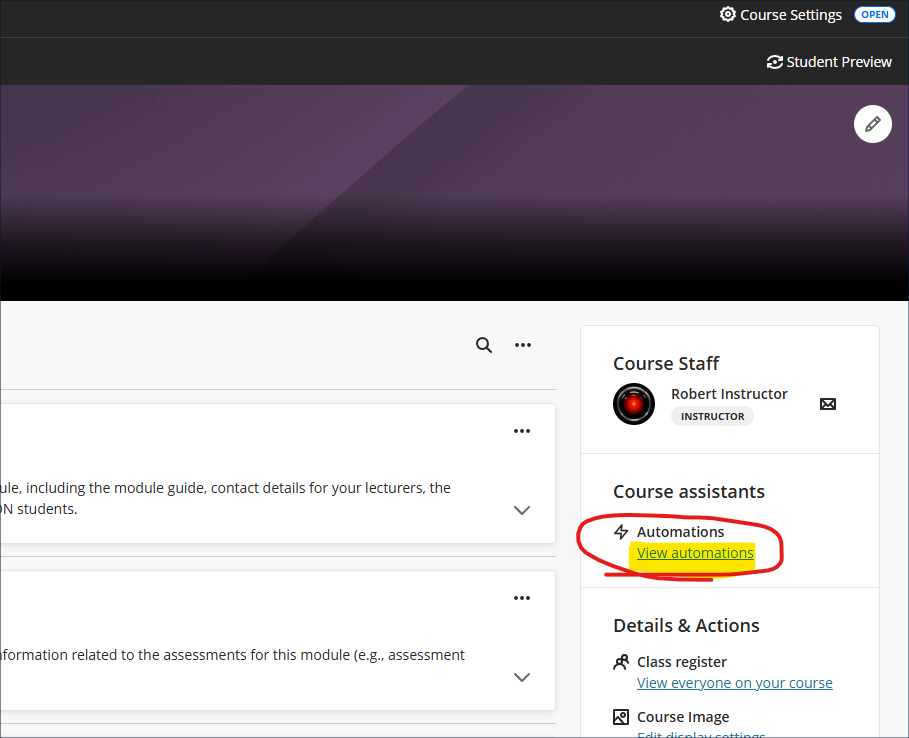
Note that congratulatory/supportive automations are only triggered by posted marks in the gradebook. Unposted marks will not activate the trigger. For example, if a student takes a formative test and receives their mark immediately upon completion of the test, an automation linked to completion of that formative test would be triggered immediately. However, if a student submits a manually marked assignment and receives a grade for it, an automation linked to that assignment will not be triggered when the mark is entered, only when the mark entered is actually posted.
For more information about automations see: Blackboard Help – Automations
Ultra document enhancement
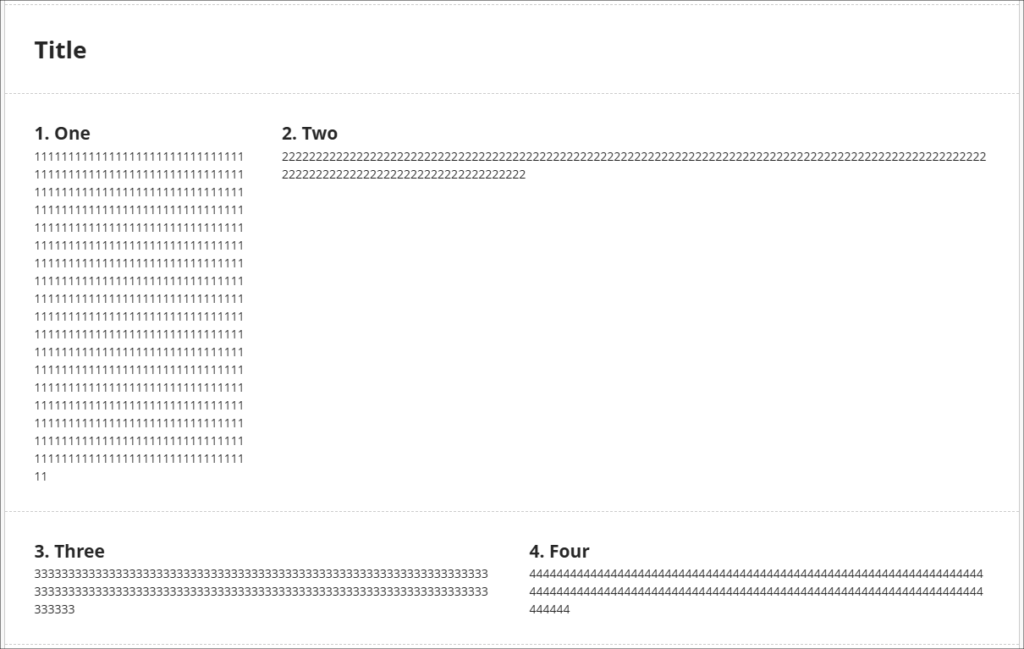
February’s upgrade includes an enhancement to Ultra documents entitled, ‘Stack blocks vertically in documents’. How this improves Ultra documents is as follows. Currently, if you have made use of multiple columns in an Ultra document you may have found that each column can only contain one block. In the following example you can see that the first row of my Ultra document (which contains the blocks titled ‘1. One’, and ‘2. Two’) has been divided into two columns which take up, respectively, 1/4 and 3/4 of the horizonal screen space. This has left me with a lot of space underneath block ‘2, Two’, but if I want to move any blocks underneath ‘2. Two’, I cannot do this as a column can only contain one block. I can, of course, take the text from other blocks and copy and paste it into the ‘2. Two’ block to fill up the space, but this is time consuming, and also frustrating if I just want to try out some different layout options.
The ‘Stack blocks vertically in documents’ upgrade means that a column can contain multiple blocks, so after the upgrade I can now fill the space under ‘2. Two’ with additional blocks by dragging and dropping them in place.
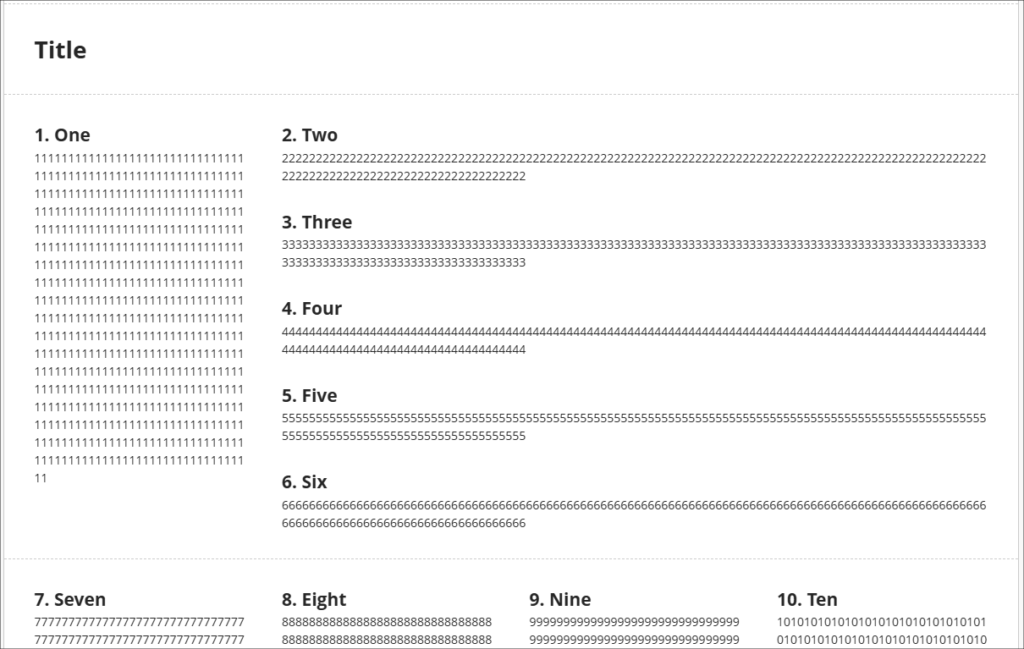
However, do bear in mind that once in a column together the blocks will share the same screen width. So, if I adjust the width of block ‘2. Two’ I will also adjust the width of all of the blocks in that column.
Also important to bear in mind that while your layout choices will be respected while students view Ultra documents on their laptops/desktop, on mobile devices the blocks will resize and flow into a single column, so instructions such as ‘immediately above/below’, or ‘to the left/right of’ will not necessarily make sense to all users. So, for example, rather than referring to an image as being on the right, it would be better to title the image (e.g., Fig 1.) and refer to the image by it’s title than by its relative position.
In the following screenshot you can see how students view the same page on a laptop (shown on the left) and on a mobile device (on the right).
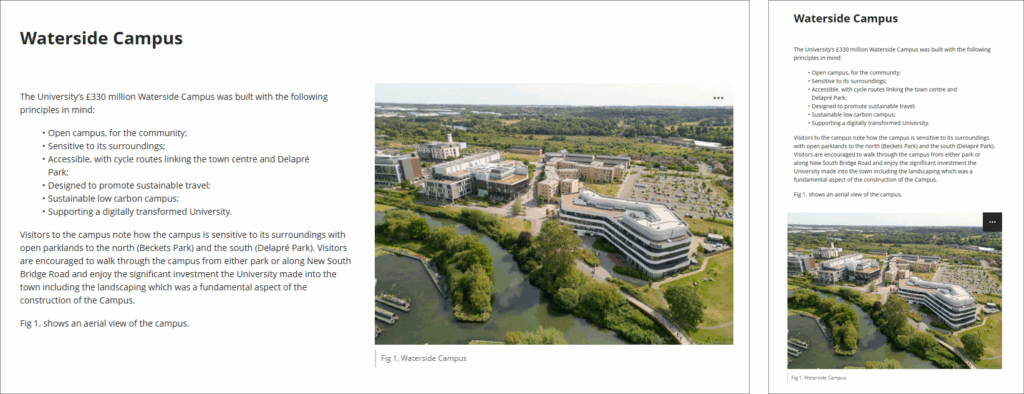
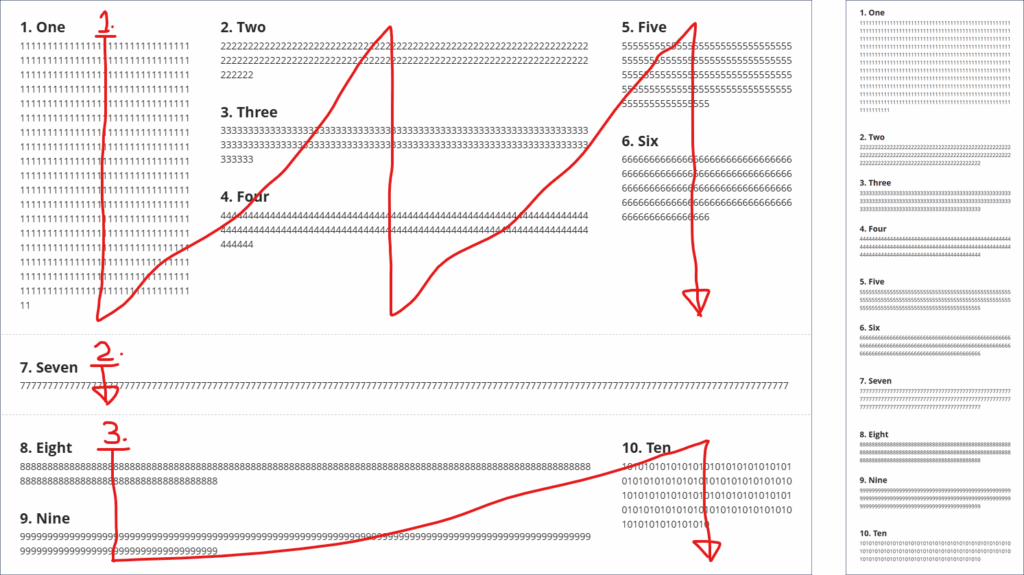
In case it’s helpful to know, when using multiple columns, the blocks always reflow in a simple, predictable matter, from the first row, first column, first block, i.e., the block in the top left position, down the column if there are multiple blocks in the column, but not crossing into the next row, then to the next column(s) on the right in that row. Once there are no more blocks in the row, the next row and the columns therein are selected, and so on. The following (rather roughly annotated) image shows an example of how an Ultra document with a complex layout on a laptop (the image on the left) will reflow when viewed on a mobile device (the image on the right).
If you’d like to see how this works, you can view a video demonstration here: Blackboard Upgrade – February 2026 – Stack Blocks Vertically in Columns in Ultra Documents (video, 4m 22s)
More information about using Ultra documents is available from: Blackboard Help – Documents
Convert a Word/PowerPoint/PDF file to an Ultra document
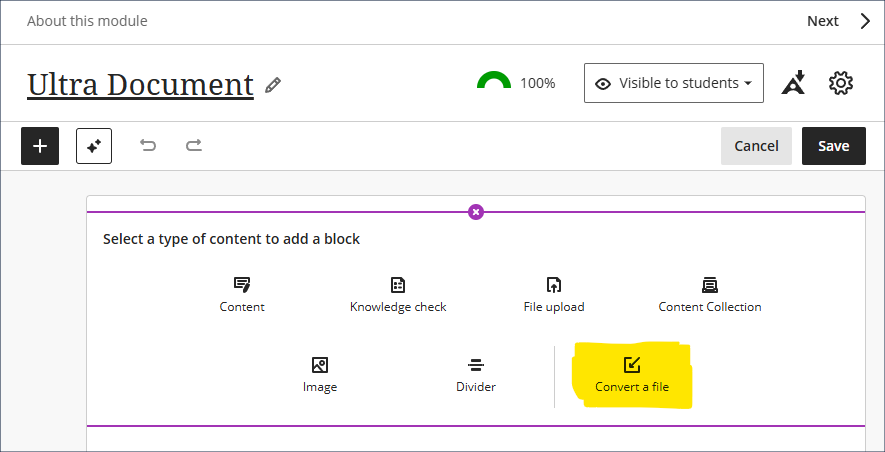
Okay, so this one isn’t actually new, but it’s pretty good and I get the impression that not too many people know about it, so here it is again. Long story short – you have various Word, PowerPoint, and PDF files in your Ultra course, and you’d really like them to be Ultra documents* but you don’t have the time or the patience to laboriously copy and paste everything into Ultra documents, so wouldn’t it be great if there was the option to auto-convert Word/PowerPoint/PDF files to Ultra documents …
*The key reasons that you’d really like them to be Ultra documents, of course, is because this not only makes them look better, but it makes them much more accessible and mobile friendly, and really easy for students to access in alternative formats … and, yes, students can still download and print Ultra documents.
Ultra Course Awards 2026
Have you put together a great NILE Ultra course for 2025/26? Or do you know someone who did?
We’re really keen to highlight and celebrate examples of good practice with Ultra, so if you or someone you know has designed a good Ultra course we’d really like to hear from you.
You can nominate yourself, or someone else, or multiple members of staff if the Ultra course has been created by more than one person. In your nomination we just need to know who it is that you’re nominating, which module the nomination is for, and what it is that you think has been done well. And you don’t have to tell us who is making the nomination if you don’t want to.
Nominated courses will be reviewed and Ultra Course Awards will be given according to the following criteria:
- The course follows the NILE Design Standards for Ultra Courses;
- The course is clearly laid out and well-organised at the top level via the use of content containers (i.e., learning modules and/or folders);
- Content items within top-level content containers are clearly named and easily identifiable for students, and, where necessary, sub-folders are used to organise content within the top-level content containers;
- The course contains online activities for students to take part in;
- The course has not previously won an Ultra Course Award.
Winners of 2026 Ultra Course Awards will be announced in the summer, and you can find out more about last year’s winners here.
Please note that nominations close at 23:59 on the 31st of March, 2026
Ultra Course Awards 2026 – Nomination Form
H5P, Xerte, Video Showcase – Call for presenters
If you have created a great online learning resource for a course using H5P, Xerte, or Video, we’d like to hear from you. We are keen to highlight and celebrate examples of content which you are proud of at a virtual online showcase on Friday 27th March, 2026. Six slots of fifteen minutes are available for you to present with Q&A.
Please complete the online entry form with your entry by deadline Friday 6th March, 2026.
For more information see: H5P, Xerte, Video Showcase – Call for Presenters (PDF)
H5P, Xerte, Video Showcase – Call for presenters entry form
Learning technology / NILE community group
Staff who are interested in finding out more about learning technologies and NILE are invited to join the Learning Technology / NILE Community Group on the University’s Engage platform. The purpose of the community is to share information and good practice concerning the use of learning technologies at UON. When joining the community, if you are prompted to login please use your usual UON staff username and password. By joining the Learning Technology / NILE Community you will receive calendar invitations to our regular live community events:
Join the Learning Technology / NILE Community Group
More information
As ever, please get in touch with your learning technologist if you would like any more information about the new features available in this month’s upgrade: Who is my learning technologist?
