Gisela Al-Hajjar in the International Office reviews the iPad for supporting staff who are travelling the world.
Kit review: iPad (PDF, 446 KB)

Gisela Al-Hajjar in the International Office reviews the iPad for supporting staff who are travelling the world.
Kit review: iPad (PDF, 446 KB)
 The report for this year’s Mobile Survey has just been published.
This annual survey forms part of the Mobile Access to Learning and Teaching (MALT) Project. You can find out more about the project in the Projects area of the LearnTech tab in NILE.
The report provides a brief summary of the main findings of the survey, including an overview of technology ownership among staff and students, trends in mobile use, and feedback on the iNorthampton mobile app.
You can read the report here: Mobile Survey report 2011/12 (PDF 613 KB).
Using mobile devices can give you a lot more freedom in how and where you work. There is a huge range of apps available to help you deliver a presentation (or lecture), as this is a common task in the business world as well as in education. The apps cover everything from preparation to delivery, the downside being that as these are often aimed at the business market, they can be expensive. Here are some of the ones we’ve come across that you might find useful.
Creating/editing your presentation
 The slickest choice for this must surely be Keynote, for iOS (Apple) devices. You can import existing presentations into the app, via email or cloud storage services like Dropbox – it will accept presentations created in Keynote (on the Mac) or Powerpoint (on a PC). You can also create a presentation from scratch, including images, tables, charts and animations. It even has an area for presenter notes. If you have an iPad 2, when connected to a video output the presenter display will allow you to see both slide and notes, and your audience will only see the slides.
For Android, Google docs seems sadly lacking in the absence of a presenter view for Google presentations. However, there are other options – QuickOffice or Documents To Go will both allow you to display Powerpoint files on your device for free. Both these apps have Pro (paid) options that will also let you create and edit presentations on the device.
Delivering your presentation
If you want to use your device to deliver the presentation, there are a few different options to consider. You can connect the device directly, using a VGA or HDMI adaptor. This is the easiest option, but it does restrict your movement (which can defeat the point of using the device in the first place). Alternatively, you can connect your device to the presenting computer using wireless or bluetooth:
The downside to the wireless connection method is that these apps generally need to be on the same wireless connection as the presenting computer – and to be able to find each other on it. This works fine on wireless that uses keys to authenticate, but often won’t work on secure wireless networks that use a browser login. If you’re planning on trying any of these, we strongly recommend a test run before the day of the presentation.
If you have any comments on the information above, or you’d like to recommend other apps that help you with learning or teaching, please feel free to add a comment or to email the team at LTSupport@northampton.ac.uk.
Disclaimer: these posts aim to recommend functionality, not particular products or services. The app world changes fast, and any third party app may not be available forever. Always make sure you have a back-up option.
 Last week I presented on the iNorthampton project, at the Blackboard User Conference in Durham. The theme for the conference was ‘openness’, which links with the key aims of the mobile project – to open up access to information, and opportunities for learning, in new contexts and spaces.
For this session, I focused on two key elements of openness – inclusion (that is, making learning and support available to the widest possible range of users), and making University data more accessible. You can view the slides from the session, titled ‘The University in your pocket’, on the LearnTech Slideshare pages.
Inclusion has been an important concern for the team from the very start of the project. Thanks to the mobile survey that ran last academic year (and is just closing for this year), we are already aware that not all students and staff have smartphones. We’re also aware that some users find using a mobile device challenging. The project team has a number of measures in place to try to address these issues where possible:
The other important concern in opening access to University information was in surfacing information from a range of complex University systems, and presenting it in a coherent and user friendly way. To enable this, the project team included key staff from the web team, Marketing, Corporate Information Systems and the Library, as well as Student Services, the LearnTech team, and the Student Union (please note that some of these teams have changed post-PSR). If you would like more technical details about how the data is fed in to the app, please contact the team.
The project team will be getting together next week to start thinking about the next phase of iNorthampton. if you have any feedback you would like us to consider, please send it to the dedicated email address: mobilefeedback@northampton.ac.uk.
Thanks
Julie Usher
*Although there are no independent accessibility standards for native apps, there are some for mobile web apps, and the main platforms all publish their own accessibility guidelines for developers (see this blog post from Henny Swan for more links). With help from Student Services, we have tested the iOS app using VoiceOver (Apple’s built-in screen reading software), with some positive results, although the Android version is currently less readable. We are also working on improving the high contrast view of the app.
The iNorthampton app is developed by a US company. For more information about section 508 compliance and VPAT documentation, or if you’d like to contribute feedback or help us with testing, please contact the team.
For more general information on accessibility and web content, see the Accessible information page on the University website.
For more info on mobile accessibility, see the TechDis Mobile Learning for Inclusive Practice page.
Did you know that you can now change the order of the modules you are enrolled on in NILE?
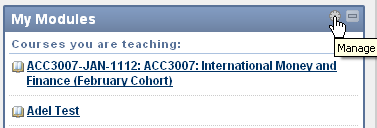
By default, the courses and modules you’re enrolled on are listed alphabetically in the My Modules box on the front page of NILE. If you are enrolled on lots of courses, this list can sometimes get unmanageable. Now you can re-order the list, to show your most used sites at the top.
To do this, first click on the cog icon at the top right of the My Modules box:
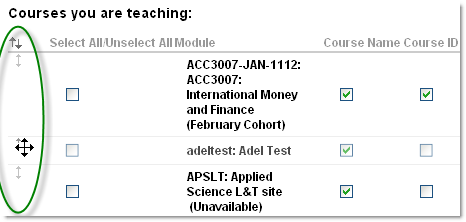
Then click and hold the arrows on the left of a course name to drag it up or down in the list, and click Submit to save your changes:
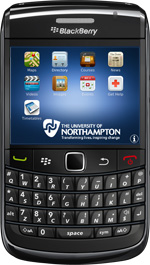 It’s here – the University’s official iNorthampton app is now available to download from the Blackberry App World!
The new Blackberry version has much of the same functionality as it’s Android and iPhone counterparts – it allows you to check maps, search the staff directory, get updates on news and events, and more. And you can download it for free now – just search for ‘iNorthampton’ on the Blackberry App World.
Unfortunately we haven’t yet been able to include the library search in this version, due to differences in the way apps are built for the Blackberry platform. You’ll notice also that the iNorthampton app for Blackberry doesn’t include the mobile version of NILE, but the good news here is that mobile NILE is still available for Blackberry users. Simply download the separate Blackboard Mobile Learn app, which is also available free from the App World, and search for Northampton on the first screen.
The iNorthampton app is a work in progress and we’re always keen to hear your feedback. Help us to improve on future releases by adding your comments to this blog, or emailing them to us at: mobilefeedback@northampton.ac.uk.
Have you downloaded the University’s mobile app, or used the mobile web version? If so, we’d like to hear from you.
The app was created based on feedback to a staff and student survey that we ran last year. It’s based on what you told us you wanted, and we’d like to keep it that way as it develops. There are a number of ways you can have your say about what’s next for iNorthampton.
1. In person. Watch out for our mobile survey team, who will be around both campuses in the next few weeks, asking for your opinion.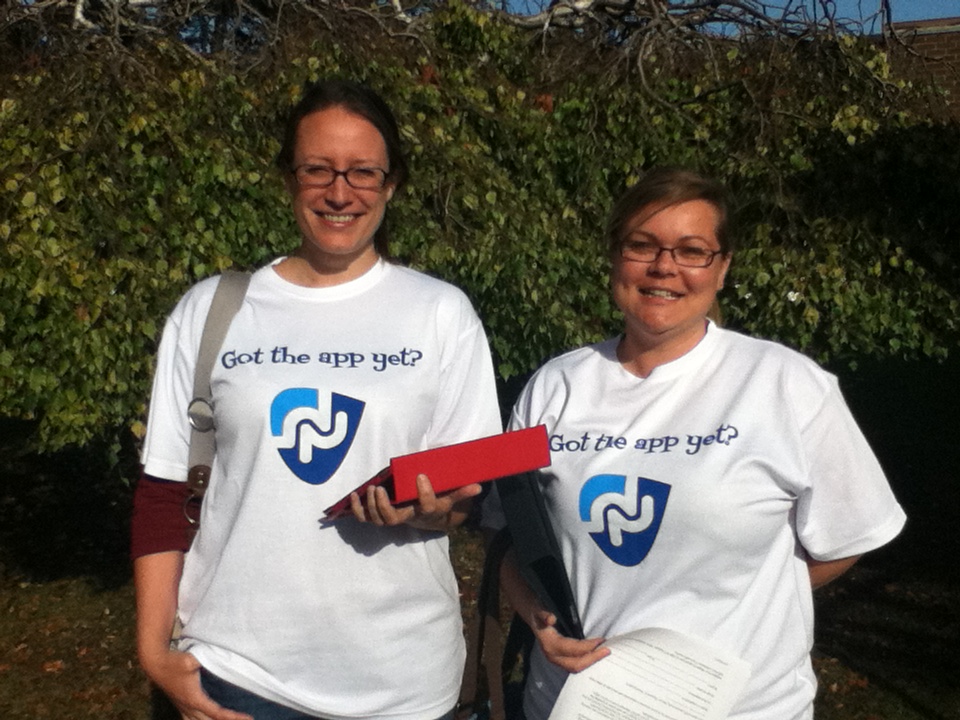
2. Email us your comments: mobilefeedback@northampton.ac.uk.
3. Tweet your thoughts, using the #iNorthampton hashtag.
4. Come and be part of our video on 2nd and 3rd November. Email us on mobilefeedback@northampton.ac.uk if you are available for this and would like to take part.
Why have I suddenly got two blog tools appearing in my NILE site?
The blog tools that we have always had in NILE are actually plug-ins (that is, they are made by a different software company to the people who make NILE, and are literally ‘plugged in’ to the NILE platform). If you have used blogs in the past, you will be familiar with the ones that look like this:

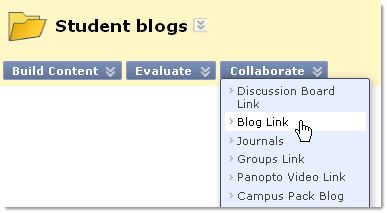 These tools are still available for you to use – you will see this option referred to as ‘Campus Pack blog’ in the tools list in your NILE sites. Sadly though this tool does not yet work so well with the mobile version of NILE in the new iNorthampton app. So for those of you who would prefer your students to be able to blog on the move, we have also switched on the blogging tools that are built in to NILE. You will now see extra options for ‘Blogs’ (or Blog Link from the Collaborate button) and ‘Journals’ in your NILE site.
What’s the difference?
The built-in blog tools are better at some things, and worse at others, in comparison to the Campus Pack plug-in blogs. Here are the main things you need to know:
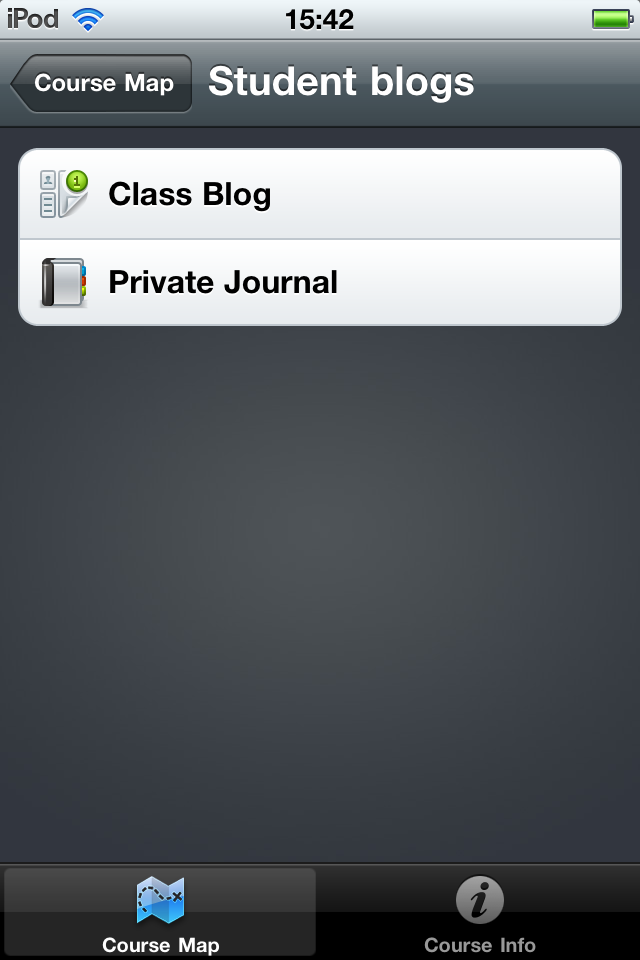 The built in tools do not currently have an RSS or email subscription option, or an export option, and they do not have granular permission levels (for example, allowing non-members to view a group blog). If you need this kind of granularity, please ask the team for advice.
Tell us what you think
If you are a regular user of blogs in NILE, we’d love to hear your thoughts on either or both of these tools. Please send us any questions or comments at: LTSupport@northampton.ac.uk.
Switching tools off in NILE
Don’t forget that if you only want to use one of these tools, you can switch the other one off to avoid confusion (or if you prefer, you can switch off both!). To do this, go to your Control Panel and click on Customisation, and then Tool Availability. Remove the ticks for any of the tools you don’t use in your site.
You may already be aware that the University’s mobile app is now available for Apple and Android devices, with a Blackberry version coming soon. But did you know it allows you and your students to have mobile access to course and module sites on NILE?
The Learning Technology team is looking for innovative staff with an interest in the potential of mobile learning, to help put this part of the app through its paces. We’d like to hear from any staff who want to use mobile learning with their students – even if your plans are simply to ‘mobilise’ your existing sites on NILE. Tell us what works and what doesn’t in the new mobile interface, and share any questions, course design tips or changes you’ve made to your sites.
If you’d like to do something a bit more adventurous, that really takes advantage of the affordances of mobile learning, we’d like to hear from you too. Mobile learning has a lot of potential to allow you to do things that you might not otherwise be able to do in your teaching. This might include simple things, like using student-generated content (photos, videos, audio recordings etc that they can easily create on their phones), or allowing students to use their handsets to feed back in lectures. Or it might involve more complex projects, like supporting students doing authentic tasks on placements and field trips, building quizzes or games, experimenting with augmented reality… Needless to say this side of things is not restricted to what’s possible through the University app, so if you’d like to go beyond that, we’d love to hear about that too.
We are looking for pilots to run this academic year, so if you have an idea please get in touch, even if you’re not clear on the details (we may be able to help you work these out). The team will be on hand to help you get started, and to support you and your students throughout the module – we may even be able to lend you some devices to use.
You can find out more about the app at www.northampton.ac.uk/mobile. If you’re interested in giving it a try, please email the Learning Technology team at: LTSupport@northampton.ac.uk.
Background
 As part of a wide project on Mobile Access to Learning and Teaching (MALT), in October 2010 the University of Northampton conducted a survey to ask staff and students about their needs with regards to mobile technology. The survey told us that demand was high – over 50% of staff and students already owned smartphones – and identified the need for more directed support and services within this area.
More specifically , the services rated most useful included: NILE (the institutional learning environment); timetables; University news; library and maps.
As a result of the needs identified, a project was commissioned to produce a mobile solution. The project brought together teams from across the University, including Marketing, the Web team, Library, Student Services, CIS and Learning Technology, as well as interested staff from the Schools. The detailed work took several months to complete, as we needed to revisit information being pushed out by a whole range of institutional systems, and reformat these with the user experience in mind.
The project team has worked closely with the chosen supplier (Blackboard, the company who also make the software we call NILE) throughout the summer, and iNorthampton – which includes mobile apps for the three main platforms, as well as a mobile web version – was created as a result. Needs identified from the survey were prioritised in order to create the first release of the app (‘Phase 1’), which went ‘live’ in the app stores in September 2011.
Phase 1 (Sept 2011)
Phase 2…….and beyond
The pace of change is rapid in the mobile environment, and so iNorthampton is an iterative project – we anticipate this will be ongoing with continuous improvement based on feedback and needs. We have already identified some priorities to look into for ‘Phase 2’ (including linking events to locations on the map, including travel information, information on accommodation; and links for the digital prospectus). We’d love to hear your ideas.
Further suggestions
iNorthampton is owned by the staff and students of The University and we need to ensure that it provides the tools and services which you want to see on your mobile devices. If you have any suggestions or comments, please send them to the team at mobilefeedback@northampton.ac.uk.