
The new features in this month’s Blackboard’s upgrade will be available from Friday 16th October. This month’s upgrade includes the following new/improved features to Ultra courses:
- Reveal student identity for anonymous assessments
- Blackboard rubrics: new rubrics management page, plus rubrics export/import option
- Display username, last access date, and points possible in the gradebook
- AI conversations: new immersive experience
Reveal student identity for anonymous assessments
Following the October upgrade, staff using anonymously marked Blackboard assignments will be able to reveal individual student identities in accordance with University policy when academic misconduct is suspected.
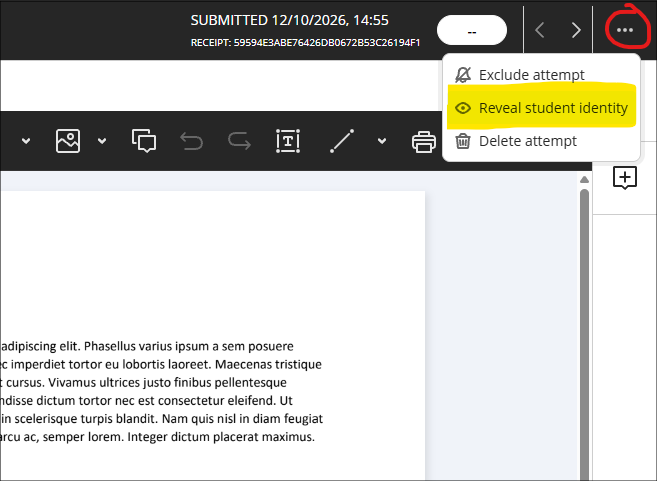
Where staff have set up an anonymously-marked Blackboard assignment and need to reveal an identity, the option to do this is located in ellipsis menu in the marking window. After selecting ‘Reveal student identity’ staff will be prompted to provide a reason, and the reason and name of the staff member revealing the identity will be stored in NILE.
Unlike anonymously-marked Turnitin assignments, anonymously-marked Blackboard assignments will not show staff which students have not submitted assignments, therefore staff cannot contact non-submitters in line with University policy. For this reason, use of anonymously-marked Blackboard assignments is still discouraged.
More information about setting up and marking Blackboard assignments can be found in our guide: Ultra Workflow 2: Blackboard Assignment
Blackboard rubrics: new rubrics management page, plus rubrics export/import option
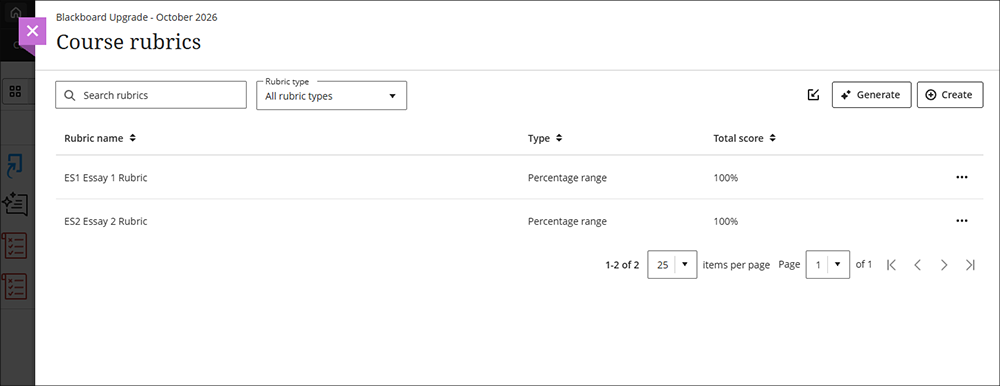
October’s upgrade will introduce a new rubrics management page for Blackboard rubrics. Currently, rubrics are accessed at the bottom of the gradebook settings panel. Following the upgrade, the bottom of the gradebook setting page will instead show a link to the rubrics management page, allowing staff to better see, create, sort, search and manage their rubrics. In addition, rubrics can be exported and imported from the rubrics management page, as well as auto-generated and duplicated.
More information about using rubrics can be found at: Blackboard Help – Rubrics
Display username, last access date, and points possible in the gradebook
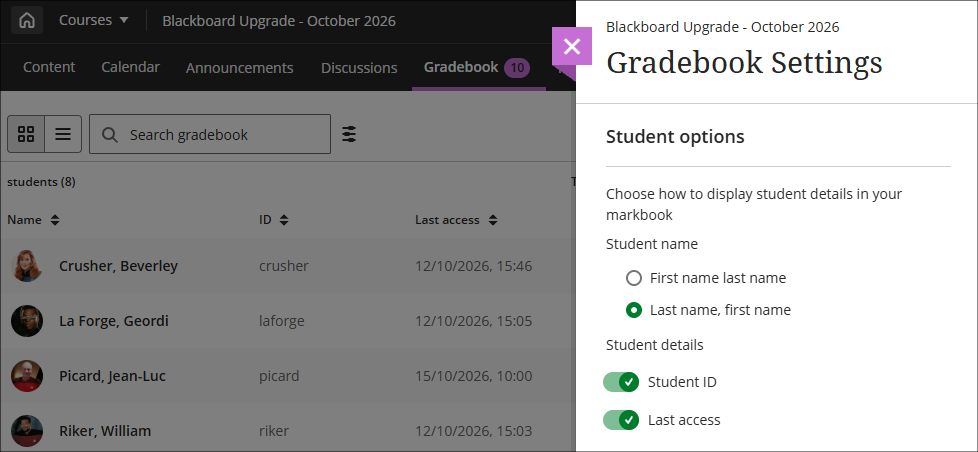
October’s upgrade will allow staff the option to display each student’s last access date in the gradebook grid view, as well as their student ID. Staff can also choose whether to display names in firstname, lastname order, or lastname, firstname. As with other gradebook columns, these can be sorted in ascending or descending order. All these display options can be found at the top of the gradebook setting panel.
Note that more detailed student engagement analytics can be found under the Analytics tab in NILE, including days since last access and overall time spent in the NILE course.
More information about contacting students with low engagement in your NILE course can be found in our FAQ: How can I view and contact students who have not been into my NILE course for some time?
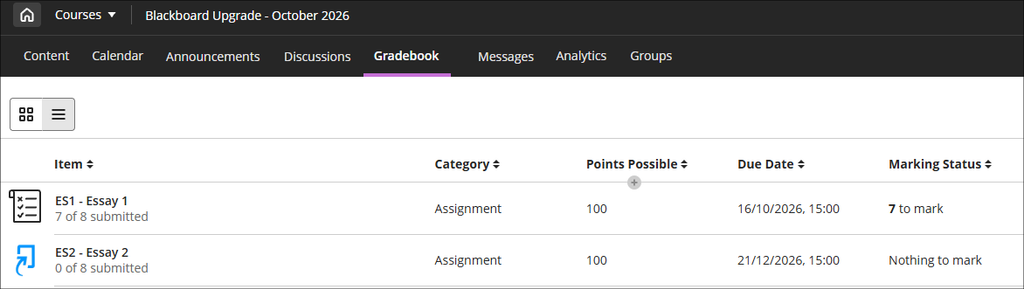
Following the October upgrade, the gradebook list view display will show the points possible for each assignment. Unlike the previous options, points possible is always displayed and there is no option to switch it off.
More information about the gradebook can be found at: Blackboard Help – Gradebook
AI Conversations – new immersive experience
October’s upgrade will introduce a new immersive experience for students taking part in AI conversations, providing students with more room to work and removing information they do not need while they are taking part in an AI conversation.
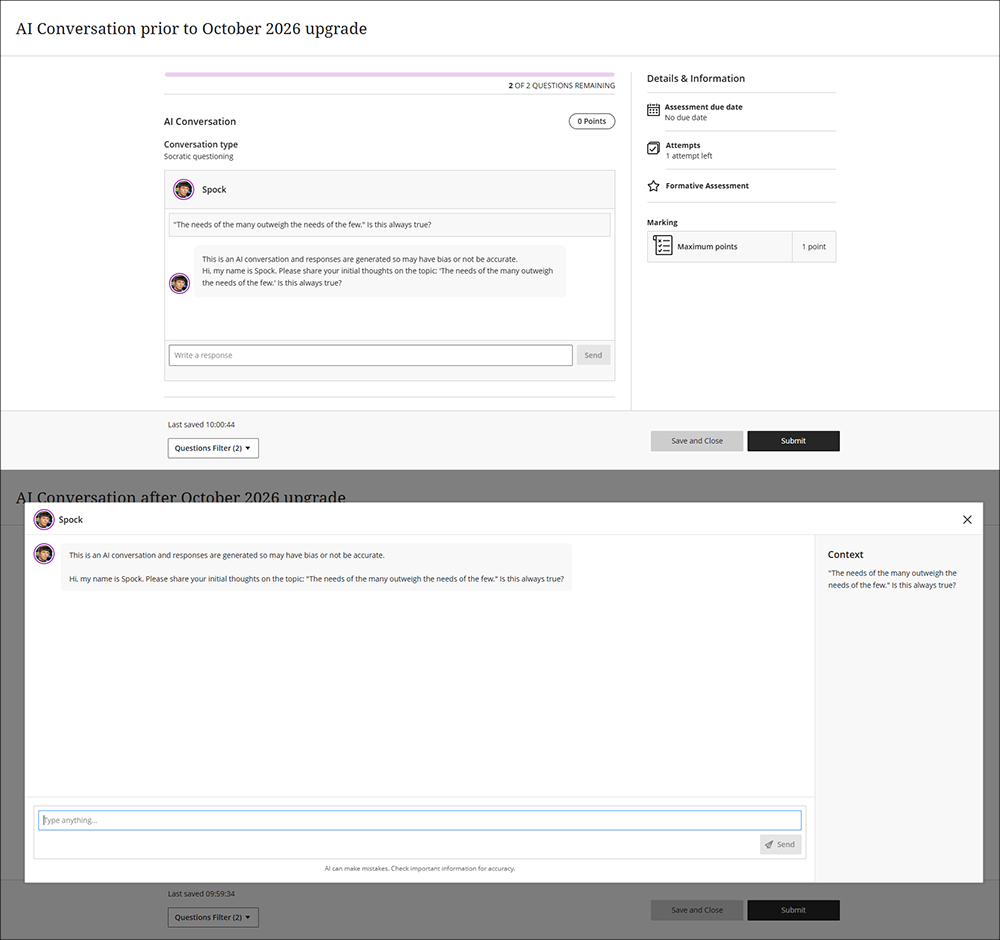
More information about setting up and using AI conversations can be found at: Blackboard Help – AI Conversation
Learning technology / NILE community group
Staff who are interested in finding out more about learning technologies and NILE are invited to join the Learning Technology / NILE Community Group on the University’s Engage platform. The purpose of the community is to share information and good practice concerning the use of learning technologies at UON. When joining the community, if you are prompted to login please use your usual UON staff username and password. By joining the Learning Technology / NILE Community you will receive calendar invitations to our regular live community events:
Join the Learning Technology / NILE Community Group
More information
As ever, please get in touch with your learning technologist if you would like any more information about the new features available in this month’s upgrade: Who is my learning technologist?