Blackboard Upgrade – November 2021

Sorry. The upgraded version of Blackboard scheduled to be available from the 5th of November has been delayed, and will now be available on the 12th of November.

November sees some great new features arriving in Ultra courses, including the much requested feature to add a bit of colour to courses via a course banner. Already available is another often requested feature, which is the ability to create Collaborate breakout groups from your course groups in NILE.

Available Now!

NILE course groups sync with Collaborate breakout groups

When setting up breakout groups in Collaborate sessions, quite a few people have said how useful it would be if they could set up their breakout groups to match the groups they have already set up in their NILE courses. Well, now this is possible.
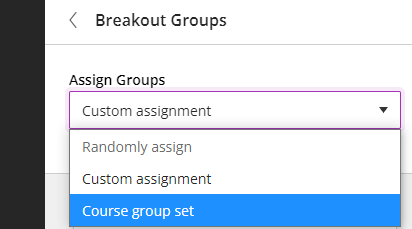
When setting up your breakout groups, you will now see an option called ‘Course group set’. This will allocate the students in your Collaborate breakout groups according to groups that you have already set up in your NILE course. And if you have multiple groups set up in your NILE course, you can choose which NILE course groups you want to sync with your Collaborate breakout groups.
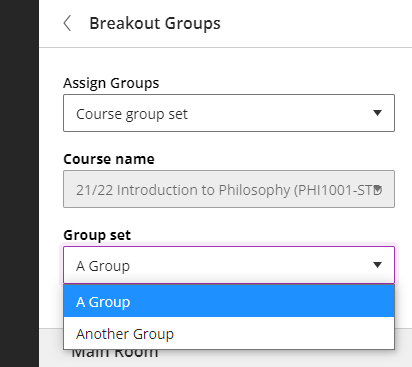
Available from Friday 5th November

• New UI (User Interface), including the ability to add a course banner
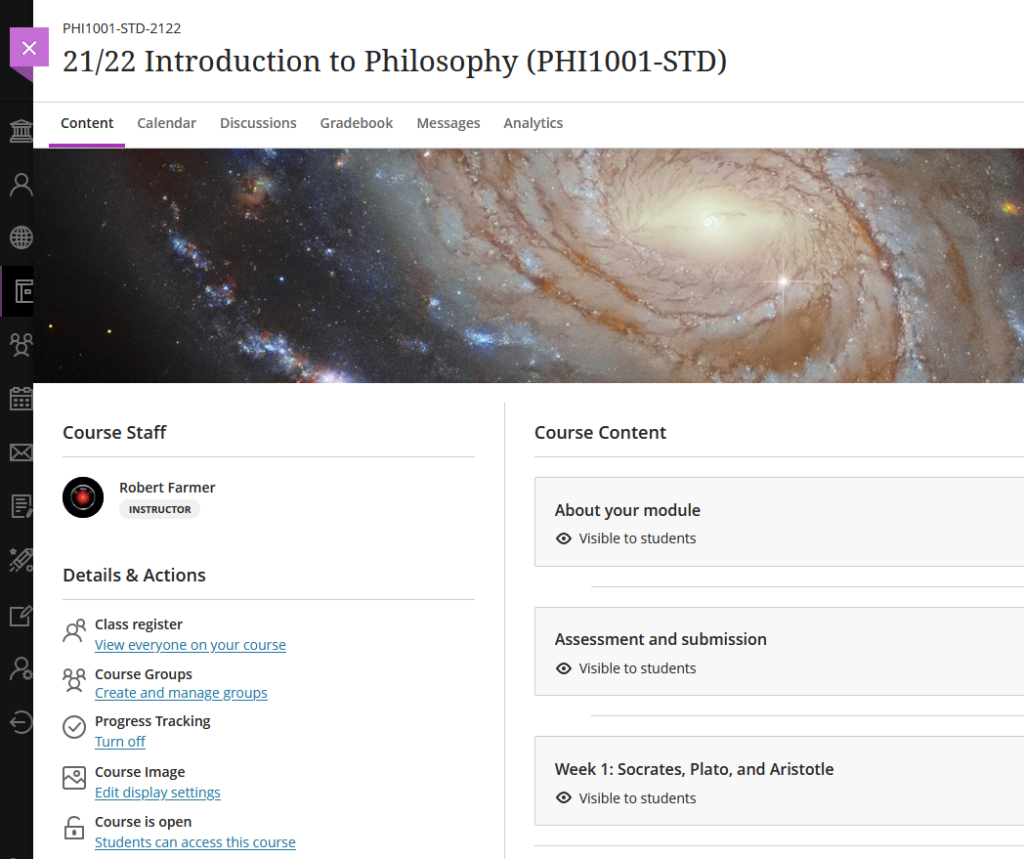
You can see immediately that the UI (User Interface) has changed a little in the new Ultra courses, with staff now being listed in the area immediately above the ‘Details & Actions’ menu. But probably of most interest here is the ability to add a course banner. From the 5th of November the ‘Details & Actions’ menu will include a ‘Course Image’ option, which means that you will be able to add a banner image to your course. Images must be at least 1200 x 240 pixels, but please do not add images which include text, as these are not accessible.

Perhaps the biggest challenge will be finding a great image to use for your course banner. A terrific source of free, high quality images can be found on the websites of the ESA (European Space Agency) and NASA. The links below will take you directly to their image galleries:

ESA and NASA images are free to use for educational and informational purposes, and, provided that any images you use do not contain an identifiable person, you will not be infringing anyone’s copyright or privacy by using them in this context. If you use images from ESA and NASA, please credit them somewhere in your course. Full terms and conditions about ESA and NASA image use can be found at the bottom of their pages which are linked above.

• Progress tracking

Also coming to the ‘Details & Actions’ menu will be the option to turn on ‘Progress Tracking’ for your students.

This feature allows your students to more easily see and mark which items in your course they have engaged with. At the moment, this feature is just for students, and academic staff do not get any information about how their students are engaging with their course content, although this is planned for a future release.

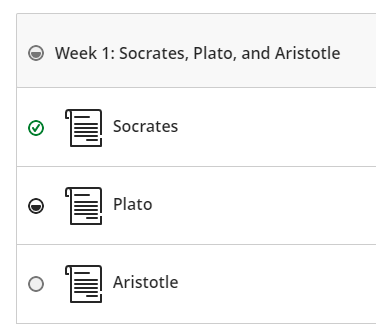
Content that a student has not looked at at all will be marked with an empty circle. Once a student has opened an item, the circle will become half-filled. Students can then click on the half-filled circle and mark it as complete (or, if Blackboard knows that the item is complete, such as when posting to a discussion or making a journal entry, it will automatically mark it as complete). Where items are in a learning module or folder, once all the items in the learning module or folder are complete, the learning module or folder will automatically be marked as complete.
• Improvements to tables

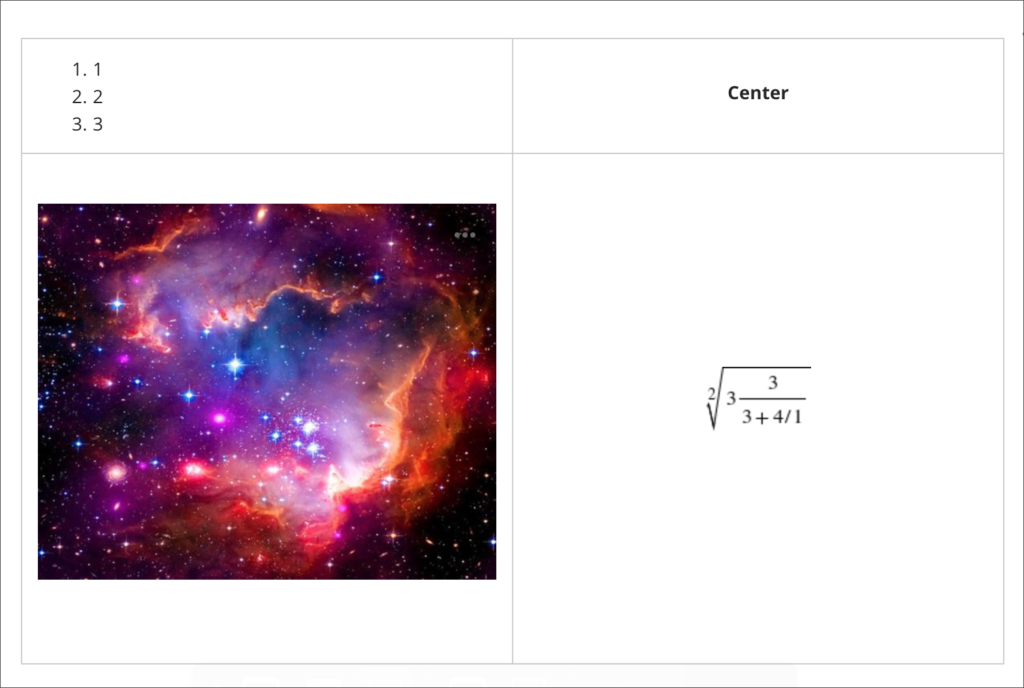
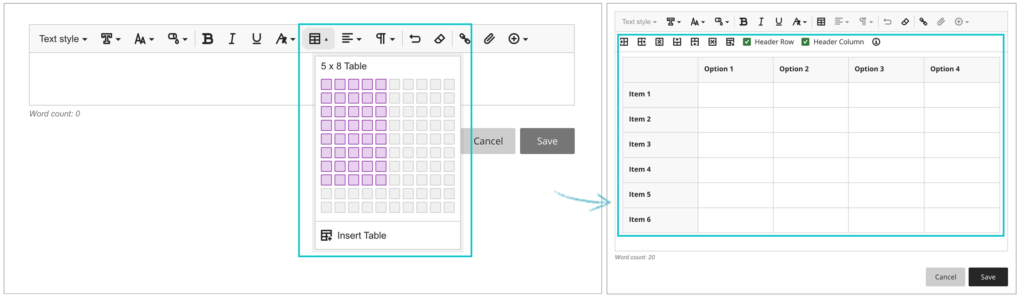
Finally, tables, which were new to Ultra courses in the October upgrade, are getting a few improvements in the November upgrade. From the 5th of November onwards, the following formatting options will be available when using tables in Ultra documents:

  • Text Style
  • Alignment options
  • List Attachment
  • Insert content

These options provide greater flexibility for staff, especially in disciplines where the presentation and formatting of data is particularly important.
Need more information?

As ever, if you would like any advice, guidance, or training with any aspects of NILE, please take a look at the guides and FAQs on our website, or get in touch with your learning technologist:

https://libguides.northampton.ac.uk/Learntech

https://libguides.northampton.ac.uk/learntech/staff/nile-help/who-is-my-learning-technologist
Blackboard Roadmap Webinar: What’s in development with Ultra and Original courses?

If you’re interested in understanding more about some of the new features that Blackboard will be bringing to Ultra and Original courses, you can join Blackboard’s Product Management leaders as they provide an update on the Blackboard Roadmap.

There are two sessions, one on the Ultra roadmap, and one on the Original roadmap. Even if you can’t attend the webinars, if you sign up to attend you will receive a recording of the webinar.

Ultra Course View
Wednesday, November 3, 2021. Time: 1:00pm GMT

Original Course View
Wednesday, November 3, 2021. Time: 12:00pm GMT

To find our more, and to sign-up, go to: https://go.blackboard.com/RoadmapWebinarSeries

Lecturer Webinar Series: How to Teach with Blackboard Learn Basics

Between November 2021 and June 2022, Blackboard are offering a series of seven free webinars to understand how Blackboard Learn Original and Learn Ultra can support your teaching, your subject and your students’ learning.

You can sign up for one, some, or all the webinars. Even if you can’t make the live webinars, by signing up you will receive the recordings of the sessions that you signed up to.

The full series of webinars is as follows:

  1. How do you to create and effectively use discussion forums in Learn Original and in Learn Ultra?
    Thursday, November 4 at 10:00am GMT
    >>View Recording
  2. How do you create and upload content in Learn Original and in Learn Ultra?
    Thursday, December 2 at 10:00am GMT
    >>View Recording
  3. How does Adaptive Release work in Original and Conditional Availability in Ultra?
    Thursday, February 10 at 10:00am GMT
    >>View Recording
  4. How do you design and manage assessment items in Learn Original and in Learn Ultra?
    Thursday, March 10 at 10:00am GMT
    >>View Recording
  5. How do you create a marking structure and provide feedback using rubrics, audio and video in Learn Original and in Learn Ultra?
    Thursday, April 7 at 11:00am BST
    >>View Recording
  6. How do you use the Grade Centre in Learn Original and the Gradebook in Learn Ultra?
    Thursday, May 12 at 11:00am BST
    >>View Recording
  7. How to use data and key tools to monitor and support student progress and personalised learning in Learn Original and in Learn Ultra?
    Thursday, June 9 11:00am BST
    >>View Recording

Find out more, and sign up to attend here:
https://go.blackboard.com/lecturer-series

Blackboard Upgrade – October 2021

From October 8th 2021, one of the most requested features of Blackboard Ultra will finally be available: the ability to create tables in the Ultra RTE (Rich Text Editor).

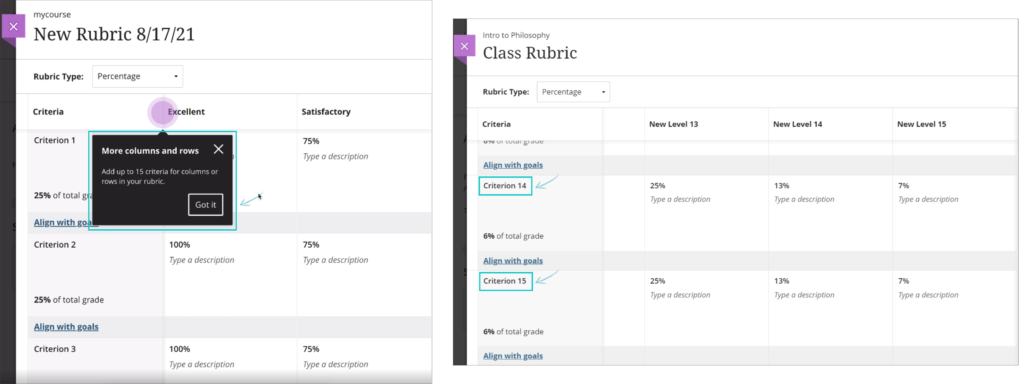
Also included in the upgrade, from the 8th of October onwards the maximum number of columns and rows in Blackboard Ultra rubrics will increase from ten to fifteen.

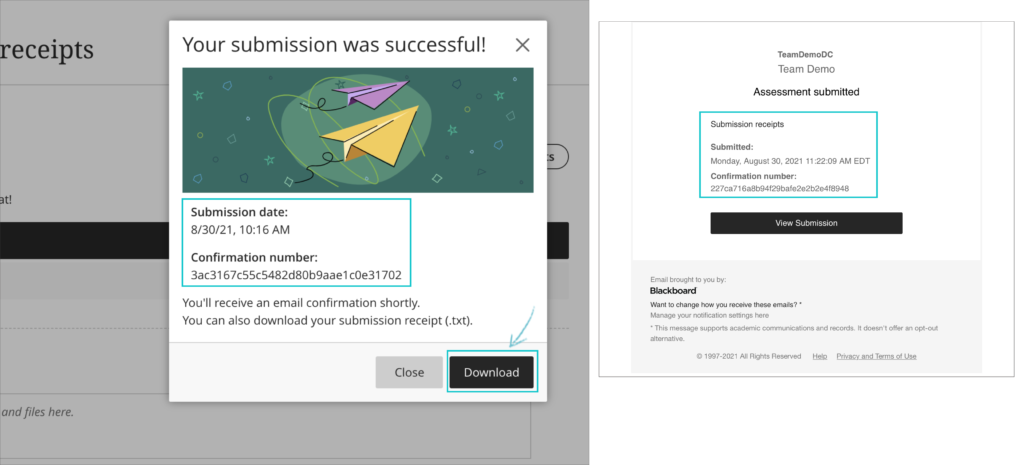
And when students submit Blackboard Ultra assignments, from the 8th of October they will receive confirmation via email and downloadable receipt that their submission has been successful. Please note that this does not apply to Turnitin assignments in Blackboard Ultra courses. Students will still be able to download their submission receipts for Turnitin assignments in Ultra courses, but will not be emailed submission receipts. Emailed submission receipts will only be available for Blackboard assignments in Ultra courses from 8th October onwards.

Also included in the upgrade are various other minor big fixes, etc.

Blackboard Upgrade – August 2021

August 6th 2021 will bring some important changes to Blackboard Ultra courses.

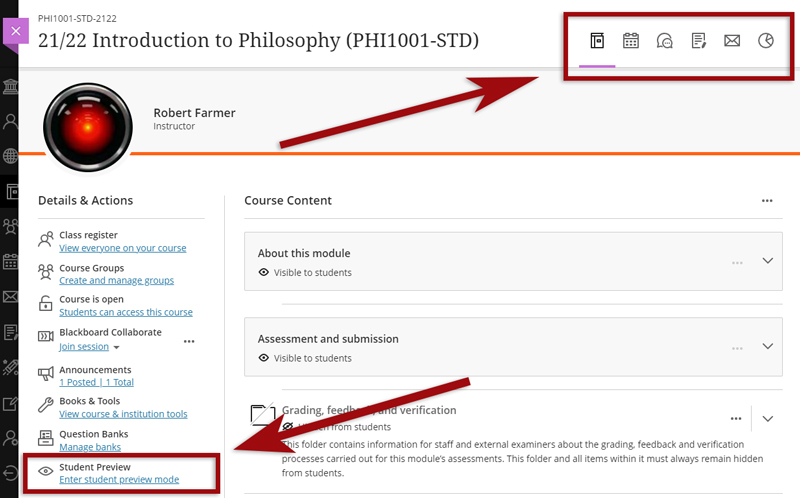
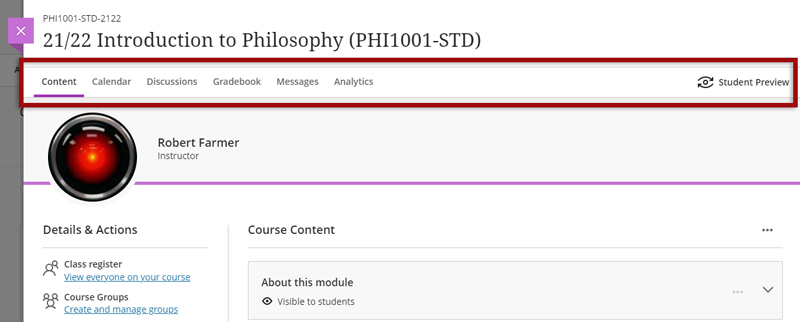
First, and most difficult to miss, is a change to the location of the Tools menu and the Student Preview button. Currently the Tools menu is on the upper right hand side of the page and is indicated by icons. This will move to the left side of the page and will become text buttons instead of icons. The Student Preview button will move from the lower left to the upper right side of the page.

Currently the Tools menu and Student Preview buttons are located as follows:

However, from 6th August onwards they can be found here:

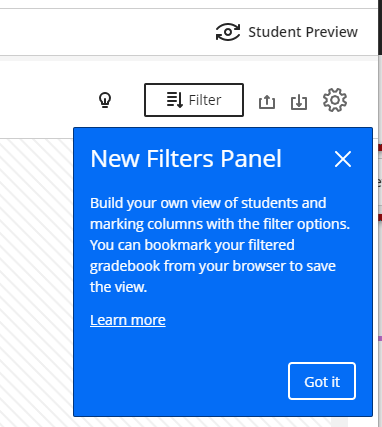
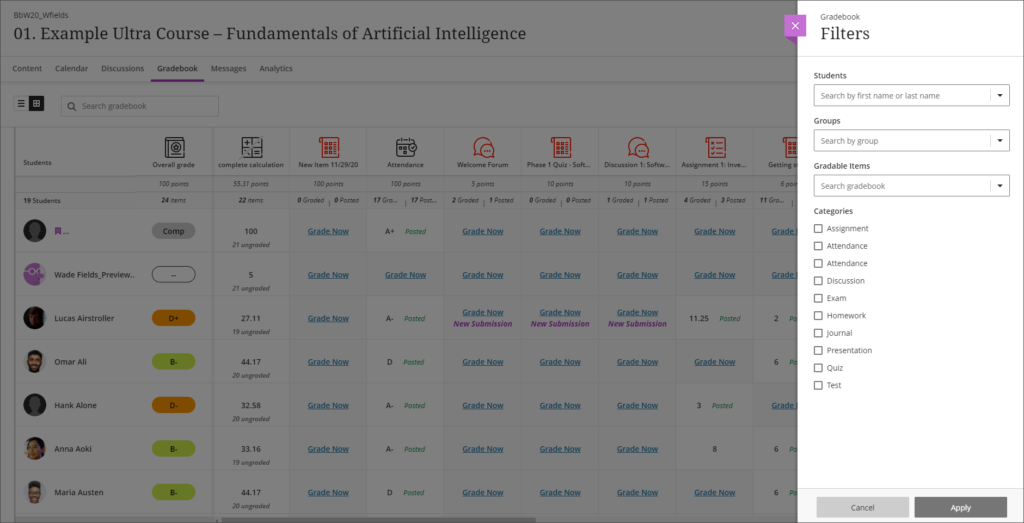
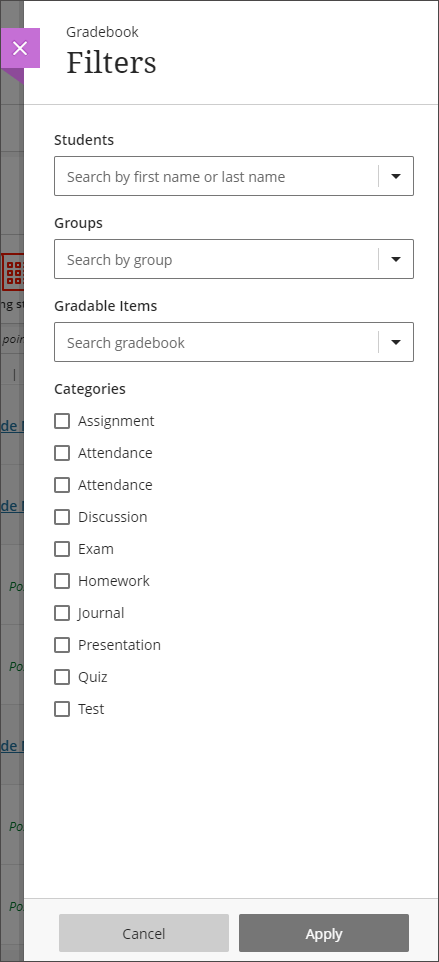
Also coming in the August upgrade is Gradebook filtering. This feature is very much like the Smart Views in Original courses, but also allows quick and easy instant filtering, as well as giving staff the ability to save preferred filters.

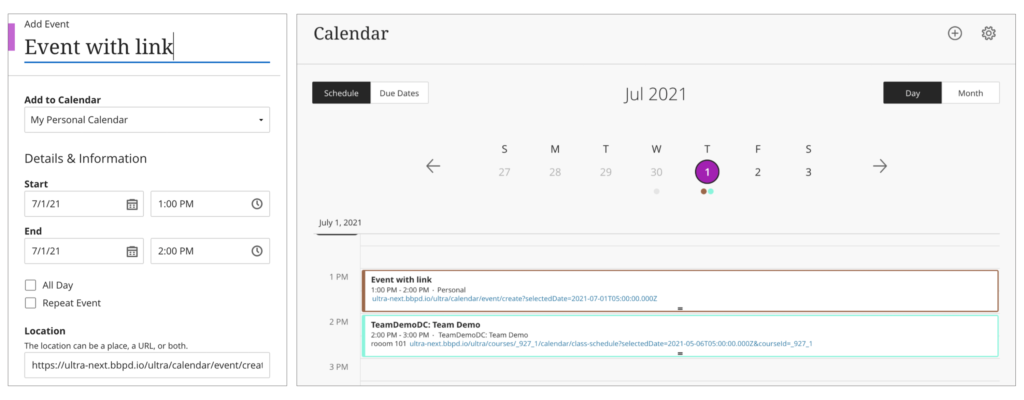
The August upgrade will bring improvements to the Calendar and to the Peer Review tool in Ultra courses. After the upgrade, hyperlinks will be supported in the calendar location field so that staff can link any virtual tool of their choice in the calendar event, and students can launch the virtual session from the calendar itself.

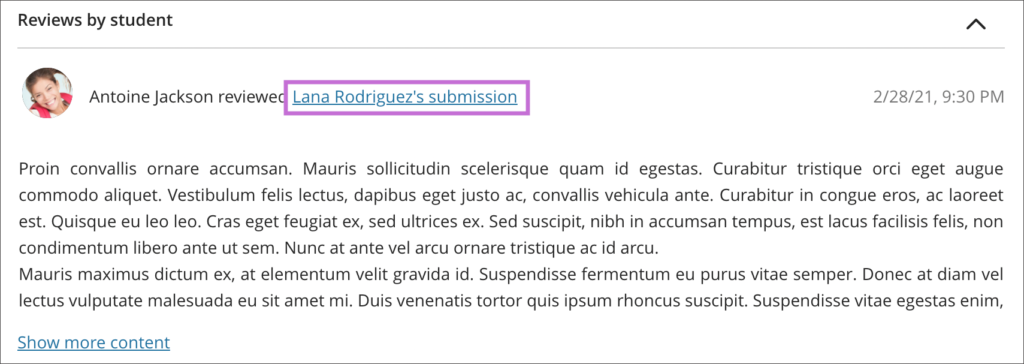
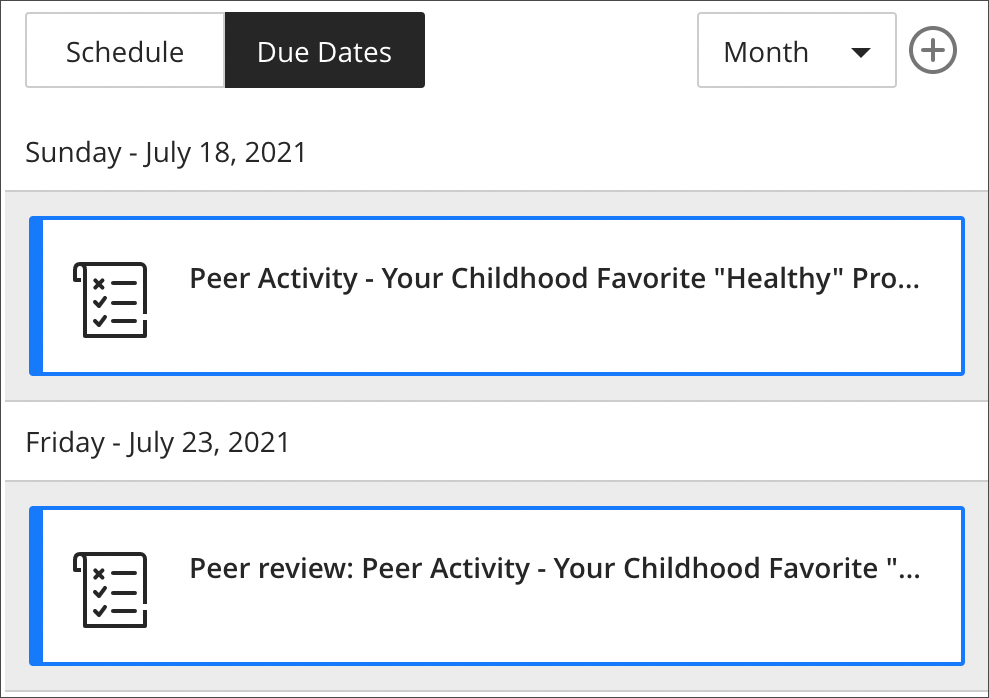
Peer Review was introduced to Ultra courses some time ago, but the August upgrade brings some useful improvements. The current capabilities of the Peer Review tool are explained in Blackboard’s guide, Peer Review for Qualitative Peer Assessments. Following the August upgrade staff will be able to access the submissions reviewed by a student right from that student’s grading panel. Students will also have direct access to the submissions available for their review from either the Due Date or the Calendar views. This makes it easier for them to act when reviewing their pending tasks.

New NILE courses now available

NILE courses for the 2021/2022 academic year are now available.

Courses will be Original or Ultra depending on type of course and level of study. Module-level courses at Foundation and Level 4 will be Ultra. Module-level courses at Levels 5, 6, 7, and 8 will be Original. All programme-level courses will be Original. You can find out more about the transition from Original to Ultra on our Blackboard Learn Ultra guides:
https://libguides.northampton.ac.uk/learntech/staff/nile-guides/blackboard-ultra

Find and enrol on your new NILE courses using the process outlined in our FAQ, ‘How do I enrol/remove myself off a module site?
https://askus.northampton.ac.uk/Learntech/faq/181746

Global Accessibility Awareness Day 2021 – The Results

The Ally winners – Alison Power, Jean Edwards and Simon Sneddon

Congratulations and well done to our three brilliant and amazing digital accessibility champions who took part in our challenge on the recent Global Accessibility Awareness Day. Simon Sneddon, Alison Power and returning competitor Jean Edwards join Charlotte Dann from last year in making their NILE sites more accessible for their students. This past year has placed huge demands on our time and our energy so it’s immensely wonderful these three were able to take part in the 2021 challenge alongside many other commitments. The 2021 trio contributed to Northampton’s final score of being 42nd in the World rankings and 4th in Europe.

The challenge was to see how much more accessible they could make their content within a short window of time. A prize for the most accessible NILE site, the most increasing in accessibility and the runner up prize for the greatest increase in accessibility. The results are in, and we are very pleased to announce the winners are:

  • Simon Sneddon gets the highest overall score with a score of 97% on modules LAW2006 and LAW2007
  • Jean Edwards gets the prize for the greatest increase with a whopping increase of 29% on PDT1068
  • Alison Power gets the runner up prize for greatest increase – with a fantastic increase of 18% on MID3026

Alison, Simon and Jean can feel extremely proud of the effort they made, but if pride is not a significant enough reward for them, we have dug deep into the coffers to award them prizes of chocolate and sweets which we will be presenting to them in a modest online celebration. Formal wear is not obligatory, though neither are jogging bottoms.

Alison Power said, “engaging with this competition was a great opportunity to review my NILE site to ensure it is as accessible as possible.  Ally is a fantastic tool to support Module Leaders in checking and revising content – I found it really user-friendly and wonder whether it could be included in the NILE Minimum Standards.”

Simons commented that “the main thing I think is to let people know that it is really straightforward to make documents and NILE sites accessible, and if you do it as you go along, it doesn’t take any additional time, so it is a win win activity. The Ally tool is really helpful, and the process also makes me think more about formatting and contrast and so on, and focusing way more on content than all the fancy things that PowerPoint can do. Substance not style.”

Jean, Simon, Alison and Charlotte now form our exciting celebrity digital accessibility tutors but of course we know there are many other tutors who couldn’t take part in the challenge but who are equally doing their bit to support and promote digital accessibility. We are immensely proud of the efforts made on a daily basis to make content and teaching more accessible.

If you would like training on making your content more accessible to students, please get in touch with your Learning Technologist and we will be happy to point you to resources or offer online one-to-one training. Making our content accessible to our audience does take time but as Simon observed if you can make the small changes early on in the process then what flows from that is infinitely improved.

Make NILE more accessible this May 20th.

Global Accessibility Awareness Day 2021

Thursday May the 20th is Global Accessibility Awareness Day and to celebrate, the University is launching a competition to see who can make their NILE site the most accessible over the course of the day.

If you’d like to be involved, click the link below to register your NILE module and we’ll send you simple instructions on how to check your modules Accessibility score as well as some useful tips on how to use Ally to easily improve your site.

Enter using the Eventbrite form.

On the morning of the 20th of May you just need to email us a screenshot of your Accessibility score then send another screenshot by 8pm of your finishing Ally score. The module with the largest increase in score will win a small prize, a special mention in Unify and the satisfaction of creating an accessible site in line with the regulations for online materials.

Last year, Charlotte Dann and Jean Edwards took up the challenge to improve the accessibility of their NILE sites using the Ally tool. The challenge involved using the Ally module accessibility reports to incrementally make changes to their course which would make their course more accessible to students. The intrepid tutors worked during the day to make the necessary changes and by the end of the day, Northampton finished 28th in the World (3rd in Europe) for the greatest improvement!

Jean said, “I took part last year and in the process of checking and improving my accessibility scores on the day I learned a lot that I have been able to apply when I make new resources. I feel I can make my resources accessible as I devise them instead of retrospectively. This is time saving for me and supportive for students.”

Charlotte also got a lot out of the challenge. “Accessibility is an important issue for me, personally as well as within my teaching. When I saw the NILE site challenge relating to accessibility last year, I wanted to use it as an opportunity to test myself against how accessible I thought I was. And I really learned a lot! Some of the changes that were needed were relatively simple for me, but make a big difference to others – things like ensuring pictures have alternate text for screen readers, and referring to Word documents throughout my site rather than PDFs which some accessibility software find difficult to navigate. This has now translated into being aware of accessibility issues outside of the NILE module site (such as in social media use for hashtags and images), and the tool itself is something I refer back to for my modules since.”

We thank Jean and Charlotte for their involvement in the challenge and for sharing their experience. This has been a busy year for teaching staff and accessibility is unlikely to be a priority with so many other demands. However, as Charlotte says, a simple change of habit can have a massive impact for students.

If you don’t have the headspace for the challenge, please consider trying something new for September to make your content more accessible. It could be clearer captions for your videos, a shorter or more concise name for your next uploaded file or using less PDFs in your course.

Every NILE user deserves a first-rate digital experience so making your content accessible is really important. We hope this is a fun way to help you improve your sites. If you need help on the day then remember to contact your Learning Technologist who will happy to give you some training or tips to win.

For guidance on how to use the Ally tools in NILE, paste the following link into your browser:

https://askus.northampton.ac.uk/Learntech/faq/189667

For more assistance on using Ally then contact your Learning Technologist:

https://libguides.northampton.ac.uk/learntech/staff/nile-help/who-is-my-learning-technologist
NILE Design Standards 2021/22

The NILE design standards for the 2021/22 academic year were approved at the Student Support Forum meeting on the 15th of April 2021, and have now been published.

The most significant change to NILE design standards for 2021/22 is the inclusion of the design standards for Ultra courses (see, ‘Section B, Tables 5.1, 5.2 and 5.3’).

The design standards for Original courses remain largely unchanged. The only changes of note from the previous year’s standards are:

  • Clarification that, should staff wish to, it is fine to update the course landing page from ‘About this module’ to ‘Announcements’ after the first few weeks of teaching (see, ‘Section C, Table 6, About this module [Entry Point*]’.
  • Renaming ‘Virtual classroom’ to ‘Blackboard Collaborate’ and having this area available by default (see, ‘Section C, Table 6, Blackboard Collaborate’).
  • Removal of the ABL definition from the landing page on programme-level courses (see, ‘Section C, Table 7, My Programme [Entry Point’].

The NILE design standards for 2021/22 are available to view at:
https://libguides.northampton.ac.uk/learntech/staff/nile-design/nile-design-standards

What do UON staff think about Blackboard Ultra?

Introduction

During the autumn 20/21 term, nine members of academic staff across all three University faculties taught 305 students on twelve Blackboard Learn Ultra modules (FAST=7; FBL=1; FHES=4). During December 2020 and January 2021, these academics shared their thoughts about Ultra with us, and this blog post presents a summary of the main findings from UON staff who have piloted Ultra with their students.

N.B. For clarification, throughout this post ‘Ultra’ refers to the new Blackboard Learn Ultra courses, whereas ‘Original’ refers to the original Blackboard Learn courses (i.e., Blackboard Learn version 9.1 courses) that UON staff have been using for many years.

Main findings

1. Once they had taken the time to get used to Ultra, the majority of staff were generally positive about it, and particularly liked its more modern look-and-feel, referring to it as being simple, clean, smart, slick, bright, and neat. However, for a very small number of staff this simpler, cleaner appearance and the lack of course customisation options was found to be bland and visually uninspiring.

2. In most cases staff noted that it did take quite some time to become familiar and comfortable with the new Ultra interface, and that a reasonable amount of thinking, experimenting and planning time was necessary to work out how to use Ultra and get the best from it.

3. As well as the time taken to get used to Ultra, and to consider how to design their Ultra courses, most members of staff reported the need to spend more time than usual putting their Ultra courses together; i.e., uploading content, and creating online activities, etc. Some staff members found this process too slow, but even those who found the process daunting also noted that it was also a good opportunity to re-evaluate their courses. As this was their first time putting an Ultra course together, most staff members reported some frustrations getting used to Ultra, or with the limitations of Ultra, but for the most part there was the sense that once they had become used to Ultra, it was not difficult to work with.

4. Many members of staff noted a loss of minor functionality with Ultra when comparing it with Original. However, with the exception of a limitation with the journal tool (which has subsequently been updated by Blackboard) the missing functionality usually refers to relatively minor issues (such as the inability to create tables in the text editor, some clumsiness with the messaging tool, difficulty using drag-and-drop function to move content around within the course, or the lack of ability to copy content within a course) which are likely to be remedied in future upgrades. In some cases, the missing functionality reported was actually there, but was difficult to find. Regarding positive comments about Ultra functionality, the Ultra discussion boards were noted as a particularly good tool. Overall, while there were concerns about Ultra’s functionality, there were no comments suggesting that Ultra was unfit for purpose, or unusable/unsuitable for teaching and learning.

5. Not all staff piloting Ultra had assessed student work in their Ultra course at the time they gave feedback, but those who had had mixed comments about the process: some had found it straightforward and intuitive, but others had found difficult and cumbersome.

6. Staff noted no problems with their students using Ultra, and no negative comments from students about Ultra – generally the sense was that students were okay with it, had adjusted to it, and were just getting on with it. One member of staff noted positive comments from their students about Ultra being easier to navigate that Original, better to look at, and displaying well on a mobile device.

7. While most staff were positive (and often very positive) about Ultra, there were a few comments which indicated that some staff were concerned about it not being as functional as Original, and their impression was that while it was a good tool, and one that they would happy use in the future, it was not quite ready yet. However, other staff, even where they noted less functionality with Ultra, did not find this to be especially problematic. Overall, almost all respondents seemed happy with the idea of using Ultra for teaching and learning either immediately, or after a little more development.

8. In terms of rolling out Ultra across all courses at the University, while some staff liked the idea of doing it all at once for all modules, most considered a three-year phased roll-out to be the most prudent and most reasonable option for both staff and students. Nevertheless, quite a number of staff piloting Ultra noted that it was going to be a lot of work for all staff to make the transition to Ultra, especially for those staff who are module leaders and who would be rebuilding their Original courses in Ultra.

Summary

The findings strongly suggest that the University made the correct decision in continuing to use Blackboard as its VLE provider and was right to begin the process of adopting Blackboard Ultra courses. The findings did not suggest any reason to abandon the UON Ultra adoption project or to stick with Original courses for the foreseeable future.

Overall, the findings showed a very good level of support for Ultra, and, for the most part, a preference for Ultra over Original. The main concerns with Ultra were about: i) the time it would take for staff to get used to working with Ultra; ii) the time it would take to rebuild Original courses in Ultra, and; iii) that currently Ultra does not completely match the functionality of Original.

Next steps and future developments

• The University Management Team (UMT) originally stated the University’s commitment to Ultra at a meeting on the 5th of May, 2020, and to a three-year phased roll-out of Ultra courses across the University beginning in September 2021. At a meeting on the 26th of January, 2021, UMT confirmed its ongoing commitment to Ultra and to the Ultra adoption timescales. You can view the Ultra course adoption plan here: https://libguides.northampton.ac.uk/learntech/staff/nile-guides/blackboard-ultra-faqs#s-lg-box-15342243

• In order to assist staff, and hopefully to reduce the amount of time it takes staff to transition their modules from Original to Ultra, the Learning Technology Team have designed and built two complete Ultra courses as examples of what Ultra courses could look like. Both courses contain the same content, but one is set out thematically, and the other on a week-by-week structure. You can access these courses as explained here: https://libguides.northampton.ac.uk/learntech/staff/nile-guides/blackboard-ultra-faqs#s-lg-box-15341315

• The functionality of Ultra is improving all the time, and we have shared the Ultra findings from UON staff with Blackboard, who are now using it to help shape future developments of Ultra. You can find out more about the latest developments with Ultra here: https://www.blackboard.com/learnultra/whats-new-learn-ultra

Find out more

You can find out more about the University of Northampton’s move to Blackboard Learn Ultra at: https://libguides.northampton.ac.uk/learntech/staff/nile-guides/blackboard-ultra