
Changemaker and Technology: Four lessons from the AshokaU 2015 Exchange

The MICA Social Design Lab

Background to the Exchange

Aside from the opportunity to network, my aims in attending the exchange was to examine two main areas – how technology can support the process of innovation and the potential for incorporating System Thinking and Design Thinking into the design of material and even courses. This document summarises my experience and the four lessons I have learned.

Technology and Innovation

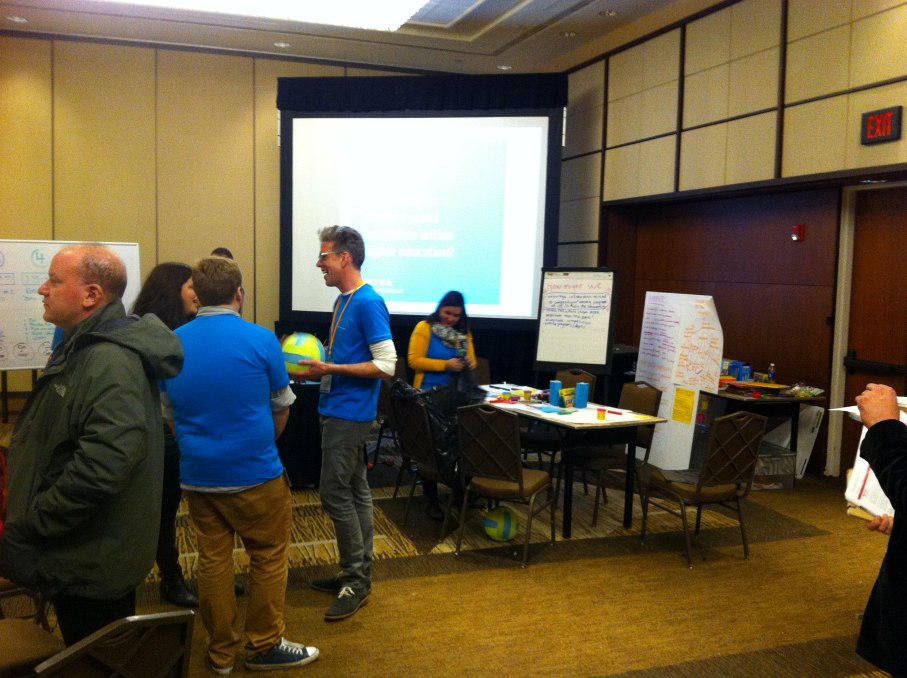
Two items on the agenda were particularly relevant here. The MICA Social Design Lab ran during one afternoon – this was a social space designed to encourage interaction between delegates and facilitate discussions, given the question ‘How might we advance social innovation in Higher Education?’

Given the rather spartan conference room environment, the range of fun, brightly coloured physical items to record, connect and visualise responses was attractive and facilitators easy to identify. But while idea capture was strong, collection and dissemination was somewhat weaker. Personally, I never encountered any analysis or results from it, though it may have just passed me by. The physical location hampered the exercise too – delegates could too easily pass by and without their physical presence the exercise was reduced in value. Could technology have supported this process better? Yes, I am convinced it could. At the very least, video or photographic capture needs to be on hand to ensure that contributions can still provoke ideas and actions after the event, along with a clear mechanisim to access it. Ultimately, technologies to engage participants, then capture and disseminate material are essential features of an environment that truly wishes to engage stakeholders. How often has a pile of flip chart paper – containing several person hours of contributions at enormous cost – lingered in the corner of my office?

Lesson #1: Low tech is fun and has its place, but technology to engage in, capture and share group deliberation is essential if the exercise is to make a real difference in a design process.

I attended a session entitled ‘Are we succeeding and how would we know?’, where three case studies were discussing in respect of their attempts to measure success. Drew Bewick of the University of Maryland discussed the use of a ‘Return on Engagement’ grid – very much along the lines of a rubric – to measure the operational value, strategic value and risks of projects on a scale of one to five, and recording the resources used, activities, outputs and impact at the same time.

Lizzie Pollock, from Brown University, discussed the measurement of the learning outcomes for individuals being assessed as part of their Social Innovation Fellowship. The items for inclusion included empathy, creative thinking, critical thinking and entrepreneurial ‘grit’. She was still struggling with ways to evidence and measure these attributes – the Torrance Test, for example, was tried, but rejected on the grounds that it was too broad. Brown are also now beginning to consider – like Maryland – impact, including enterprise survival rates and generated revenue.
John Isham, of Middle bury College, had done some interesting work on the three impact areas of the project itself, the student(s) concerned and the Campus, emphasising the inter-relation of all three. He identified a weakness in project management skills amongst participants in projects and was conscious that just ‘building stuff’ is an inadequate measure of success. Students were beginning to be involved with evaluating other students’ projects but this was at a fairly early stage.

Two points struck me here in particular – the lack of pre-determined project management structures or tools can be a barrier both for students who have little or no experience of managing a project and supervisors who have no ‘dashboard’ view of the progress of a project or its outcomes. Secondly, we seem locked into a ‘new year, fresh start’ approach to developing social innovation projects and ignore the lessons of the previous year.

Lesson #2: A project management system – simple and free to use – is needed to support students and their mentors/supervisors/assessors.

Lesson #3: Evaluation of previous social innovation ventures by students before they start their own, would be a valuable learning experience for them and provide data for the hosting institution.

Systems and Design Thinking

Unfortunately, both sessions related to these topics – ‘Systems Thinking for Leading Changemakers’ and ‘Can Everyone be a Designer? ‘Provocations in the Pedagogy of Design Thinking’ failed to fully deliver to my expectations, the latter being a discussion about a process I didn’t understand! Mary Anne Gobble’s summary article (Gobble 2014) has assisted me to a great extent on the topic of Design Thinking. Whether you believe this to be fad or fact, the importance of taking the “beneficiary’s” perspective into account during the design phase of any social innovation would seem to be a critical success factor.

Lesson #4: Empathy is not just a desirable personal attribute; it is a critical success factor in the design process. 

Systems Thinking seems to sit uncomfortably in social innovation design, being apparently more suited to translating the messiness of real life into computer software. However, there are clear connections here to the knotty problem of measuring success – by establishing the ‘units’ that exist within a process flow and their rates of change (along with auxiliary variables) we can begin to pinpoint objective measure of success. Overall, I couldn’t see how a non-specialist could apply these techniques easily, though David Castro did provide some interesting resources and links (including free modeling tools such as InsightMaker) that I may well do some more exploration with.

Summary

Clearly there was a lot more that I got out of the visit, some of which are on http://ashokaun15.weebly.com/. I have an excellent contact in Waterloo, Canada who is sharing her experience of embedding Flipboard into teaching with me, along with the Tophat student response system and met a wide range of contacts from around the world. Many of the delegates leave you speechless at the problems they are seeking to overcome and the relentless enthusiasm they still have to press on. Wrangling with a few NILE issues pales into insignificance when trying to develop a system to support 100,000 students in Indian rural schools with no Internet connection!
But as Wray Irwin pointed out before I left, you would be surprised just how far ahead we are in the field of social innovation compared with most. Developing the support infrastructure for prospective social innovators and evaluating our successes and failures more effectively will push us ahead further still.

References

Gobble, MM. (2014). ‘Design Thinking’, Research Technology Management, 57(3), pp. 59-61

Acknowledgements

Many thanks to Tim Curtis for inviting me to attend, Rob Howe and Chris Powis for allowing me to go and the ‘awesome’ support of my fellow delegates in Washington.

(a copy of the fully hyper-text linked version of this document can be found at http://1drv.ms/1FEGoad)

SaGE Refresher Training – March/April 2015

Another major marking season will soon be upon us and being prepared before the event can prevent avoidable stress for students and markers.

LearnTech are offering 90 minute SaGE refresher training courses in March and April, with an option for subject/division groups to review their own second marking and external examiner procedures afterwards.

Sessions are on 23 and 31 March (2-4), 21 (2-4) and 24 April (10-12). If you are part of a subject group in your school who want to use the review option, please book into the same session.

Booking is at:

https://www.eventbrite.co.uk/e/making-your-mark-count-a-sage-refresher-tickets-16118479807

Interactive mapping guide

mapembedAlthough some mapping applications are included as part of the NILE External Resources blog, more detailed use cases have been assembled in this Xerte learning unit to guide you through some possible applications of free mapping and associated software. This includes creating overlays, plotting images, exploring historic imagery, creating tours and crowd sourcing geographic data. Most tools allow the created content to be shared to viewers who will not need to register in any way.

Many of these use cases could be applied to collaborative student projects or research tasks which  relate to specific geographic areas, though the requirement for registration of an editing tool will restrict their use as part of a summative assessment.

We hope to grow and improve this resources, so if you have any use case examples or other applications we would be very pleased to include them. Since this original post was made, we have added CartoDB as another resource.

Writing good assessments – a guest post from the Centre for Achievement and Performance

Our colleagues at CfAP are often on the receiving end of poor assessment design. In this post, Kate Coulson, Head of CfAP, describes the impact on the student experience and looks at ways to ensure this won’t happen to your students…

“Maya* is an undergraduate in the second year of her degree. Throughout her first year, she was averaging a C grade in her assessments. Maya has just received her grade and feedback from her first assessment of her second year. She was given a D grade and the marking tutor advised her to visit CfAP to get some support and guidance in “understanding the question”.

When Maya meets with a CfAP Tutor she becomes very distressed and states that “the question didn’t make sense” and “I don’t know what I needed to include”. She also states that she spoke to her tutor directly as she was unclear about the assessment but their conversation left her more confused. When chatting to her course mates about the assessment, they had interpreted the requirements in a totally different way and she panicked and didn’t know what to do.”

When writing questions for essays or assignments it is imperative that you think about the student. Badly written essay questions confuse the student and can affect their confidence and performance in the task – sometimes even leading them to question whether University is the right place for them.

Tips to help you avoid the pitfalls:

  • Allow time to plan your questions or tasks.
  • Be clear about what knowledge and skills you want the students to demonstrate (these should be informed by your learning outcomes).
  • When you are writing a question or task, consider the stage of the programme and module where it takes place, and evaluate whether the students have the content knowledge and the skills necessary to respond adequately.
  • When scheduling, be aware of other assessments students will be given from other modules on the programme. Nobody benefits from students having to divide their time and energy between multiple deadlines.
  • Discuss the assessment with your students – both the task itself and the purpose of it. Explaining why you have chosen this task, and how it will help them to reach the learning outcomes, will help them feel ownership. Be prepared to adjust in response to valid feedback.
  • Share grading criteria and rubrics ahead of the assessment. Students should know what they are aiming for, and what satisfactory performance looks like. Better still, consider writing a model answer. This will help you to reflect on the clarity of the essay question, even if you choose not to share it with the students until after the deadline. It could also serve to inform the grading of students’ responses.
  • Use your colleagues to critically review the question or task, the model answer and the intended learning outcomes for alignment.
  • Use formative tasks to help students to develop their understanding of expectations and standards. Better still, plan out the ‘assessment journey’ when planning your module, to ensure students have opportunities to learn the process as well as the content of the assessment. The Assessment and Feedback cards from the JISC Viewpoints project can help you do this.

Writing good essay questions is a process that requires time and practice. Review your questions after the students have completed them, think about how the questions have been interpreted. Studying the student responses can help evaluate students’ understanding and the effectiveness of the question for next time.

Useful reading and resources:

The University’s Assessment and Feedback Portal provides more information about assessment design, including links to published research in this area.

The Assessment Brief Design project from Oxford Brookes gives detailed guidance on writing clear and targeted briefs.

For more on the great work done by the Centre for Achievement and Performance, visit the CfAP tab on NILE.

*”Maya” is a fictional character, although her story is based on real events.

Pop-up Panopto Training

Access the Panopto training session (44 minutes)

Busy staff often complain – with justification – that training isn’t available when they need it. Learntech are always looking for better ways to make training easier to access and, as part of our improvements for 2015, are starting to introduce ‘pop-up training’ options. These are sessions on topics suggested by small groups of staff who are able to spare around an hour at a time on a date to suit themselves. Once we have been able to arrange a trainer and the resources, we will offer more places to other members of staff through School managers and the staff Facebook group. This will be at relatively short notice – maybe as little as a week – but we hope that this option will prove popular.

Panopto was the subject of our first full session – requested by three members of staff, we actually saw 12 staff attend and have created an online resource for staff unable to attend as a result. You can access the Panopto training session here, with a Podcast version available if your browser or device has difficulty displaying that content. Producing a Panopto recording of a Panopto recording is a bit more complicated than just creating a Panopto recording, but the attendees got a lot out of the session and were contemplating some novel uses. The ability to collectively share notes between students and instructors was a feature many thought should be more widely used.

If you have any similar training needs and can arrange for at least two staff members to attend, we will be delighted to do something similar for you. Contact your School Learning Technologist or mail us at learntech@northampton.ac.uk with your requirements, numbers and possible dates.

Using e-tivities to support independent learning and classroom teaching

Dr Terry Tudor, Senior Lecturer in Waste Management, introduced structured online learning activities (e-tivities) into his Masters modules after attending a CAIeRO for individuals course development workshop. Read the case study to see how these activities have helped to link his distance learning students with his learners on campus – and also helped them to improve their writing skills.

View the full case study here (PDF, 620KB)

Material Icon Collection

material icon library screenshotClear signposting for learners is really important but getting a consistent style to a site or learning unit can be difficult. Google have released 750 icons as a Creative Commons Attribution (CC-BY) resource that provides a large number of formats and sizes. You can download it from https://github.com/google/material-design-icons/releases – this is a big file though, over 50MB.

Although font format is missing from this package, Sergey Kupletsky has created one that you can use if you prefer that approach (most modern professional web sites use this method nowadays).

The combination of all these formats should mean that it is relatively easy to create websites, learning units and even printed material that follows the same design.

(First published in the Nile External resources site)

2015 Mobile Survey – Response and Actions

The report for this year’s mobile survey has now been published where we look at the way that mobile devices, apps and interactions are used and carried out at Northampton. There were 322 respondents who took the opportunity to let us know their thoughts on the University’s mobile provision and any developments that they would like to see.

The report provides a brief summary of the main findings of the survey, including an overview of technology ownership among staff and students, trends in mobile use, facilities on campus (WiFi etc), and feedback on the iNorthampton app (which you can find in the App Store, Play Store and on the web).

You can read the report here: Mobile Survey report 2014/15 (PDF, 1024KB)