
Currently viewing the tag: "NILE"
As part of our regular programme of NILE maintenance and improvements, this summer there will be two short periods when work will be completed. There may a disruption to the NILE service during these periods.
On the weekend of 25/26 June, the software that underpins NILE will be upgraded to the latest service pack.
On the 26/27 July, NILE will be linked to the staff / student login system.
In preparation for these changes, all users need to ensure that their passwords and email addresses on NILE match those on the main University IT systems, before 25th June. For more details, please see the upgrade information page.
You may or may not be aware that there were issues with pasting text directly from Microsoft Word into text areas within NILE (including Announcements, and Items). Generally most formatting and font sizes were transferred over incorrectly, resulting in your content looking messy.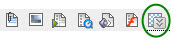
You can now paste directly from Word using the MashUp feature within any text editor in NILE!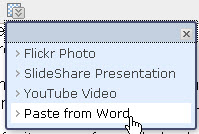
Rather than using the usual button from the tool bar to paste text, click on the MashUps button and select ‘Paste from Word’.
On the next screen press Ctrl + V on your keyboard to paste the text. You may still need to adjust line spacing, but font sizes and types will be consistent throughout the text.
Click ‘Submit’ once you are happy with the text. You can then choose all the usual options for the Announcement or Item and Submit that too.
There have also been issues with embedding YouTube clips into your modules on NILE. These have now been resolved: the procedure has not changed. If you think this would be useful and want to know how, have a look at the Embedding External Content into NILE guide.
