
Update – May 8, 2026: Please note that the May upgrade is currently on hold as a problem was discovered with it. NILE is not affected by the problem as it was discovered prior to our upgrade, therefore we will remain on version 4000.12 (April 2026) and won’t be upgraded to version 4000.15 (May 2026) until the problem has been fixed. More information is available at: Blackboard Issues with 4000.15.0 Release
Update – May 11, 2026: The 4000.15 (May 2026) upgrade is available as of today, Monday 11 May 2026.
The new features in this month’s Blackboard’s upgrade will be available from Friday 8th May. This month’s upgrade includes the following new/improved features to Ultra courses:
- Improved search and navigation in course switcher
- Second due date for discussions visible in gradebook
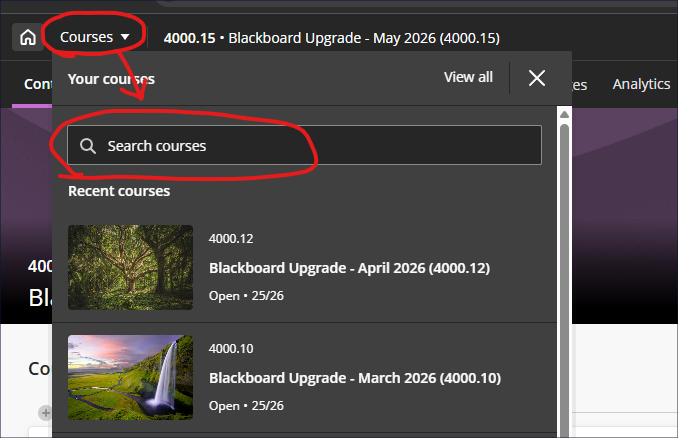
Improved search and navigation in course switcher
Following the introduction of the new navigation in the January 2026 upgrade, the May upgrade will bring in an improvement to the course switcher, allowing staff and students to search for courses. At present, the course switcher allows staff and students to move from their current course to one of their four most recent courses (displayed in the ‘Recent courses’ section of the course switcher window). Following the upgrade staff and students will see a search box, making it possible to switch between any two NILE courses without closing the current NILE course and returning to the main NILE courses menu.
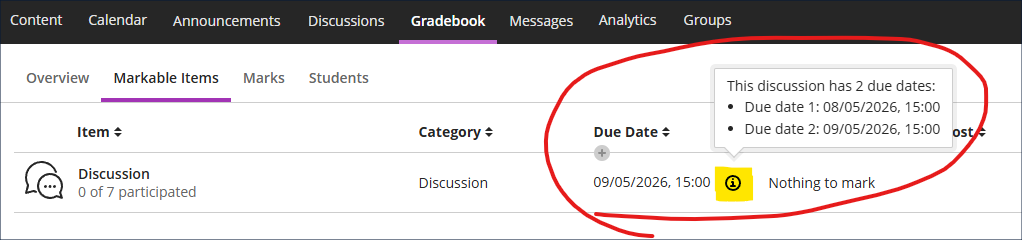
Second due date for discussions visible in gradebook
Following the December 2025 and March 2026 upgrades, which, respectively, brought in the options to specify participation requirements and add a second due date when using marked discussions, May’s upgrade will, where a second due date has been set, allow staff to view both discussion due dates in the gradebook.
Learning technology / NILE community group
Staff who are interested in finding out more about learning technologies and NILE are invited to join the Learning Technology / NILE Community Group on the University’s Engage platform. The purpose of the community is to share information and good practice concerning the use of learning technologies at UON. When joining the community, if you are prompted to login please use your usual UON staff username and password. By joining the Learning Technology / NILE Community you will receive calendar invitations to our regular live community events:
Join the Learning Technology / NILE Community Group
More information
As ever, please get in touch with your learning technologist if you would like any more information about the new features available in this month’s upgrade: Who is my learning technologist?